
In brief. Google has added interactive website generation based on uploaded documents and research materials to Gemini Notebook. Users simply upload their sources and ask the system to «make me a site»: it can build a study simulator, a data dashboard, or a project tracker. The result opens in a separate browser tab, is saved within the notebook, and can be shared with others. However, viewing a shared site requires access to the notebook itself, making source privacy a key consideration.
On November 16, Google announced a major new feature for Gemini Notebook: transforming uploaded materials into interactive web pages. While it might look like a natural continuation of summary and slide generation, it introduces an entirely new workflow. Document owners can now generate functional, interactive tools from their files instead of manually searching through lengthy reports each time.
Google showcases three primary categories for these sites: interactive educational tools, reporting dashboards, and task trackers. For instance, chemistry materials can become a clickable periodic table, financial documents can turn into a quarterly sales dashboard, and meeting notes can transform into a milestone tracker with interactive checkboxes.
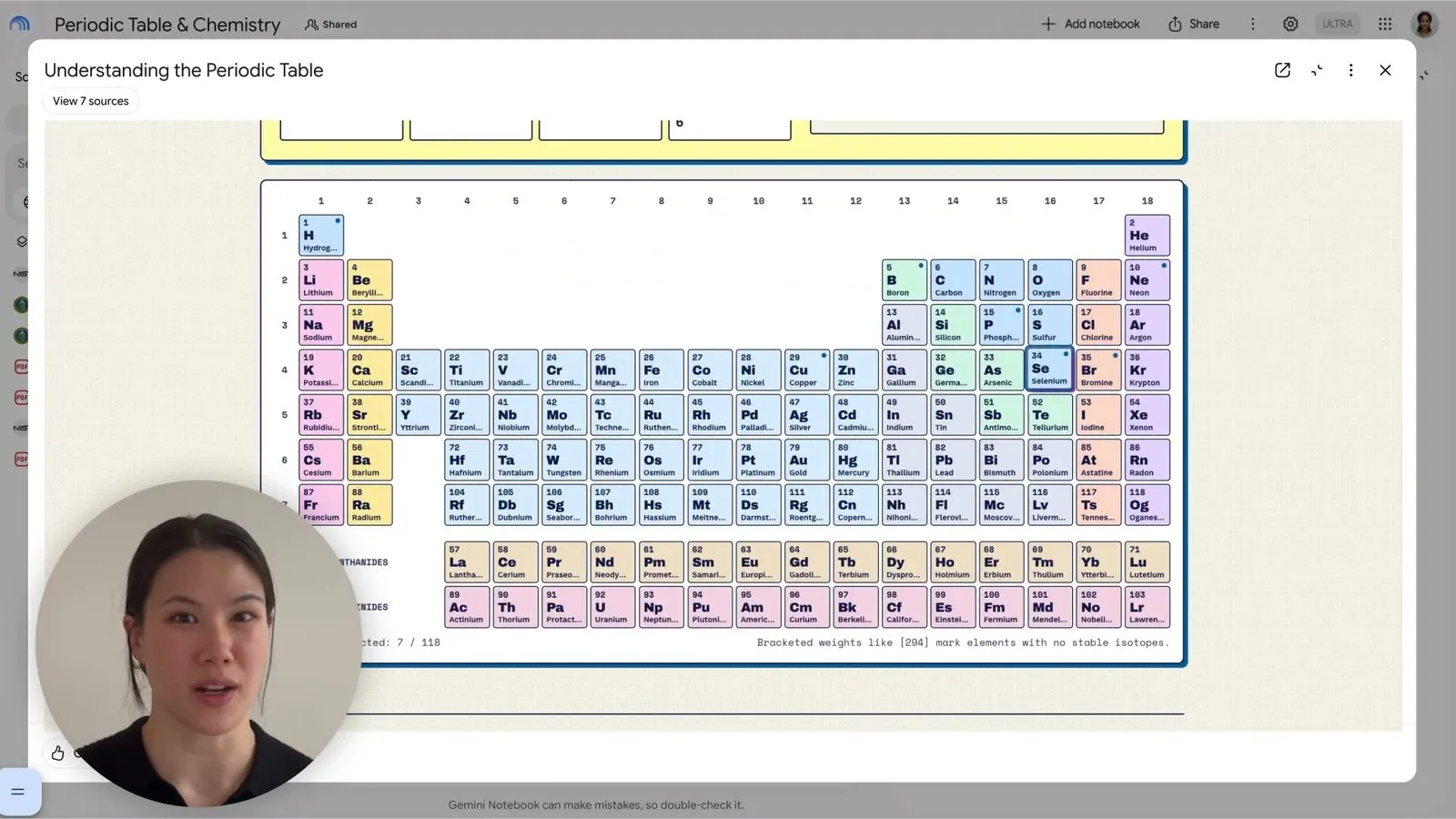
Gemini Notebook «Understanding the Periodic Table» interactive website. Source: Google / AI for Mortals.
From NotebookLM to Gemini Notebook
Many users originally knew this service as NotebookLM. In July 2026, Google rebranded it to Gemini Notebook, preserving it as a dedicated space for grounded research. At the time of rebranding, Google reported over 30 million active users and 600,000 participating organizations.
From the beginning, NotebookLM stood out because it focused strictly on user-supplied sources: uploaded PDFs, notes, web pages, and other documents. The model answered questions, compiled summaries, and discovered cross-document connections. Over time, Google introduced audio and video overviews, study guides, quizzes, and other ways to interact with information.
Interactive site creation extends this grounded philosophy: the uploaded source remains the single source of truth, while AI designs a custom interface on top of it. Instead of just receiving a static table or bulleted summary, users now get an interactive page complete with filters, navigation selectors, and visual elements.
How an Interactive Site Differs from a Chatbot Answer
Consider a benchmark report detailing ten AI models, their pricing, latency, and evaluation results. In a standard chat, you can ask which model is cheapest or request a side-by-side comparison. An interactive page, by contrast, puts decision criteria directly into the UI: you can filter models by budget, sort by speed, and examine trade-offs without submitting a new prompt for every filter change.
That is the core value of the format. Information is accessed through pre-built controls. The user solves practical tasks inside a purpose-built interface without writing a single line of frontend code.
This proves especially valuable for:
- Education. Historical timelines, flashcard decks, interactive diagrams, and study trainers built from lecture notes.
- Business Intelligence. KPI dashboards from quarterly earnings reports, department comparison tables, and trend visualizers.
- Project Management. Deliverable trackers, checklists, and deadline schedules organized by workstream.
- Research. Structured navigation across large collections of documents, findings comparison, and systematic reviews.
How to Create a Site in Gemini Notebook
Google published an official guide. The workflow consists of five steps:
- Visit notebook.google.com and create a notebook or open an existing project.
- Add reference documents, links, and notes that should serve as the knowledge base.
- In the Chat panel, enter make me a site and describe the required interface.
- Once generation finishes, locate the newly created site in the Studio panel.
- Open it in a new tab to interact with controls. The same menu provides sharing and export options.
Editing permissions are required: users with view-only access cannot create or delete generated sites. According to Google, rollout is underway globally for users aged 18 and older in the web version, including Google Workspace accounts. Mobile app support is planned for a later date. At launch, Google has not provided an exact timeline for mobile availability.
Three Practical Prompt Examples
For a financial report:
Make me a site with an interactive quarterly sales dashboard based only on the uploaded reports. Add filters by quarter and region. Show revenue, growth rate and a comparison chart. If the source does not include a metric, mark it as unavailable rather than estimating it.
For exam preparation:
Make me a site for studying the uploaded biology notes. Include a topic map, glossary, practice questions and a progress tracker. Explain answers using only the source materials.
For project coordination:
Make me a site with a project tracker based on these meeting notes. Group tasks by workstream, show deadlines and owners when they are explicitly stated, and flag tasks with missing dates rather than inventing deadlines.
Specifying strict boundaries is crucial. It is essential to explicitly instruct the model not to fabricate missing metrics, dates, or conclusions: a polished UI does not guarantee the factual accuracy of the data displayed inside it.
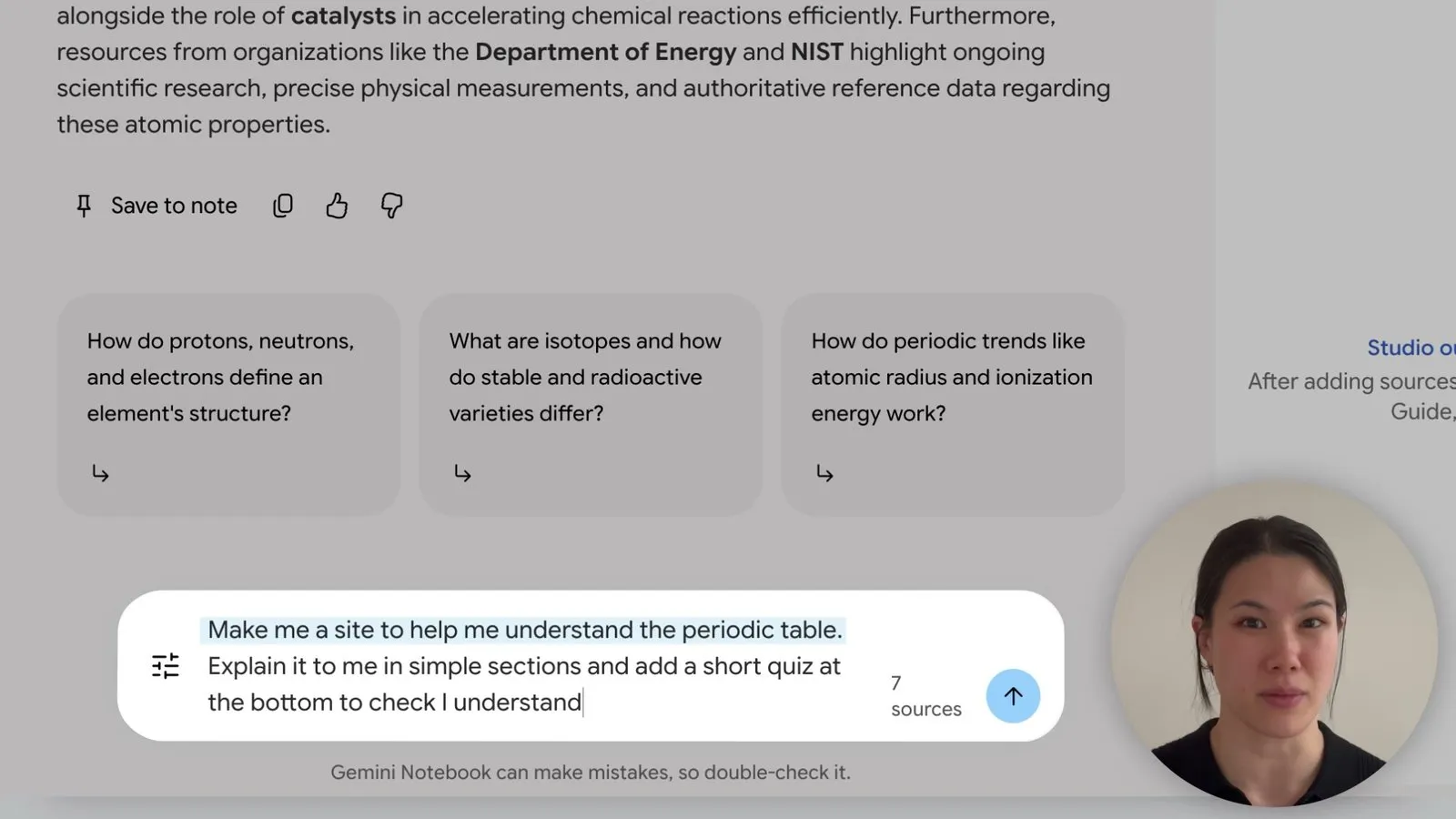
The «Make me a site» prompt with seven notebook sources. Source: Google / AI for Mortals.
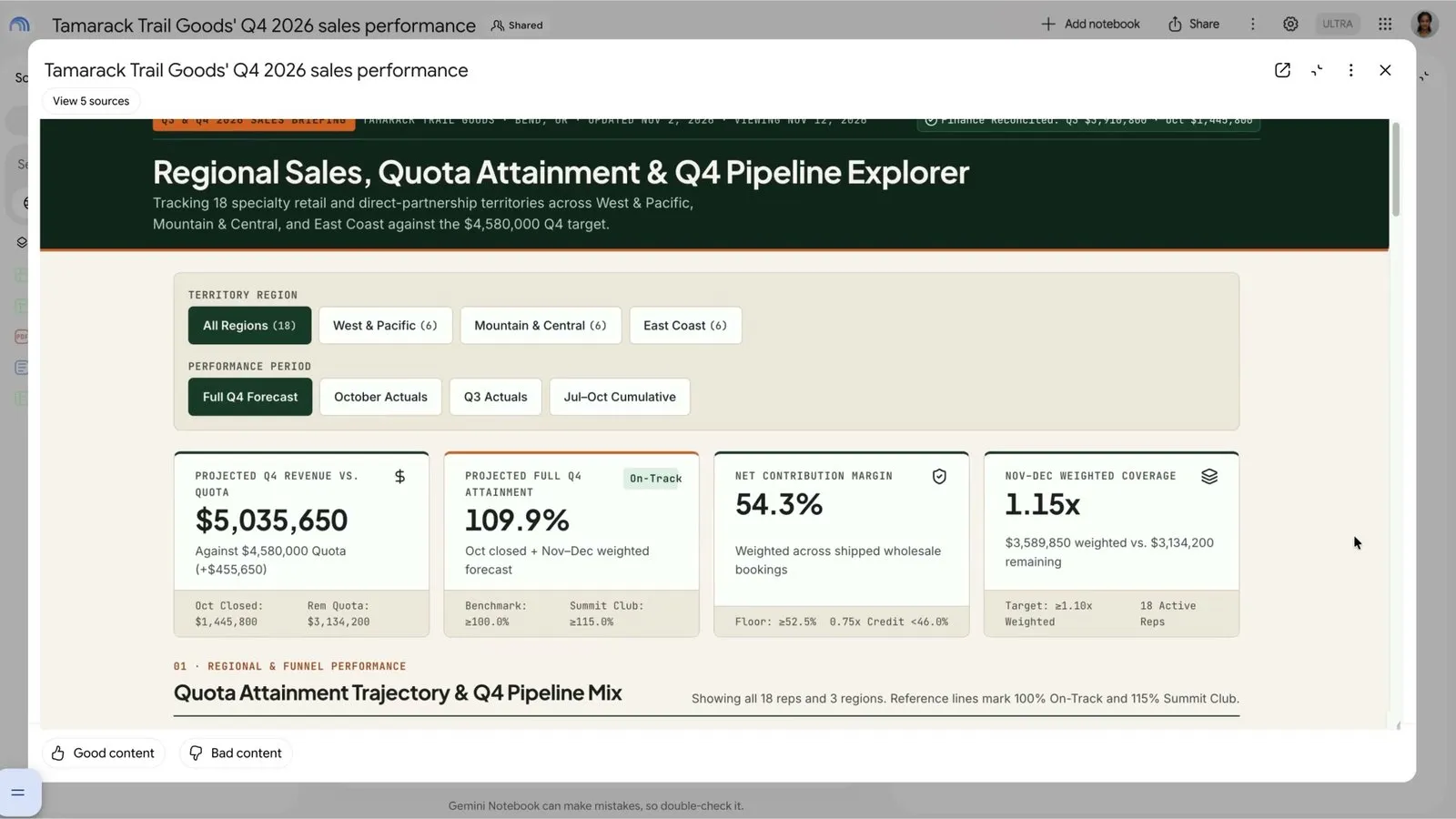
Interactive sales dashboard generated by Gemini Notebook from five sources. Source: Google / AI for Mortals.
Official Google video demonstration: showcasing an interactive chemical reference, project tracker, and sales dashboard.
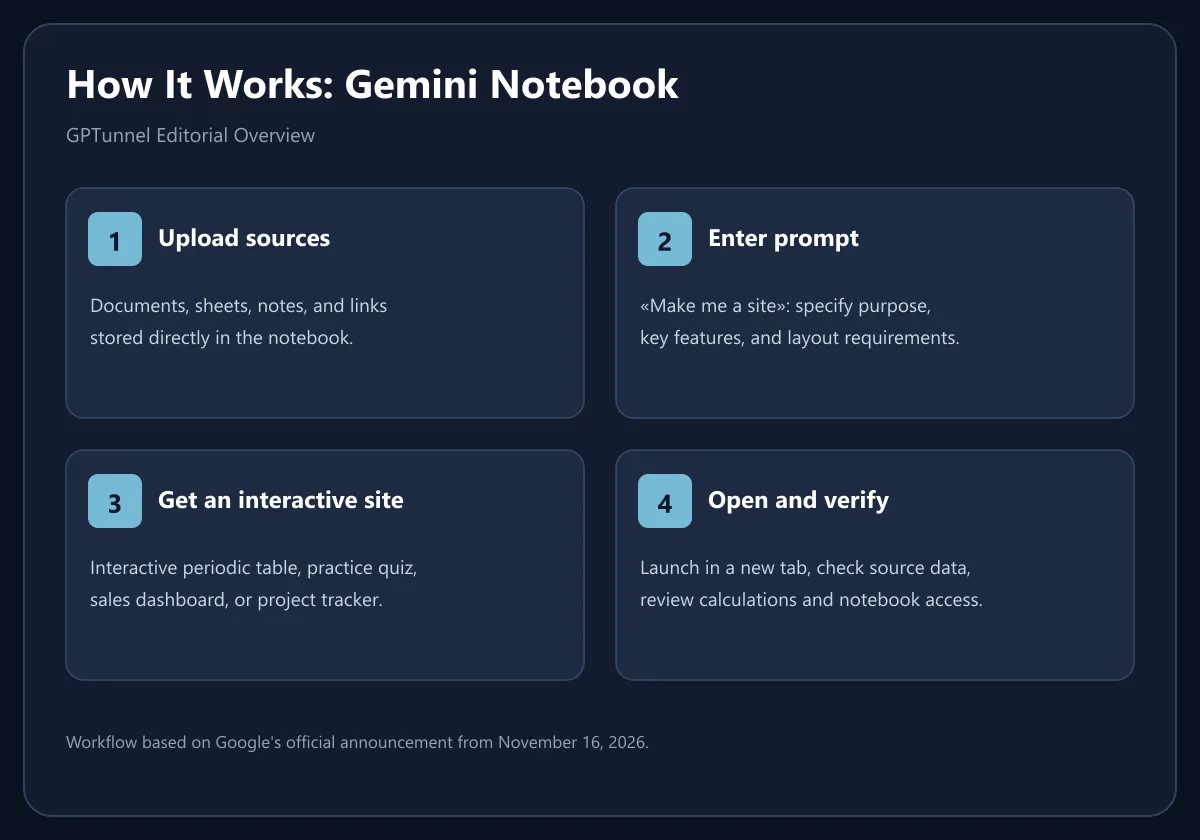
GPTunnel editorial diagram based on Google's announcement.
Can You Share or Download the Site?
This is a critical detail frequently overlooked in short news coverage. According to Google Support, you can open the site in a new tab, copy a direct link to the artifact, or download it via Studio → More → Download.
However, viewing a shared link requires access to the underlying notebook. If access to the notebook is restricted, sending an artifact URL will not turn it into an independently accessible standalone website. Furthermore, Google notes that public sharing and permission management are currently tailored for personal accounts; enterprise Workspace policies may impose different restrictions.
Generated sites also support local interactive state: checkboxes, user notes, and filter selections persist between visits. When sharing a site, each collaborator sees their own interactive inputs rather than viewing values entered by another user.
Important: this feature should not be confused with launching a full-scale public web service on a custom domain. Being able to download an artifact does not mean Google provides external web hosting, backend database management, CRM integrations, or an authentication system. Those capabilities still require custom software engineering.
Why Data Grounding Remains Crucial
Generating web interfaces directly from documents carries two distinct risks: the model may misunderstand source materials, and users might place unearned trust in a polished visual layout.
For example, if an earnings statement covers only three quarters, the model might render a continuous annual chart. That visualization looks complete, but falsely suggests that fourth-quarter data was present. Similarly, missing deadlines in project notes might be silently filled in with plausible dates unless strict guardrails are applied in the prompt.
For business and research tasks, a methodical verification process is recommended: cross-reference every displayed metric against source files, verify unit labels, test edge-case filters, and review empty or invalid fields. Public materials require thorough editorial verification of every claim.
The second consideration involves confidentiality. If a site is assembled from proprietary contracts, internal audits, or personnel records, teams must carefully verify what underlying documents become accessible to invited collaborators. Granting site access cannot be evaluated separately from permissions governing the entire notebook repository.
Where AI Interfaces Are Heading
A broader shift toward interactive AI artifacts is visible across the entire industry: conversational assistants increasingly output spreadsheets, mini-apps, data visualizers, and interactive documents directly within the chat. In this context, Google's update competes less with conventional site builders like WordPress and more with developer canvas tools such as Claude Artifacts and interactive elements in ChatGPT.
What distinguishes Gemini Notebook is its focus on a grounded corpus of documents. The product was built from day one for document synthesis, and interactive websites serve as another medium to surface that knowledge. For course materials, corporate knowledge wikis, or financial reviews, this feels like an organic evolution of the research workflow.
The primary advantage lies in document reusability. Teams that maintain up-to-date project notebooks can quickly spin up new dashboards or revision guides on demand. Still, questions around automatic UI updates when sources change, complex calculations, and external hosting require careful assessment: Google's initial release provides an interactive tool, not an end-to-end web application platform.
Who Benefits Most from This Feature
Educators and students gain quick visual study aids and interactive flashcards. Analysts can prototype exploratory dashboards before committing to formal BI tools. Project managers can convert meeting notes into functional milestone trackers. Content creators can draft prototype interfaces without engineering resources.
Conclusion. Gemini Notebook marks a clear step from summarizing documents to providing interactive tools for working with their contents. Generating functional sites from a single prompt is powerful, provided the underlying sources are accurate and structured. Notebook permissions, numerical validation, and document privacy remain just as essential as the generated interface itself.
Sources
- Google: Transform notes, research, and sources into interactive sites, 16.11.2026
- Google Help: Generate sites in Gemini Notebook
- Google: NotebookLM is now Gemini Notebook
- Android Authority: Gemini Notebook now lets you create interactive websites
- PPC Land: Google's Gemini Notebook turns notes and files into sites