AI tool

Remove a watermark from a photo online

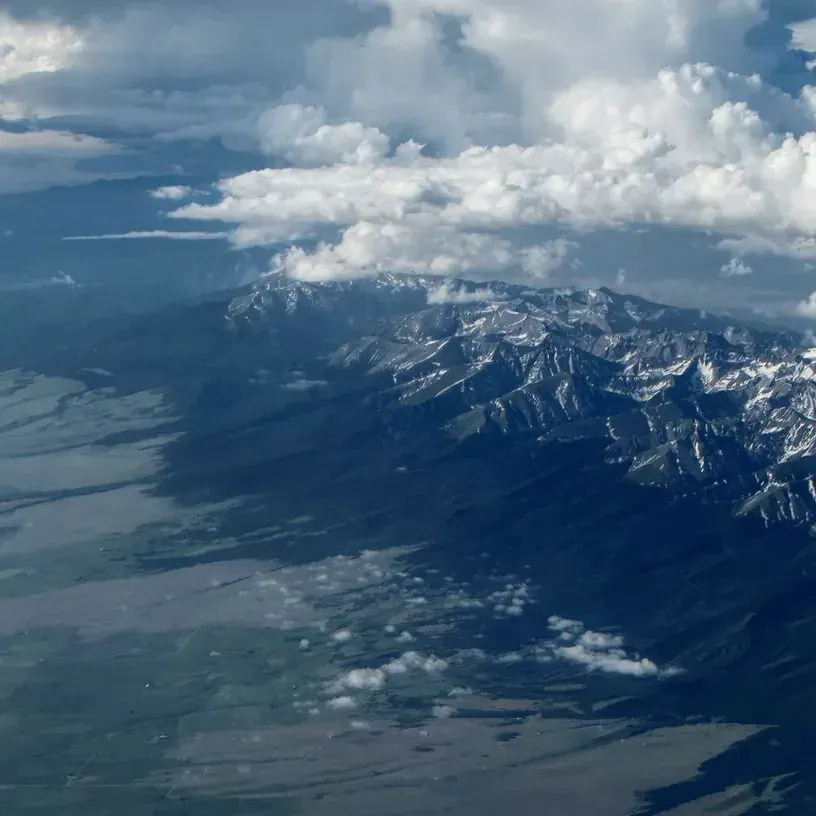
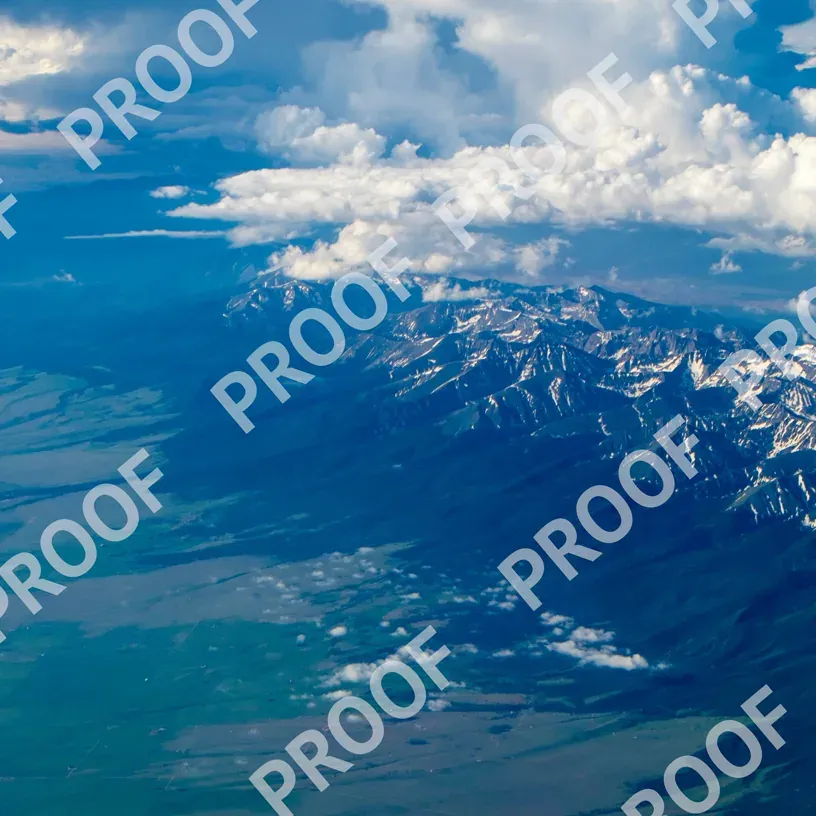
Remove a watermark from a photo online: the AI erases the overlay and repaints the background underneath in ten seconds. No Photoshop, no installs.

Removing a watermark with AI: before and afterWatermarkedAfter processing
Drag the slider · the whole prompt is Remove watermark

A watermark covers part of the frame, and removing it cleanly is harder than it looks: there are no original pixels underneath, so something has to replace them. An eraser or clone stamp in an editor takes its patch from a neighbouring area, which is why they only cope on flat backgrounds — on grass, fabric or a pattern the seam stays visible.

The Grom Art model rebuilds the background under the mark from the meaning of the whole frame instead of copying the piece next to it. All it needs from you is the file and a two-word prompt — no mask required.

How to remove a watermark from a photo in three steps

Everything runs in the browser: no software, no plugins, nothing to install.

Sign in to GPTunneL
One account for every model on the platform.

Sign in whichever way suits you.

How it works

Removing a watermark means repainting what it covered

Classic watermark removers work by subtraction: they find the semi-transparent overlay, cancel it out and leave a murky patch behind. On plain sky that goes unnoticed; on grass, fabric or a face the patch is obvious, because there is nowhere for them to get the background from. AI solves a different problem. Instead of cancelling the watermark pixels it repaints the whole area: it looks at what surrounded the mark and continues the texture underneath. So it makes no difference whether the mark sits on a flat background or on brickwork, whether it is a single caption in the corner or a grid across the entire frame. The honest downside: the model repaints the image rather than cutting along a mask. Fine detail under the caption itself is reconstructed by inference, not from the original, and the overall tone of the frame may drift. If the colours matter, add keep original colors and lighting to the prompt, or restore saturation in an editor afterwards.

What the watermark removal AI can do

Watermarks, captions and logos

A grid across the frame, a caption in the corner, a capture date, a logo in the header, a service label. To the model these are all the same thing — a layer laid over the photograph.

A prompt instead of masks and brushes

No tracing the caption, no picking clone-stamp hardness, no cleaning up leftovers: you write Remove watermark and get the result. There is nothing to select by hand.

Complex backgrounds, not just sky

Grass, fabric, patterns, brick, hair, water. The background under the mark is not blurred into a patch — it is continued, because the model rebuilds the texture from its surroundings.

Runs in the browser, nothing to install

Everything is computed on our infrastructure. Works from any browser, including on mobile data, with local payment methods.

Before and after

The same trick removes more than watermarks

Watermark removal is one case of a single operation: erase something and rebuild the background. Below are examples of the same model on neighbouring tasks — drag the slider, original on the left, result on the right.

Clear everything off the tableOriginalAfter processing
Unwanted objectsClear everything off the tablesame prompt, with the object name instead of watermark
Remove a passer-by from the backgroundOriginalAfter processing
People in frameRemove a passer-by from the backgroundthe background behind them is rebuilt from the surroundings

Both examples are the same Grom Art model with no manual touch-up: upload a file, write a line, take the result.

Restoration, background replacement, outpainting beyond the frame and recolouring live there too. What else Grom Art can do

When people remove watermarks most often

The "AI generated" label

Samsung Galaxy stamps it on every frame after a generative edit. Every workaround, manual ones included, is covered in a separate blog post.

Date stamps on old photos

The orange timestamp from film compacts and early digital cameras. It sits over the frame and usually spoils the composition.

Service captions and version numbers

"Draft", "sample", "version 2" marks and internal numbering on mock-ups and renders that are ready to be shown without them.

Your own watermark on your own photos

A photographer hands the client clean files, but the unmarked original is gone. Your own mark comes off your own shots, no questions asked.

An outdated company logo

After a rebrand the photo archive still carries the old mark in the corner. Erasing it beats reshooting.

Screenshots and renders

Trial-version badges from editors and render engines on your own work, when the licence was bought later.

What watermark removal costs

You pay for the processed frame, not for the right to use software: there are no subscriptions, licences or monthly fees — you top up a single GPTunneL balance and spend it on any model on the platform.

Output resolutionPrice per frame
0.5K$0.04
1K — enough for web and social$0.08
2K — for print and large screens$0.16

Prices are calculated at the base rate as of 13 August 2026. The current price list and your personal loyalty discount are shown in your account; the full list lives on the pricing page.

Need something larger than 2K — remove the mark here first, then raise the resolution with the upscaler: that order matters, otherwise you enlarge the caption along with the photo.

Frequently asked questions

We have no free tier, and we are not going to promise one. What we also do not have is a subscription: you pay only for the frames you process, from $0.04 each. Free online services usually cancel the mark by subtraction and leave a murky patch behind — here the area is repainted in full.

Remove that watermark right now

Upload a frame, write Remove watermark and take the clean file at full resolution.

  • From $0.04 per processed image
  • No subscription, no licence, nothing to install
  • One balance for Grom Art and every other GPTunneL model