
Google has introduced A2UI 1.0 (Agent-to-User Interface), the first stable release of an open protocol enabling AI agents to generate interactive user interfaces on the fly during conversations. An agent defines forms, buttons, data tables, and other controls, while host applications render them using native styling and components. The technology is already being used across projects at Google, Atlassian, Alation, and ByteDance, and integrates with AI assistant workflows including Claude and Gemini.
From Text Conversations to Interactive Actions
Modern AI agents can handle multi-step workflows, but pure text chat is not always practical for inputting parameters and reviewing complex outputs. For instance, when booking a table, users need to specify dates, times, party sizes, and personal preferences.
With A2UI, an agent can immediately present an interactive form with a calendar picker, time slots, guest counters, and a confirmation button. Users adjust values directly in the UI instead of typing back-and-forth prompts.
When planning a trip, an agent can build an interactive itinerary with transport schedules, hotel cards, and selectable options. Instead of parsing walls of text, users select options on screen.
The interface is generated dynamically for the specific task at hand. Host applications retain full control over component styling, allowed actions, and data security.
How A2UI Works
A2UI defines a standardized structured data exchange format between an AI agent and the client application presenting the output. The agent produces an abstract interface description, and the application maps it to its own native components.
The process consists of four stages:
- The user submits a request. For example, asking to compare products or organize an event.
- The agent selects components. It generates a structured JSON payload describing cards, input fields, buttons, and layouts.
- The application renders the interface. The client-side renderer turns the schema into an interactive UI using components registered in the application.
- The user interacts with the UI. Form submissions, button clicks, and value changes trigger application functions or subsequent agent actions.
A2UI supports streaming and partial interface updates. For instance, a data table can stream in new rows progressively as information arrives without redrawing the entire screen.
For security, the agent can only reference components explicitly whitelisted and registered by the developer. The agent only outputs structured schemas, while code execution and permissions enforcement remain strictly on the host application side. This prevents arbitrary code execution while preserving native security boundaries.
What Is New in A2UI 1.0
Google first introduced early previews of A2UI in December 2025. On November 11, 2026, the project reached its first stable release - A2UI 1.0. This milestone expands interaction primitives and introduces production-ready SDKs across platforms.
Bidirectional function calling. UI elements can trigger callbacks on the host application or send events back to the agent. For example, selecting a date can query available booking slots, while clicking confirm executes the next step in an automation pipeline.
Multi-platform support. Web renderers are available for React, Angular, and Lit. The project also provides native support for Flutter and iOS SwiftUI. An Android Jetpack Compose renderer is currently in preview (version 0.9.1), with version 1.0 support under active development.
Developer SDKs. Official SDKs for Python, TypeScript, and Dart help build protocol payloads, translate model outputs into component trees, and manage errors.
A2UI 1.0 also enhances accessibility primitives and supports metadata extensions. All code is released under the Apache 2.0 open-source license.
Where A2UI Is Already Used
Google highlighted several real-world implementations across enterprise tools and developer frameworks:
Atlassian Jira: Contextual Clarifications
In Jira, AI agents prompt team members for missing details using interactive cards. When an issue requires more context, the agent surfaces quick-select options inside the workflow, helping developers clarify scope without leaving the task.
Alation: Analytics Dashboards in Claude
Alation leverages A2UI to surface interactive analytics dashboards, metrics cards, and SQL query results. The same declarative schema can render within Alation's data catalog app and inside Claude via MCP Apps.
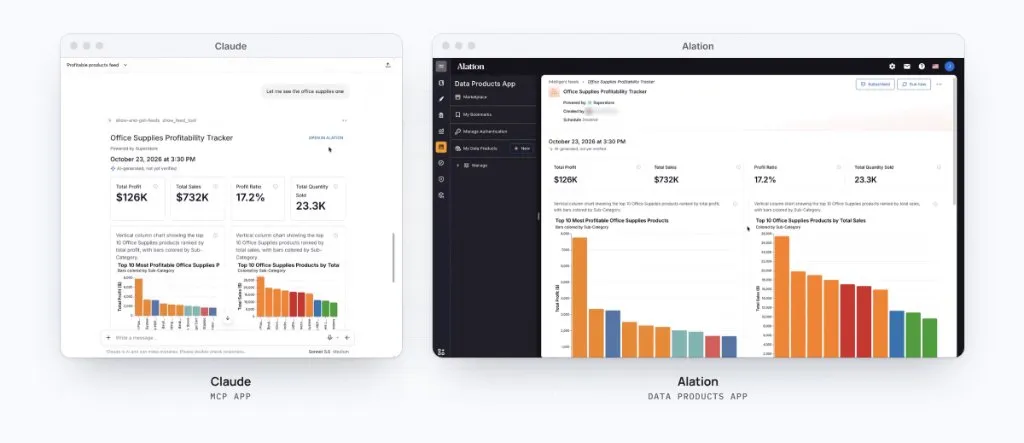
This architecture demonstrates cross-host portability: the agent or backend service defines data and layout structures, while the host client supplies the visual widgets.
ByteDance: Travel Itinerary Planning
ByteDance integrated A2UI into its Lynx cross-platform UI framework. In their demo, an agent crafts a two-day Kyoto travel plan rendered as an interactive visual route with adjustable stops.
Google Gemini Notebook: Generative Content Customization
Within Google Workspace and Notebook tools, A2UI enables interactive configuration for generated slide decks and video summaries. The agent presents cards for selecting presentation themes, formats, and design styles before kicking off generation.
How A2UI Differs from MCP
A2UI and the Model Context Protocol (MCP) address complementary problems, making them easy to confuse.
MCP standardizes how AI assistants connect to external tools, databases, and context sources. The MCP Apps extension allows rendering interactive mini-apps inside supporting assistant environments.
A2UI standardizes the portable declarative schema for user interfaces. It tells host applications which UI components to draw and how to route user interaction events.
The two protocols complement each other: an agent can retrieve live enterprise data via an MCP tool and then present the output as an interactive A2UI dashboard with filters and action buttons.
What This Means for Users and Developers
A2UI bridges the gap between text-based AI chats and visual application workflows. Users can work through forms, tables, and controls whenever structured interaction is faster than typing. This streamlines booking, data analysis, document setup, and complex multi-step workflows.
Developers gain a unified, cross-platform standard for generative interfaces. A single agent prompt workflow can serve web, mobile, and desktop frontends while respecting each platform's design system and security model.
Implementing A2UI still requires upfront engineering: developers must define and register components, wire event handlers, and enforce data boundaries. However, having a standardized protocol eliminates fragmented ad-hoc solutions across the industry.
The primary significance of A2UI 1.0 is establishing an open, cross-platform standard for generative user interfaces between AI agents and client applications.