

Kling AI is a video generation model by Kuaishou: describe a scene in text or upload a photo, and you get a short clip with camera movement, lighting, and believable physics. In this guide we'll walk through how to use Kling AI step by step: text-to-video generation, bringing photos to life, clips with native audio, ready-made prompts you can copy as-is, and answers to the most common questions — from clip length to vertical formats.
We'll be working in GPTunneL's Creative Lab — it hosts the entire current Kling lineup, no separate Kuaishou subscription needed: you pay per second of finished video.
What the Kling AI Model Can Do
Get this straight from the start: Kling isn't a "picture animator." The model computes the scene like a cinematographer and director in one:
- calculates object motion and physics — fabric, water, hair;
- controls the camera: orbit, tracking, dolly, pan;
- builds lighting and depth of field;
- in recent versions — generates audio together with the visuals.
Kling understands the logic of cinematography and responds correctly to specific directions: "slow camera orbit," "tracking shot behind the character," "backlight," "golden hour," "shallow depth of field." That lets you control not just what's in the frame, but how it looks.
The format is short clips of 5 or 10 seconds — enough for an ad intro, a landing page background, a vertical social clip, a visual concept test, or a demo fragment of a future project.
Kling Versions in GPTunneL: Which One to Pick
The GPTunneL video model catalog carries the entire live Kling lineup — the choice depends on the task:
- Kling v3 — the flagship: maximum photorealism, the most accurate prompt following, 720p and 1080p rendering. Use it for final clips where quality matters most.
- Kling v3 Motion — a lighter version of v3: noticeably cheaper per second, great for drafts, batch runs, and scenes where motion is the point.
- Kling 2.6 — generates video with audio in a single render: character speech, ambient noise, and sound effects in sync with the picture.
- Kling 2.5 Turbo — a fast, economical previous-generation option, good for high-volume A/B creative testing.
- Kling 2.1 and 2.1 Master — the older versions stay in the catalog: handy for re-running prompts that already worked well.
A practical scheme: drafts and idea sweeps on v3 Motion or 2.5 Turbo, finals on v3, clips with dialogue and sound on 2.6. Current per-second pricing for every version is on the pricing page, along with a calculator for your clip length.
Text-to-Video, Step by Step
The base mode is text-to-video: the model builds the scene from scratch based on your description.
Step 1. Write a Detailed Prompt
Your main weapon is text. The more precisely the scene is described, the closer the result gets to what you expect. Spell out:
- where and when the action takes place;
- who or what is in the frame;
- what the subject is doing;
- how the camera moves;
- what the light is like;
- what the mood is.
"A house on a hill" is a weak description. "A modern house with panoramic windows on a hill at sunset, the camera slowly flies from top to bottom, warm golden light" — now that's a scene you can control.
Step 2. Choose Generation Settings
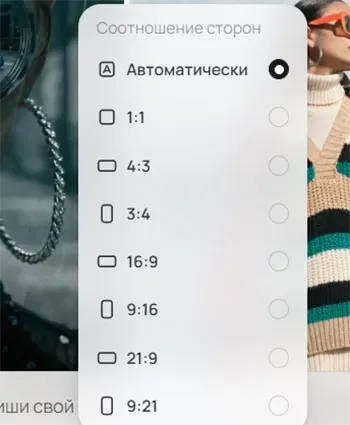
- Number of clips: 1, 2, or 4. For commercial work, generate 2–4 variants at once — it's easier to pick the winner and compare interpretations of the same scene.
- Aspect ratio: 1:1, 4:3, 3:4, 16:9, 9:16, 21:9, 9:21. Rule of thumb: 9:16 for TikTok and Reels, 16:9 for YouTube and websites, 21:9 for a cinematic look, 1:1 as a feed-safe universal.
- Duration: 5 or 10 seconds. Five for quick tests, ten for an ad scene or an atmospheric clip.
Step 3. Generate and Refine
Once rendering is done, compare the variants: how the light, camera movement, and mood differ. If the result isn't right, don't rewrite the whole prompt. Adjust one thing at a time: the light, the camera path, a detail of the environment. One corrected parameter gives you far more control than a full rewrite.
Bringing Photos to Life: Image-to-Video
The second most popular scenario is animating a photo. Upload a picture, and Kling turns it into video: a portrait starts blinking and smiling, a landscape comes alive with wind and light, a product shot rotates for the camera.
How to use the mode:
- Upload an image as the base for generation — it becomes the first frame of the clip.
- In the prompt, describe only the motion, not the scene again: what should move and how, where the camera goes. The scene is already defined by the picture.
- Start with one simple action: "the woman in the photo slowly smiles and slightly turns her head, gentle hair movement, camera almost static."
The mode works with any picture: an old family photo, a product render, or a generated image. The same rule as in text-to-video applies: the fewer simultaneous movements, the more stable the result — "animate everything at once" turns a photo into mush.
Video with Sound
Kling 2.6 generates audio in sync with the visuals — speech, ambience, and effects in a single render, no editing or third-party voiceover. The prompt defines five audio layers:
- who is speaking (character and role);
- what they say (the line in quotes);
- how they say it (pace, intonation, manner);
- what sounds surround them (rain on glass, street traffic);
- what sounds come from actions (a chair creaking, a cap clicking open).
The more specific the sound description, the more accurately the model reproduces it: instead of "a noisy street," write "car horns + footsteps on asphalt + distant conversation." A detailed breakdown of audio prompts with examples is in our Kling 2.6 guide, and you can try it right away in Kling 2.6 in Creative Lab.
How to Write a Prompt for Kling AI
Kling works best when the scene is described like a short film fragment. The working formula: scene → subject → action → camera → light → environment → style → quality.
- Scene sets time and place: "a modern office in the morning," "a street after rain at night." Time of day matters — it automatically defines the character of light and shadows.
- Subject — through visual attributes: age, look, clothing, material, color, scale. For a product: "thick glass," "glossy surface," "micro water droplets."
- Action — one and simple: "slowly turns their head," "steam rises from a pipe." The fewer the actions, the more stable the frame.
- Camera — use precise terms: "slow push-in (dolly-in)," "smooth chest-level tracking shot," "arc orbit," "left-to-right pan." One camera path per clip works better than several.
- Light makes the video look expensive: "warm sunset light," "backlight," "soft diffused daylight," "volumetric light and light haze."
- Style and quality define the aesthetic: "cinematic color grading," "shallow depth of field," "realistic textures," "high-end commercial aesthetic."
Ready-Made Kling AI Prompts with Examples
All the examples below were generated in Creative Lab — copy the prompts as-is and adapt them to your task.
Perfume Ad
Settings: 16:9, 10 seconds, 2 variants
"Ultra-realistic cinematic commercial of a premium perfume bottle. A glass bottle with gold details stands on a black glossy reflective surface. Slow camera push-in from medium to close-up. Dramatic studio lighting: a warm key light from the left and soft backlight from behind. Light haze in the air. Micro water droplets on the glass. High contrast, luxury brand feel, shallow depth of field, smooth motion, 4K, high-end commercial aesthetic."
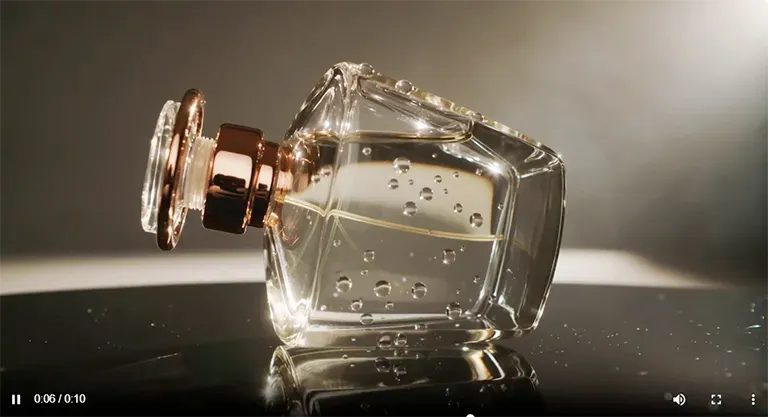
Result 1 — more haze and dynamics: a studio-ad atmosphere with light playing on the facets, though it loses some of the "luxury" stillness: /lab/g/699cf20b69911613216dcd52
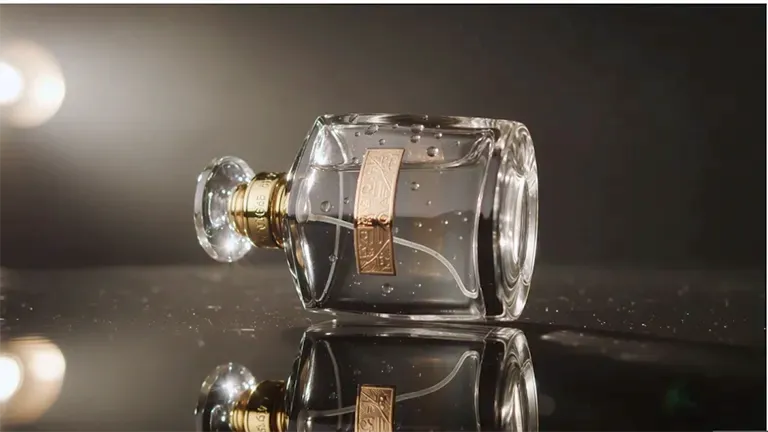
Result 2 — cleaner and higher contrast, slower camera, the scene feels more expensive and calm; a more minimalist look: /lab/g/699cf20b69911613216dcd51
SaaS Platform Video
Settings: 16:9, 5 seconds
"Abstract visualization of a digital AI platform in dark space. Transparent holographic interface panels float in the air. Glowing blue and violet data streams move between them. The camera slowly orbits the interface. Soft volumetric lighting, light particles in the air, modern tech style. Minimalist corporate design, crisp details, smooth animation, professional look for an IT company website."
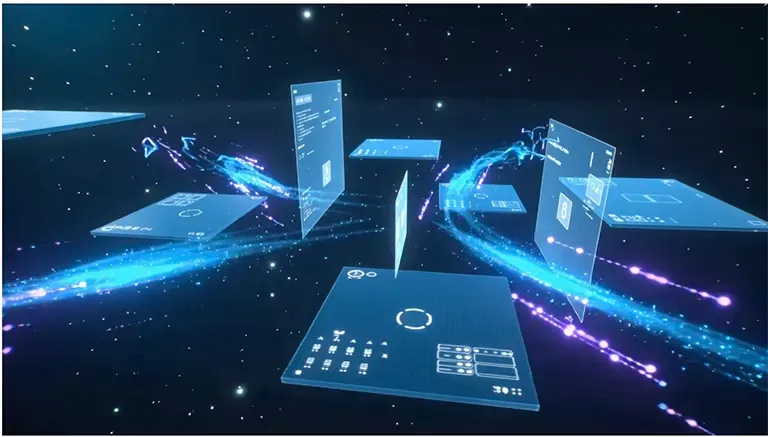
The scene came out cohesive: panels float in dark space, the composition reads in depth, data streams fly like comets. The orbit is wider than expected — the accent shifted toward "cosmic": /lab/g/699cf6e669911613216dcd53
Real Estate Promo
Settings: 21:9, 10 seconds, 2 variants
"A modern luxury house with panoramic windows on a hill at sunset. Golden sunlight reflects off the glass. A drone-style camera slowly flies from top to bottom toward the building facade. A light breeze sways the surrounding trees. Realistic shadows, detailed architecture, premium real estate atmosphere. Natural colors, cinematic color grading, smooth camera motion, the feel of an expensive video presentation."
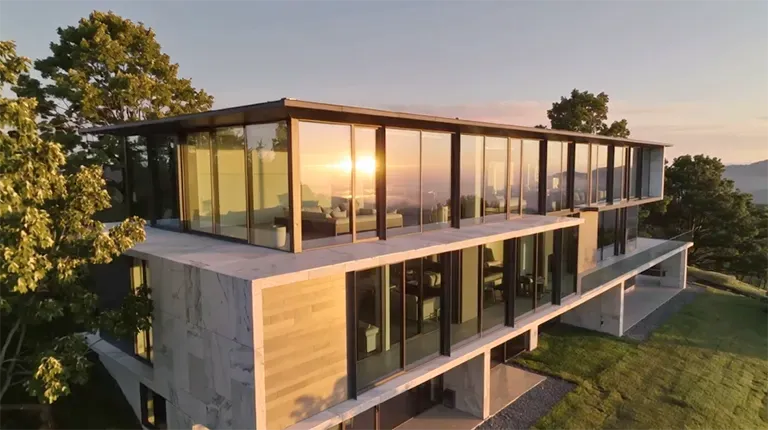
Result 1 — the camera moves with drone logic, sunset light reflects in the glass, the scene looks like a real luxury property shoot: /lab/g/699cf99869911613216dcd55
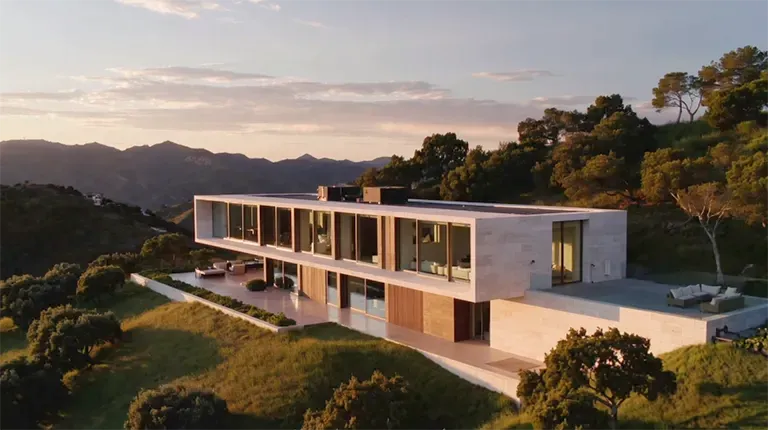
Result 2 — striking architecture but a more "rendered" feel: a wide arc orbit instead of a top-down flight, closer to an architectural visualization: /lab/g/699cf99869911613216dcd54
Fashion Brand
Settings: 9:16, 5 seconds, 2 variants
"A young confident model walks down a modern city street at sunset. Slow-motion footage. A light breeze moves her hair and the fabric of her coat. The camera tracks in front of the model at chest level, smooth movement. Warm sunset light, soft orange glow. The city background is slightly blurred. Fashion campaign style, realistic skin texture, smooth cinematic footage, premium brand aesthetic."
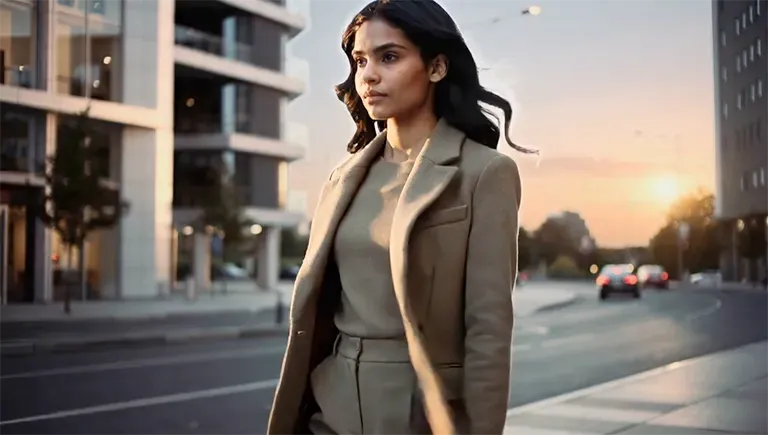
Result 1 — sunset light and blurred background as prompted, but the camera went bottom-up, and there's a visible halo around the silhouette: /lab/g/699cfe83ffa1d8f49965e2b3
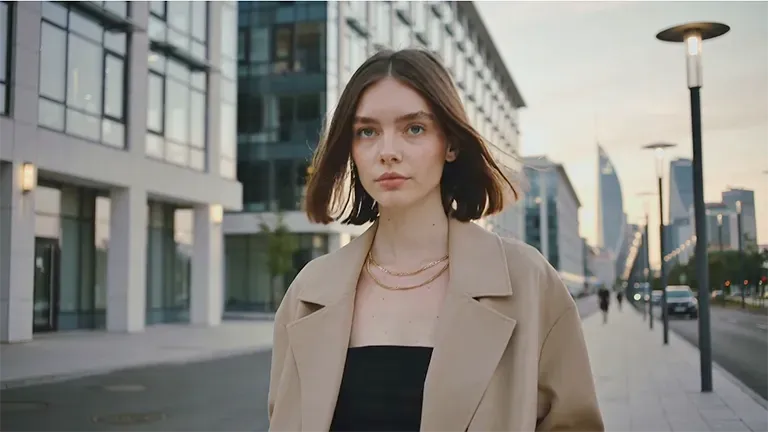
Result 2 — less dramatic light, but a stable composition, smooth body movement, skin without the "plastic" effect — noticeably more professional execution: /lab/g/699cfe83ffa1d8f49965e2b2
Common Mistakes When Working with Kling
- Too many actions in one prompt. "Walks, turns around, waves, camera orbits" — guaranteed chaos. One action, one camera path.
- Rewriting the whole prompt after a miss. You throw away what already worked. Change one parameter per iteration — light, camera, or an environment detail.
- A prompt without camera and light. The model will improvise them — and almost never the way you need. These two blocks are mandatory.
- A vertical clip with a horizontal composition. For 9:16, define the frame up front: "centered composition, subject in the middle of the frame."
- Expecting a finished video product. Kling delivers a single 5–10 second clip with no editing: cutting scenes together, titles, and timed music happen in your editor. Plan the clip as a fragment, not a film.
- "Melting" anatomy and artifacts. Simplify the action and add "smooth motion, no abrupt gestures"; a flat frame — add depth: "slightly blurred background, shallow depth of field"; a scene falling apart — lock it down: "one scene, no location change, one camera."
FAQ: Access, Pricing, and Formats
Do I need a separate Kling subscription or a VPN? No. In GPTunneL, Kling runs right in the browser with no VPN needed and no separate Kuaishou account — local payment methods, one balance shared with every other model.
How much does generation cost? There's no subscription — you pay per second of finished video, and the price depends on the model version and resolution. Run drafts on the lighter versions and render finals on the flagship. The current price list and calculator are on the pricing page.
Is there a free mode? There's no free tier, but no monthly minimums either: top up your balance with any amount and spend it only on what you actually generate.
How long are the clips? 5 or 10 seconds. Longer stories are assembled from several generations in editing — for serial clips, keep the prompt and change only the action.
Can I make vertical videos? Yes: pick 9:16 for TikTok, Reels, and Shorts, or 9:21 — and bake the vertical composition right into the prompt.
How does Kling compare to Veo and Sora? They're models of the same generation, but Kling in GPTunneL is available without waitlists or separate subscriptions, and the short format with 2–4 variants per run is built for real work — quickly pick the best take and ship it.
Try Kling Right Now
Copy any prompt from this article, pick a format — 16:9 for a website or 9:16 for social — and launch 2–4 variants in Kling v3 in GPTunneL's Creative Lab: no subscriptions, pay per use, one balance shared with every other video generation model. Then change one parameter at a time — light, camera, an environment detail — and watch the scene come alive your way. Experimenting is part of the workflow here.