
Wan is Alibaba's AI model line for video generation, and Wan 2.6 is the most balanced model in the line for price and quality. It turns a text description or a photo into a 5, 10 or 15-second clip with sound, in 720p or 1080p. This guide covers how to use Wan 2.6 in GPTunneL: both generation modes, ready-made prompts with real results, prices — and an honest answer to what the Wan 3.0 release changes.
Update, August 2026. Alibaba opened the Wan 3.0 beta — clips up to 30 seconds in a single take and video generated from documents. Wan 3.0 has no public API yet, so for everyday work the practical entry point into the line is still Wan 2.6 and 2.7. What that means in practice — see the "Wan 2.6 or Wan 3.0" section below.
What Wan 2.6 can do in GPTunneL
In GPTunneL, Wan 2.6 comes with a simple interface and essential settings — exactly what you need to get your first clip in a couple of minutes without digging through configurations.
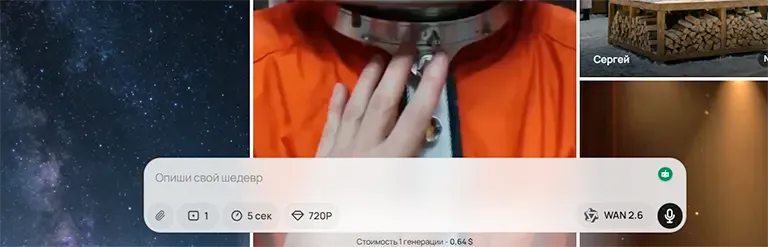
Video length
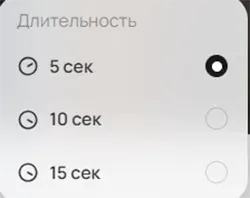
- 5 seconds — for short dynamic scenes and quick idea tests;
- 10 seconds — the universal format for intros and ad fragments;
- 15 seconds — when you need atmosphere and complex camera movement.
Quality
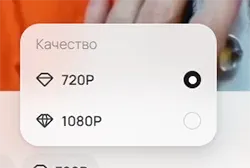
720p renders faster and costs less — handy for iterating on ideas. 1080p is for the final clip and publishing.
Number of variants
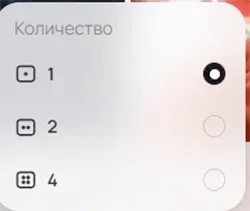
One run can generate 1, 2 or 4 clips. For a complex, dynamic scene, request 2–4 variants right away: the model interprets pacing and composition differently each time, and picking the best take is easier than nailing it on the first try.
Two modes: text-to-video and image-to-video
Wan 2.6 has two working modes, both available in the same window:
- Text-to-video (t2v). You describe the scene in words — the model builds the clip from scratch. The main mode for ads, intros and concepts: full control over the story, but the result depends entirely on the prompt.
- Image-to-video (i2v). You upload a picture — the model brings it to life: adds motion to a character, water or smoke, moves the camera. Use it when the style and composition are already locked: a product photo, an illustration, a frame from an image generator. In the prompt, describe only the motion — what should come alive and how.
A practical combo: generate a frame in an image model, polish it, then animate it in Wan 2.6 via i2v. You get tighter control over the picture than with pure t2v.
How to use Wan 2.6 step by step
- Sign up for GPTunneL and top up your balance — there is no subscription, you only pay for seconds of finished video.
- Open Wan 2.6 in the lab. A quick model overview lives on the Wan 2.6 page.
- Pick a mode: text-to-video or image-to-video (upload your source frame).
- Set the duration (5/10/15 s), quality (720p/1080p) and number of variants (1/2/4).
- Write a prompt — using the formula from the next section — and start the generation.
For your first run, take 720p and 5 seconds: a fast, cheap way to check how the model reads your wording, then re-render the final in 1080p.
Wan 2.6 prompts: how to write them
Wan 2.6 generates a moving scene, not a still image. Anything you leave out — camera movement, light, pacing — the model fills in with defaults, and the clip can drift far from what you had in mind. So be specific along four axes.
Camera movement
Without it, the video looks flat. State it directly: "smooth camera flythrough", "slow push-in", "arc orbit around the subject", "handheld camera effect". The camera steers the viewer's attention — give the model a command, not a guessing game.
Lighting
Light sets the mood: "soft diffused lighting" — calm, "high-contrast directional light" — drama, "warm sunset light" — emotion. Skip it and the frame comes out neutral.
Depth of field
To isolate the subject — "shallow depth of field, blurred background". If the whole scene matters — "deep focus, sharpness across the entire frame".
Atmosphere
Smoke, dust, fog, snow particles, light rays — details like these make the frame feel dimensional and alive.
A working formula
Who / where / doing what / what light / what camera / what style / what pacing.
A dancer on a night street under neon signs performs an energetic dance.
High-contrast lighting with bright light sources. Handheld camera effect.
Realistic style, fast pacing.
In earlier versions of the line, including Wan 2.5, users compensated for the model's limits with very long descriptions. In Wan 2.6 precision beats volume: clearly specified light, camera and pacing work better than an overloaded, unstructured paragraph. "A beautiful video" or "an epic scene" gives the model nothing to work with.
Cheat sheet: what to put in the prompt
If terms like "rim light" feel unfamiliar, grab ready-made phrases — you can paste them into the prompt as they are.
| You want | What to write in the prompt |
|---|---|
| Cinematic look | "cinematic style", "volumetric light", "realistic color grading", "deep shadows", "high detail" |
| Blurred background, subject in focus | "shallow depth of field", "blurred background", "focus on the main subject" |
| Sharpness across the frame | "deep focus", "detailed foreground and background" |
| Soft calm light | "soft diffused lighting", "warm light", "smooth shadows" |
| Dramatic lighting | "high-contrast lighting", "bright directional light", "dramatic atmosphere" |
| Fast action | "fast camera movement", "sharp turns", "energetic pacing" |
| Smooth calm video | "slow camera flythrough", "calm pacing", "soft dynamics" |
| Reportage feel | "handheld camera effect", "slight camera shake", "documentary style" |
| Slowed-down motion | "slow motion", "slow motion effect", "smooth motion detail" |
| Tech aesthetic | "premium style", "neon glow", "reflective surfaces", "clean minimal background" |
The phrases combine easily: "high-contrast lighting, shallow depth of field, slow camera flythrough, cinematic style" is already a working base.
Ready-made prompts with results
Three scenarios from practice — copy the prompt as is and swap in your own scene.
YouTube channel intro
Cinematic logo animation for a YouTube channel.
A dark studio with light haze. The logo forms out of glowing particles
into a metallic 3D shape. High-contrast lighting, bright directional light
and deep shadows. Volumetric light passes through the haze.
The camera slowly orbits the logo in an arc, smooth camera movement.
Shallow depth of field, blurred background, focus on the logo.
Slowed particle motion, slow motion effect.
High detail, premium style.
Settings: 10 seconds, 1080p, 2 variants.
Both variants showed that Wan 2.6 reads complex visual parameters correctly: contrasty directional light with deep shadows, volumetric light through the haze, metallic texture with realistic highlights, slowed-down sparks. The "premium" feel of the scene comes through — the material reads as metal, the light is spatial rather than flat.
In the first variant the camera orbit is smooth, with pacing that matches the wording.
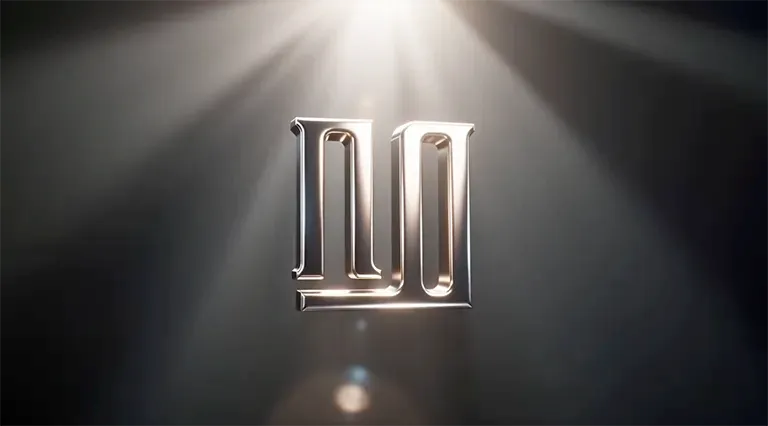
In the second, the camera moves noticeably faster — a more aggressive feel. A clear example of why you should generate several variants: the model interprets scene pacing differently.
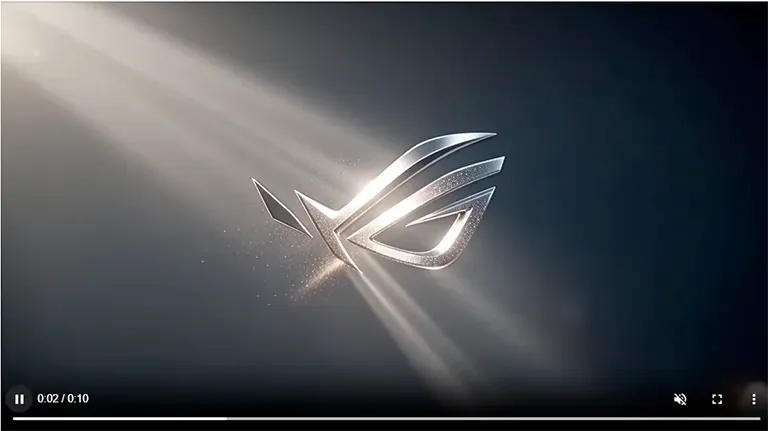
Result 1: /lab/g/69a097b334032d1200b0b38f · Result 2: /lab/g/69a097b334032d1200b0b38e
Mobile app promo
A dynamic promo video for a mobile app.
A smartphone floats in the air on a clean gradient background. Premium
style, neon glow and reflective surfaces. The interface smoothly appears
on the screen.
Fast camera movement with energetic turns. Deep focus across the frame,
sharp foreground and background.
Bright directional lighting with contrasting shadows.
Modern tech atmosphere, active scene, energetic pacing.
Settings: 15 seconds, 1080p, 2 variants.
Wan 2.6 correctly picked up "premium style", "neon glow", "reflective surfaces" and "deep focus": clean smartphone geometry, neat edge highlights, realistic interface animation. Both clips look like a proper presentation animation — the difference is in rhythm, not quality.
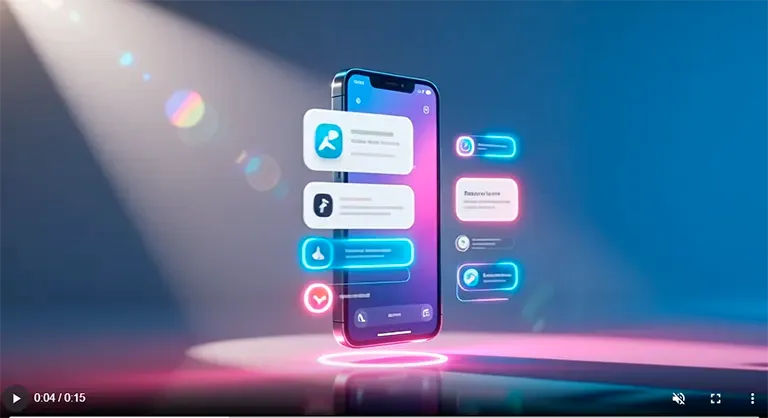
In the second variant the final seconds feel less packed — for presentation use, trim 1–2 seconds off the end.
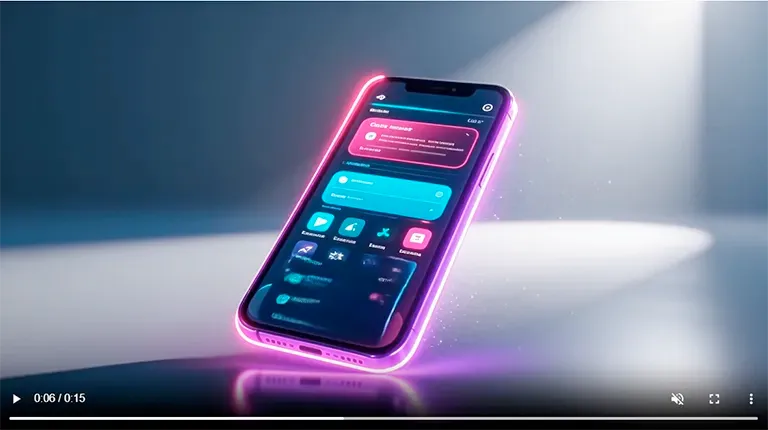
Result 1: /lab/g/69a09d8834032d1200b0b391 · Result 2: /lab/g/69a09d8834032d1200b0b390
Epic dragon scene
An epic fantasy scene.
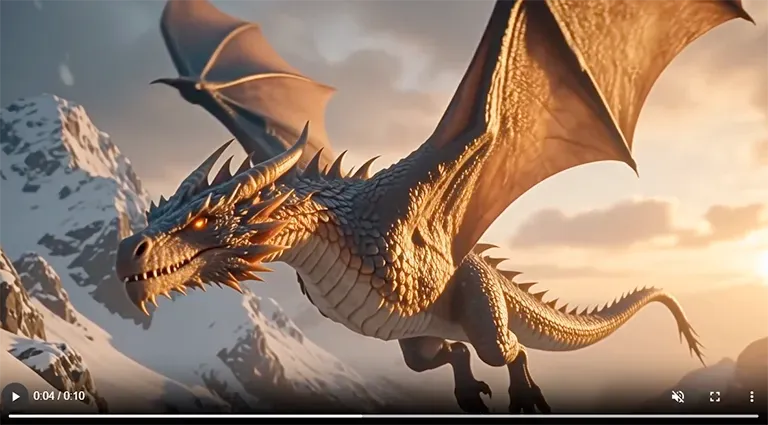
A huge dragon flies over snow-covered mountains at sunset. Warm sunlight,
soft diffused lighting and a volumetric atmosphere. Snow dust in the air.
The camera moves upward in a smooth cinematic flythrough.
Shallow depth of field, slightly blurred foreground, focus on the dragon.
Slowed-down motion, slow motion effect.
Highly detailed scales, dramatic atmosphere.
Settings: 10 seconds, 1080p, 2 variants.
The model handled nearly everything: sunset light, atmospheric mountain perspective, snow dust, scale detail and slow motion in flight. Both versions look like a fragment of a fantasy film.
The second version is visually stronger: deep red wings, a more dramatic sunset, a visible tear in the wing and steam from the mouth — details that give the character a backstory without a single extra word in the prompt.
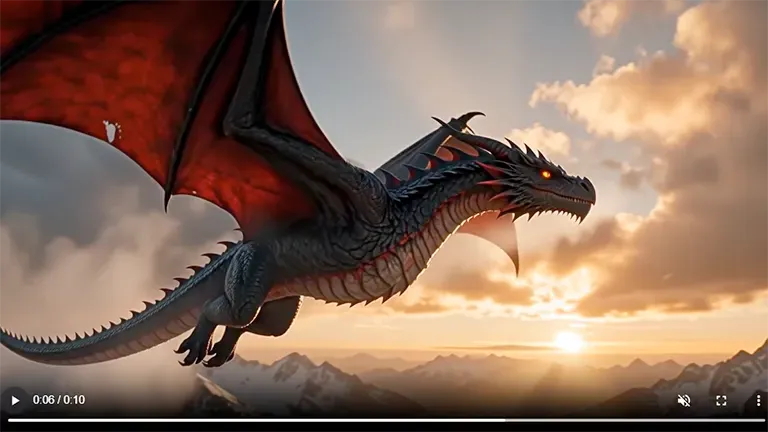
One caveat: in both variants the dragon looks big, but not truly gigantic. If scale matters, reinforce it in the text separately: "colossal scale, the dragon covers part of the horizon". Without that emphasis the model aims for a balanced composition.
Result 1: /lab/g/69a0a31e34032d1200b0b393 · Result 2: /lab/g/69a0a31e34032d1200b0b392
Wan 2.6 or Wan 3.0 — which to choose
In August 2026 Alibaba opened the Wan 3.0 beta: clips up to 30 seconds in a single take, video generated from documents (pdf, xls, ppt and even web pages), and interval-based editing of finished clips. The full breakdown with official demos is in our Wan 3.0 news post.
What this means for Wan 2.6 in practice:
- Wan 3.0 is not a "try it today" option yet. The beta lives in Alibaba's China-facing services, and the international API is rolling out gradually. GPTunneL will add the model the day the public API opens — as with every version of the line.
- Price. The international Wan 3.0 API costs $0.05–0.20 per second depending on resolution: a 30-second 1080p clip runs about $6. Wan 2.6 is far friendlier for iteration: a 5-second 720p draft costs about $0.64.
- Length. 30 seconds in one take is a strong argument for storytelling. But for social media, ads, intros and product clips, Wan 2.6's 5–15 seconds cover the job entirely.
- Iteration speed. Short clips render faster, and 2–4 variants per run let you explore ideas cheaper than burning long takes.
The working setup today: ideas and drafts on Wan 2.6, final renders of complex scenes on the higher-end Wan 2.7, and Wan 3.0 bookmarked until the public API arrives.
Wan 2.6 vs Veo and Sora
Veo 3 and Sora 2 are the flagships from Google and OpenAI, but both come with practical barriers: limited access, queues, heavy onboarding. Each has its strengths: Veo 3 is deeply integrated into the Google ecosystem but capped at 8 seconds; Sora 2 offers flexible narrative control with multi-shot scenes and the cameo feature.
Wan 2.6 wins on ease of entry: no invite, no queues, results in a few clicks, up to 15 seconds in 1080p. The tests above show that in light, materials and camera movement the model performs at the level of proper CGI rather than a rough draft. Compare every video model in the catalog on the video models page.
How much Wan 2.6 costs
There is no subscription — you pay per second of finished video: about $0.13 per second in 720p and $0.19 in 1080p. A ten-second 1080p clip is around $1.92, a 5-second 720p draft about $0.64. Only Wan 2.5 is cheaper within the line; the flagship Wan 2.7 costs more. Get an exact quote for your clip length with the calculator on the pricing page; current rates are always in your account.
Wan 2.6 limitations
- Length. 15 seconds is the ceiling. Intros, teasers and short scenes — yes; a full plot with development won't fit in a single generation. Need longer — look at Wan 3.0.
- Artifacts. Occasional texture micro-jitter, slight deformations during fast motion, unstable fine details in the far background. Invisible in most scenes, but complex dynamics can expose them.
- Text in frame. The model often distorts readable captions and lettered logos — plan around it for brand work, or add the text in editing.
Wan AI model FAQ
Is Wan free to use? No. There is no free access to Wan either from Alibaba or via third-party services — sites promising "Wan free, no sign-up" show someone else's demos or fakes. In GPTunneL there is no mandatory subscription either: you pay only for seconds of finished video.
Can I download Wan and run it locally? Open weights exist only for the older versions of the line — the last one is Wan 2.2 (Apache 2.0). Wan 2.5, 2.6, 2.7 and 3.0 are closed models available only through cloud services; "downloading Wan 2.6" is simply not possible.
How is Wan 2.6 different from Wan 2.5 and Wan 2.7? Wan 2.5 is the cheapest — good for drafts. Wan 2.6 is the price-quality balance and the hero of this guide. Wan 2.7 is the line's flagship with better detail and stronger voice generation, but pricier: $0.20 per second in 720p and $0.30 in 1080p.
Does Wan 2.6 generate sound? Yes — clips come with audio, up to 15 seconds, from text or an image.
Should I wait for Wan 3.0 instead of using Wan 2.6? If your job is short clips up to 15 seconds, there is nothing to wait for: Wan 2.6 is available right now and cheaper to iterate on. We'll add Wan 3.0 to GPTunneL the day its public API opens — follow the blog for news.
Try it yourself
Take any prompt from this guide, pick 720p and 5 seconds for a test — and see how Wan 2.6 reads your wording. Open Wan 2.6 in the GPTunneL lab — no subscriptions, pay per use. Re-render the final in 1080p or hand it to the higher-end Wan 2.7 — the whole video model catalog lives on one page.