
Just a few years ago, building your own website looked like a massive undertaking involving a large number of people. An aspiring entrepreneur, an ambitious blogger, an expert wanting to monetize their knowledge, or the owner of a local workshop had to work through a multi-stage quest. First you had to draft a detailed brief, then find a professional graphic designer, and afterward hand off the mockups to a developer to write the code. This process demanded a large financial investment and a colossal reserve of patience, since classic website development traditionally stretched over weeks, and sometimes months, of tedious approvals, revisions, and testing.
Artificial intelligence as an assistant
Today, generative neural networks trained on colossal datasets that include millions of the world's best web pages take on routine, technically complex, and creative tasks. The line between a professional developer and an ordinary user with an interesting idea is gradually disappearing. The No-Code concept (development without programming) has evolved into AI-Driven Development, where the main tool of creation is no longer knowledge of programming language syntax, but a clearly formulated thought. Artificial intelligence acts as a universal digital assistant capable of generating a unique design layout, choosing a harmonious color palette, building a logical interface structure, and even filling the site with content — all within a few minutes.
How neural networks build websites
Most platforms that offer fast website creation operate at the intersection of several types of neural networks. Their interface is built on natural language processing (NLP) technology.
Creating the request. When a user enters a text prompt describing the future project, the algorithm parses it, extracting key entities: the business topic, target audience, desired mood, required functional elements, and overall style.
Creating the visuals. After the initial analysis, the language model passes instructions to the generative system responsible for spatial planning and composition. The AI doesn't pick a random template from a ready-made database. It dynamically combines blocks based on UX/UI design principles. For example, if the system recognizes the request as building a website for a coffee shop, it will automatically include a large hero banner with a welcome offer, a menu-and-prices block, an interactive location map, and a table-booking module. If it's a photographer's portfolio, the emphasis will shift toward wide-format galleries with minimal distracting text.
Creating the content. In parallel, content-generation algorithms kick in. Trained language models instantly produce relevant headlines, product descriptions, "About us" sections, and calls to action tailored to the specific niche. Moreover, modern builders are integrated with visual neural networks that automatically select or generate from scratch unique graphics, photos, and icons matching the chosen color scheme. As a result, the user gets a web resource ready to launch.
How to formulate your idea for a neural network
However advanced the technology, a neural network still can't read minds, so before opening the builder, it's worth doing some analytical groundwork and picturing the look and structure of the future site. This will save you from chaotic edits later on.
- Define the site's main goal. You need to clearly answer the question of what task the site should solve. It could be collecting contact data from potential customers (lead generation), directly selling a specific product, showcasing creative work, informing an audience about an event, or running a personal blog.
- Analyze the target audience. A web page aimed at young extreme-sports enthusiasts should differ radically in design, dynamics, and tone of voice from the site of a law firm targeting large businesses. Note down the age, interests, and key expectations of your future visitors.
- Gather the content foundation. Prepare the basic information that must appear on the site: the project or brand name, a list of key advantages, contact details, addresses, social media links, and any unique text fragments you already have ready.
Once the concept is formed, it needs to be packaged into a text description — a prompt. A good request for an AI builder should be as detailed as possible. Avoid overly short, abstract phrases like "make a website for an auto shop." Instead, use expanded constructions. A proper prompt looks like this:
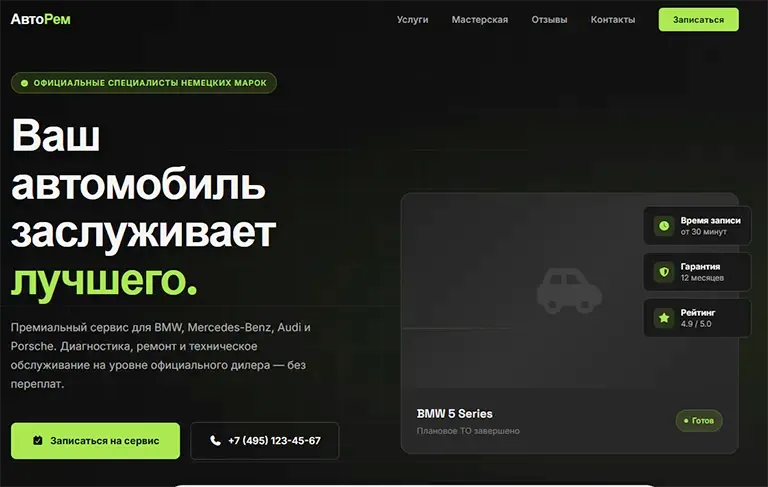
"Create a modern, minimalist one-page website for the premium auto shop 'AutoRem,' specializing in repairing German cars. The target audience is owners of business-class cars who value their time and a high level of service. The color scheme should be strict: deep graphite, matte black, and an accent neon green for buttons. The site should include: a hero screen with a unique selling proposition and a booking button, a service list with prices, a customer review block, workshop photos, and an interactive feedback form."
The more specifics, context, and stylistic guidance you give the neural network at the start, the more accurate, relevant, and refinement-free the final result will be:
Choosing the right tool for your task
The modern market for AI web-development tools is booming, offering users a huge range of platforms, each with its own unique features, strengths, and functional limits. Choosing a specific service should be based on the scale of your project, your need for customization flexibility, and your plans for further development of the resource. Let's take a detailed look at the most in-demand and effective solutions available today.
CodeBlocks. A tool developed by GPTunneL. It lets you create convenient websites either from a ready-made template or from scratch. The user types a prompt into the chat window. It's best to describe the visuals in as much detail as possible to get the right result right away. We used the prompt example from the previous block in exactly this tool. Below we'll walk through building a website step by step using CodeBlocks as an example.
Framer AI. This service is perfect for those who want an ultra-modern, dynamic site with refined animation and flawless typography. The user simply enters a text request, and the system starts building the site structure before your eyes, choosing fonts, complex gradients, and interactive transition effects.
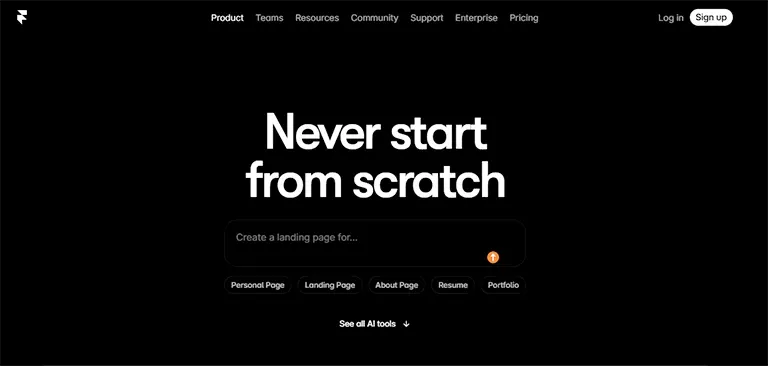
Framer AI's main advantage lies in its incredible flexibility during editing. The layout generated by the neural network can be adjusted down to the smallest detail: dragging elements, changing scroll-animation parameters, and fine-tuning mobile responsiveness in real time. The platform has built-in SEO tools and lets you deploy projects to your own hosting in one click. That said, keep in mind that because of the abundance of professional settings, Framer's interface may feel a bit overwhelming for those without much web-development experience.
Durable AI. The developers of this platform claim their service can generate a full, working website with text, images, and a map in just thirty seconds. In practice, the process really is impressive: you specify your business type, enter your company name, and the system instantly assembles a neat, concise landing page.
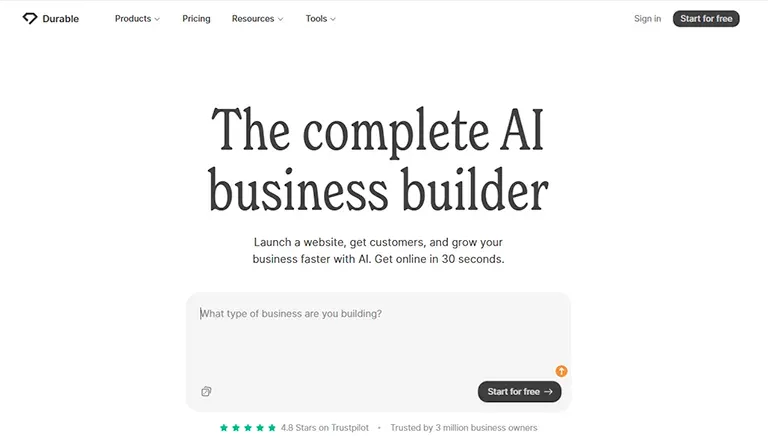
Durable is primarily aimed at individual entrepreneurs and service-industry specialists (plumbers, tutors, cleaning companies, personal trainers). Besides generating the site itself, the platform provides built-in AI tools for creating ads, writing social media posts, and managing your first clients. Design customization options are somewhat more limited than in Framer, but for quickly testing business hypotheses or launching an urgent ad campaign, Durable is a great fit.
Relume AI. Unlike other builders, Relume focuses on creating ideal prototypes (wireframes) and sitemaps. Based on your text prompt, the neural network builds a detailed logical scheme of the future pages, arranging content blocks according to conversion and usability best practices.
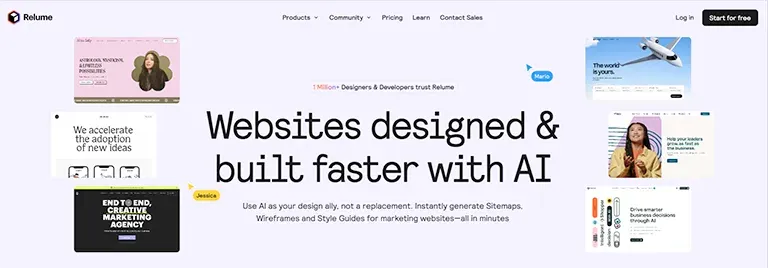
Once the structure is approved, Relume lets you export the resulting framework to popular graphic editors or directly to the Webflow platform for further visual polishing. This tool is a good fit if you need to build a large-scale corporate portal or a complex multi-page resource where information architecture and user flow matter critically.
Step-by-step guide to building a website
Step 1. Sign in to the system and start generating
Go to the website of the AI builder you've chosen and complete the standard registration process using email or an existing Google account. Let's walk through it using CodeBlocks by GPTunneL as an example. After signing in to your account, select the "Sites and presentations" menu in the top-left corner of the screen. A dialog box will open for entering your text prompt. Paste in the detailed, pre-prepared request describing your future site, color preferences, and block structure. Press Enter and start the creation process.

Step 2. Review and approve the concept
For the next several dozen seconds it may seem like nothing is happening, but during this time the AI is writing the code for your future site in real time. It will select background images, build a neat grid to showcase your portfolio, and write welcome headlines. Look over the proposed version, scroll the page from top to bottom. At this stage, don't get hung up on minor text inaccuracies — evaluate the overall composition, how easy it is to absorb the information, and the atmosphere the visuals convey.
Step 3. Fine visual tuning and customizing elements
You can point the tool to individual elements and ask for them to be fixed. For example, change the button color, edit the text, or add or remove a section. There's a "Select element" button in the dialog window. Click it, and you can hover over any part of the page to make edits.

Step 4. Final testing, domain setup, and the grand launch
Before launching your site, do a comprehensive audit of the work. Test all interactive elements yourself: click links, check whether pop-ups open, fill out a test request in the feedback form, and make sure the new-client notification arrives instantly in your email or messenger. If everything works flawlessly, move on to publishing. By default, AI platforms provide a free second-level technical domain like yourname.framer.ai or company.wixsite.com. If you're planning active promotion of a commercial project or personal brand, you can buy your own unique domain from any accredited registrar and connect it to the site. After that, confidently click "Publish" — congratulations, your site is officially launched and available to users around the world.
Visual content and copywriting
Although artificial intelligence can instantly write text and select graphics, the initial generation result often suffers from a certain impersonality and formulaic quality. For a site to truly grab the target audience and convert casual visitors into loyal customers, the text and visual content need to be carefully customized to shed that robotic feel.
The nuances of AI-generated text. In copywriting, neural networks tend to overuse pompous but essentially empty phrases like "we are a dynamically developing company with a team of top-class professionals offering innovative solutions for your maximum success." Such phrasing carries no practical value and instantly triggers banner blindness in today's users. Ruthlessly cut such text constructions. Replace abstract promises with concrete numbers, undeniable facts, and measurable results. Instead of "fast turnaround," write "we deliver a design project in 5 business days." Instead of "thousands of happy clients," specify "we've completed 142 private garden projects."
Proper article structure. Follow a strict hierarchy of headings and text. The most important, most intriguing information should be on the first screen, in the main heading (H1). Within the first three seconds on the site, a visitor should clearly understand where they've landed, what product or service is being offered, and what personal benefit they can get from it. Subsequent paragraphs should be short, concise, and broken into logical lists — this makes it much easier to scan the page while scrolling quickly.
Image requirements. As for the visual component, avoid trite stock photos showing unnaturally smiling businesspeople in suits shaking hands against a sterile office backdrop. Such images are instantly recognized by the audience as fake and undermine trust in the brand. If you can't arrange a professional individual photo shoot, use specialized neural networks to generate unique graphic content. Or you can use one of the GPTunneL tools to create images. Formulate your image-generation prompts in a consistent style, and make sure that across the whole site there's a balance in the saturation, contrast, and color temperature of the images. Use quality mockups and vector-format icons so the graphics look crisp both on old laptop screens and modern smartphone displays.
Technical optimization, analytics, and promoting an AI-built website
Launching a site isn't the finish line — it's just the beginning of its full life in the global online world. For a resource built with artificial intelligence to bring real value, you need to pay close attention to its technical condition, data-collection tools, and strategies for attracting your target traffic.
Load speed and technical audit. Search algorithms and ordinary users are extremely intolerant of slow sites. If a page takes longer than three seconds to load, the likelihood that a visitor closes the tab rises sharply. Even though modern AI builders try to optimize the code during creation, a user can unintentionally overload the site with heavy content.
Be sure to optimize all uploaded graphic files. Before adding an image to the site, run it through specialized web compression services. Convert images to modern, high-efficiency formats (such as WebP), which provide excellent visual quality at a minimal file size. Use Google PageSpeed Insights to regularly monitor your resource's speed and quickly spot technical issues.
Setting up web analytics to study audience behavior. Managing a project blind, without understanding how visitors behave on the site, is a direct path to wasting your marketing budget. Right after publishing the resource, integrate web analytics tracking codes (such as Google Analytics) into its structure.
You'll be able to track in real time which geographic regions your users come from, which advertising channels bring them to you, how much time they spend on specific pages, and at which exact stages they leave the site without completing a target action. Session-recording tools are of particular interest, letting you literally see a recording of a user's session through their own eyes: how they moved the mouse cursor, where they stopped reading, which elements they tried to click. This analysis provides tremendous food for thought and helps you make targeted interface improvements, boosting the site's overall conversion rate.
Traffic-acquisition and promotion strategies
The mere fact that your site exists online doesn't guarantee an automatic influx of visitors — you need to announce your existence to the world. To do this, you need to use a set of marketing tools:
- Content marketing and SEO. Regularly publish high-quality, in-depth material on your site's pages (for example, in a "Blog" or "Useful articles" section) that answers users' current search queries. AI builders make it easy to weave keywords into the text, which over time will help your site climb the search results for free.
- Paid search advertising. Launch targeted ads in search engines. This is the fastest way to attract the hottest, most ready-to-buy audience — people who are searching for your product or service online right now.
- Social media promotion. Create official communities for your project on popular platforms, share links to new site content, run interactive activities, and drive traffic through the synergy of different communication channels.
Advantages and pitfalls of AI-driven development
To form an objective view of AI-built websites, it's worth weighing all the advantages and the obvious limitations of this approach. It would be a mistake to assume that neural networks are an absolute panacea capable of completely and permanently replacing traditional custom web development.
Undeniable advantages of using artificial intelligence
- Significant financial savings. You no longer need to hire an entire team of specialists (UX researcher, designer, front-end developer, copywriter, tester) and pay them significant fees. Building a website becomes accessible even to low-budget startups.
- High speed of project delivery. The process from an idea in your head to a fully functional, live website online shrinks from several weeks to a couple of hours. This lets you react instantly to market changes and stay ahead of competitors.
- Low barrier to entry and accessibility. Modern AI platform interfaces are intuitive and friendly. If you know how to use email, write text messages in messengers, and move sliders in your smartphone settings, you'll have no trouble building a website with neural networks.
- Easy testing of business hypotheses. Entrepreneurs can generate ten different landing pages for ten different product variations at minimal cost, run test traffic to them, and use real statistics to understand which offer is in the highest demand in the market.
Significant limitations and potential risks
- The problem of templated design and lack of uniqueness. Since neural networks are trained on websites that already exist online, their output inevitably contains repeating compositional techniques, similar font pairings, and standard visual solutions. Creating something radically new and revolutionary that overturns ideas about web design is still beyond AI's reach. So during the refinement stage, put more emphasis on unique content, brand colors, and your own style.
- Limits on customizing complex features. If you need to add a custom interactive service-cost calculator with many floating variables, build a complex members-only area for registered users with multi-level access rights, or set up a specific integration with an old warehouse-management system, the standard capabilities of an AI builder may not be enough. In such situations, you'll still need to bring in a professional developer to write custom code.
- Direct dependence on third-party infrastructure. Your site is entirely based on the technological capacity and servers of the chosen AI platform. If the service suddenly changes its pricing policy, restricts access for users in your region, or runs into serious technical failures, your digital business could be at risk, since migrating such a site to another independent hosting can be technically very difficult.
A visual comparison of real vs. AI-driven development
Take the first step into the digital future
The technological revolution in web development has already happened, and it would be foolish to ignore the opportunities it opens up for each of us. Artificial intelligence has transformed from a complex technology available only to a narrow circle of scientists and highly paid engineers into a democratic, everyday, and effective tool for creation. All that separates you from launching your own beautiful, functional website is a few minutes of free time and the willingness to take the first step.