
Audio-to-text transcription turns spoken words from a recording into plain text. An hour-long interview used to take three or four hours to transcribe by hand — now a neural network does the same job in minutes: upload a file, get the text. This guide walks through the whole process step by step: how to transcribe audio and video online, which formats work, how to handle interviews, lectures and meetings, what to do about timestamps and speakers, and how to turn a transcript into a summary in one more minute.
This is a process guide — from uploading a file to a finished document. If you want a market overview and tool comparison instead, see our roundup of AI transcription services.
How to transcribe audio to text: 3 steps
GPTunneL has a dedicated tool for this — Audio & Video to Text, built on OpenAI's Whisper models. Nothing to install, everything runs in the browser:
- Sign in to GPTunneL. Email registration takes a minute; one account covers every tool on the platform.
- Upload a file and pick a model. Audio or video both work — no conversion needed. The interface shows the processing cost before you run it, calculated from the recording length.
- Grab the text. The transcript is grouped by speaker turns — copy it or save it as .txt or .docx.
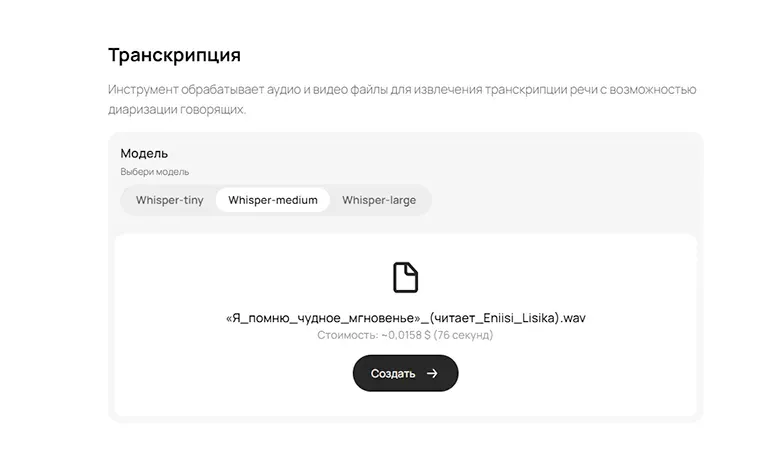
There are three models: Whisper-Tiny — fastest and cheapest, for rough drafts; Medium — a balance of speed and accuracy; Large — maximum accuracy plus manual language selection. For interviews, negotiations and anything where every phrase matters, use Large.
Which files work: audio and video formats
Whisper accepts almost anything you'll meet at work:
- audio — MP3, WAV, OGG/OGA, FLAC, M4A;
- video — MP4, WEBM, OGV, MOV (the audio track is extracted automatically).
In practice that means audio and video transcription works with Zoom and Google Meet recordings, webinars, podcasts, voice messages, training videos and archived footage — no pre-conversion. You don't need a desktop transcription program either: everything happens online, and results arrive in 10–60 seconds depending on the recording length.
One practical tip for very heavy files: if a video weighs gigabytes, extract the audio track as MP3 — the upload will be many times faster, and transcription quality won't change, since the model only works with sound anyway.
How to transcribe an interview, a lecture or a meeting
The scenario decides which model to pick and what to do with the text afterwards.
Interview
Quote accuracy is critical here: a single misheard word can flip the meaning. Use Whisper-Large, and if the speaker uses a language other than yours, set the language manually — auto-detection sometimes misses even on clear diction. The finished transcript is grouped into speaker turns, so a dialogue reads like a dialogue, not a wall of text.
Lecture or webinar
Whisper handles long monologues full of terminology well — it was trained on roughly 680,000 hours of multilingual audio with varied accents and background noise. After transcribing, ask a chat model for lecture notes: key points, definitions, a list of sources — ninety minutes of lecture collapses into one structured page.
Meeting or call
The most common business scenario: a call recording becomes text, the text becomes minutes with decisions and action items. Keep in mind that interruptions and cross-talk reduce the accuracy of any ASR model, so a recording from a decent microphone will transcribe noticeably better than a phone lying on the meeting-room table.
Long recordings, timestamps and speakers
Long files. A recording uploads in one piece; the cost is calculated from its length and shown before you start — no surprises. You don't need to slice a two-hour webinar manually: Whisper segments the audio into 30-second chunks itself and assembles them into coherent text.
Timestamps. Whisper models mark up the recording by time segments — that's what subtitles are built on. If you need a transcript with timestamps for subtitles or editing, ask a chat model to reformat the finished text into the markup you need.
Speakers. Whisper itself doesn't tell voices apart — it captures speech, and the text is grouped into turns. Labelling participants is easier as a second step: paste the transcript into chat and ask "label the turns: interviewer / guest" — models handle this well from the context of questions and answers.
What transcription quality depends on
ASR accuracy is measured with WER (Word Error Rate) — the share of wrong words against a reference transcript. The rule is simple: the bigger the model, the lower the WER. In practice quality comes down to four things:
- The model. In our tests Tiny confused word forms and "reconstructed" phrases by sound similarity, while Large transcribed the same recording almost flawlessly — and faster.
- The language. Auto-detection can miss: in one test the Medium model produced Spanish text for a recording in a different language. Large lets you set the language manually — for foreign speech this step is mandatory.
- The recording. Noise, a weak microphone and cross-talk directly raise the error rate. Numbers are a separate risk zone: "15,000" can come out as "15 1000" — check figures against the recording.
- Expectations. Whisper captures speech literally: with pauses, slips and repetitions. It doesn't edit style and doesn't summarize — that's the next step's job.
What to do with the text: summary, minutes, article
A transcript is raw material. The value appears at step two, when the text becomes a working document. Open a chat in GPTunneL, paste the transcript and ask:
- "Summarize the meeting: decisions, tasks, owners, deadlines" — ready-made minutes;
- "Pick the 5 strongest quotes for an announcement" — a social post drafted from an interview;
- "Turn this lecture into notes with term definitions" — study notes;
- "Write an article from this transcript, structure: problem — solution — takeaways" — a publication draft.
Gemini 3.6 Flash is a great fit for these jobs: its 1M-token context fits the transcript of a multi-hour recording in one go, and the model accepts audio as input — a short voice message can be handled right in the chat, no separate tool needed.
How much audio transcription costs
In GPTunneL transcription starts at $0.01 per minute of audio or video: Whisper-Tiny — $0.01/min, Medium — $0.0125/min, Large — $0.0145/min. The final amount is calculated from the recording length and shown in the interface before you start: an hour-long call on Tiny runs about $0.60. There's no subscription — you pay only for completed transcriptions from your single platform balance. Current prices for all models are on the pricing page.
FAQ
Is there a free audio-to-text transcription? GPTunneL has no free tier, but there's no subscription either: a transcription starts at a cent per minute of recording, you pay per file, and you see the cost before running. For occasional tasks that's cheaper than a monthly plan on a dedicated service.
Do I need to install a transcription program? No. Everything runs online in the browser: upload a file, get the text. Nothing to install or configure.
Which languages does it understand? Whisper was trained on multilingual audio and supports dozens of languages, including speech with accents and professional terminology. For foreign-language recordings it's safer to set the language manually in Whisper-Large.
Can I transcribe video? Yes. Upload MP4, WEBM, OGV or MOV — the model extracts the audio track itself and transcribes it just like regular audio.
How do I get a meeting summary after transcription? Paste the finished transcript into a GPTunneL chat and ask for minutes: decisions, tasks, deadlines. For long recordings use a model with a large context — Gemini 3.6 Flash, for example.
Which Whisper model is the most accurate? Large: it has the lowest WER in the lineup, handles complex vocabulary and lets you set the language manually. Tiny and Medium are faster and cheaper — good enough for drafts.
Try it on your own recording
Take your last call or voice message and upload it to Audio & Video to Text — you'll have the text in a minute, and one more minute in chat turns it into minutes or notes. No subscriptions, pay per use, from $0.01 per minute of recording. More about the tool — on its page.