
Suno AI is a music generation model that builds a complete song from a text description: vocals, melody, arrangement, and mixing in a single generation. Describe the mood in words or paste your own lyrics — a couple of minutes later you get a finished track you can download and drop into a video, podcast, or ad. In this overview: what Suno can do, which versions have shipped, how it differs from other music models, and how to try it online in GPTunneL.
What is Suno AI
Suno is an American company founded in 2022 by people who previously worked at TikTok, Kensho, and Meta. The idea was simple: remove the studio, the gear, and music theory from songmaking, leaving only text. You describe a song in words — the model composes the melody, sings, and mixes the track itself.
The bet paid off: Suno became the most popular music AI in the world. The main reason is the voice — Suno's vocals sound natural, without the robotic mush, and that is still rare among music generators.
What Suno can do: key features
- A complete song in one generation. The output isn't a stem for an editor but a finished composition: vocals, instruments, verse-chorus structure, and final mixing.
- Natural vocals in many languages. Voice quality is Suno's strongest side — clean pronunciation without slurred syllables. You can hand the model your own lyrics and get a song with them.
- Your lyrics or your mood. Two workflows: either describe the mood and genre and let the model write the words, or paste ready lyrics — Suno will compose music around them and sing.
- Any styles and genres. Pop, rock, jazz, electronic, orchestral, lo-fi — and you can blend them: "synthwave with piano arpeggios" or "acoustic ballad with orchestration."
- Instrumental mode. One toggle gives you a clean instrumental track for background music, intros, or soundtracks.
- Full-length output. A finished track usually runs two to four minutes — a whole song, not a short fragment.
- Two tracks per request. Suno returns two different takes for every prompt — usually one of them nails the idea on the first try, with no need to pay for a re-run.
Suno versions: from v3 to v5
The model improves fast, and the difference between generations is audible to anyone:
| Version | Released | What changed |
|---|---|---|
| Suno v3 | March 2024 | first mass-market version: two-minute songs with vocals from a description |
| Suno v3.5 | May 2024 | track length grew to four minutes |
| Suno v4 | November 2024 | cleaner vocals and mixing — tracks stopped sounding like demos |
| Suno v4.5 and v4.5+ | May–July 2025 | follows the genre more precisely, noticeably wider range of styles |
| Suno v5 | September 2025 | current generation: vocals no longer drift on long notes, arrangements sound closer to a studio recording |
GPTunneL carries the current version of Suno — updates are plugged in as they ship, so you don't need to track releases yourself.
Styles and prompts: steering the result
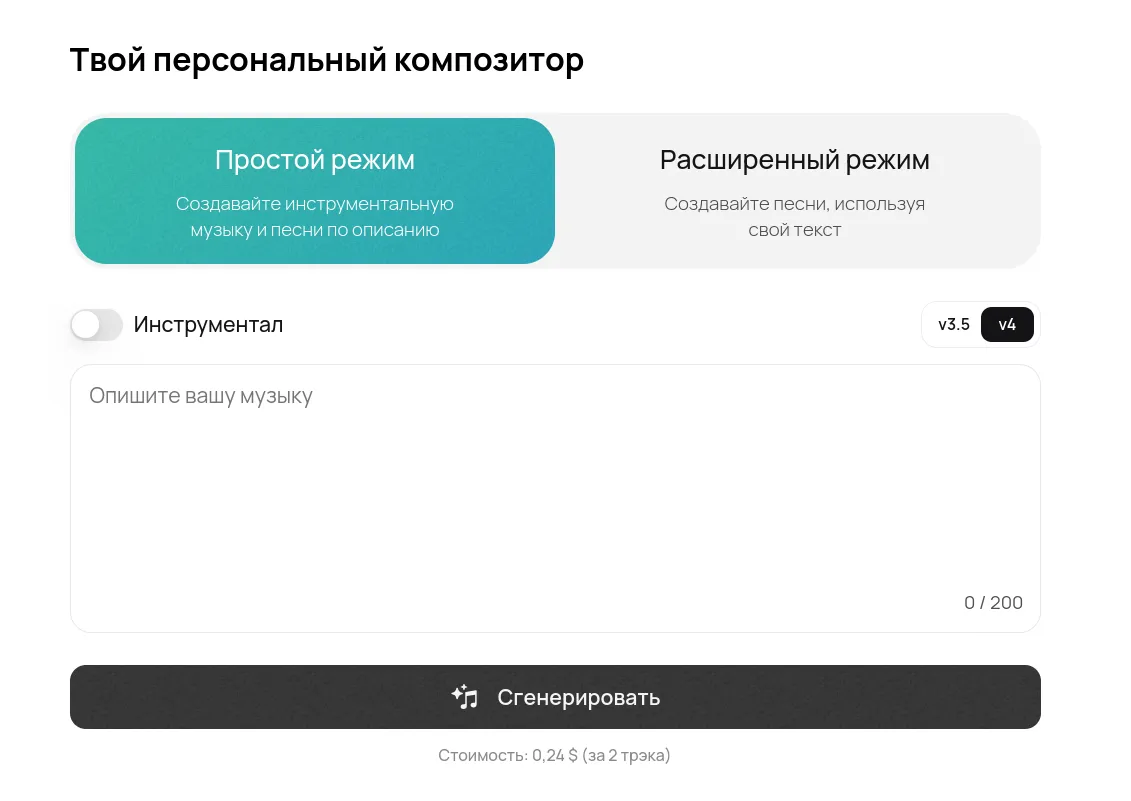
In simple mode a single sentence is enough — genre, mood, tempo, instruments:
A dreamy synthwave track with soft female vocals, 90 BPM, nostalgic mood
In advanced mode you write the lyrics yourself and mark the structure with tags like [Intro], [Verse 1], [Chorus], [Bridge] — that's how the model knows where the verse is, where the chorus goes, and where to place an instrumental break. The style lives in a separate field: anything from "pop" and "rock" to "epic orchestra with choir."
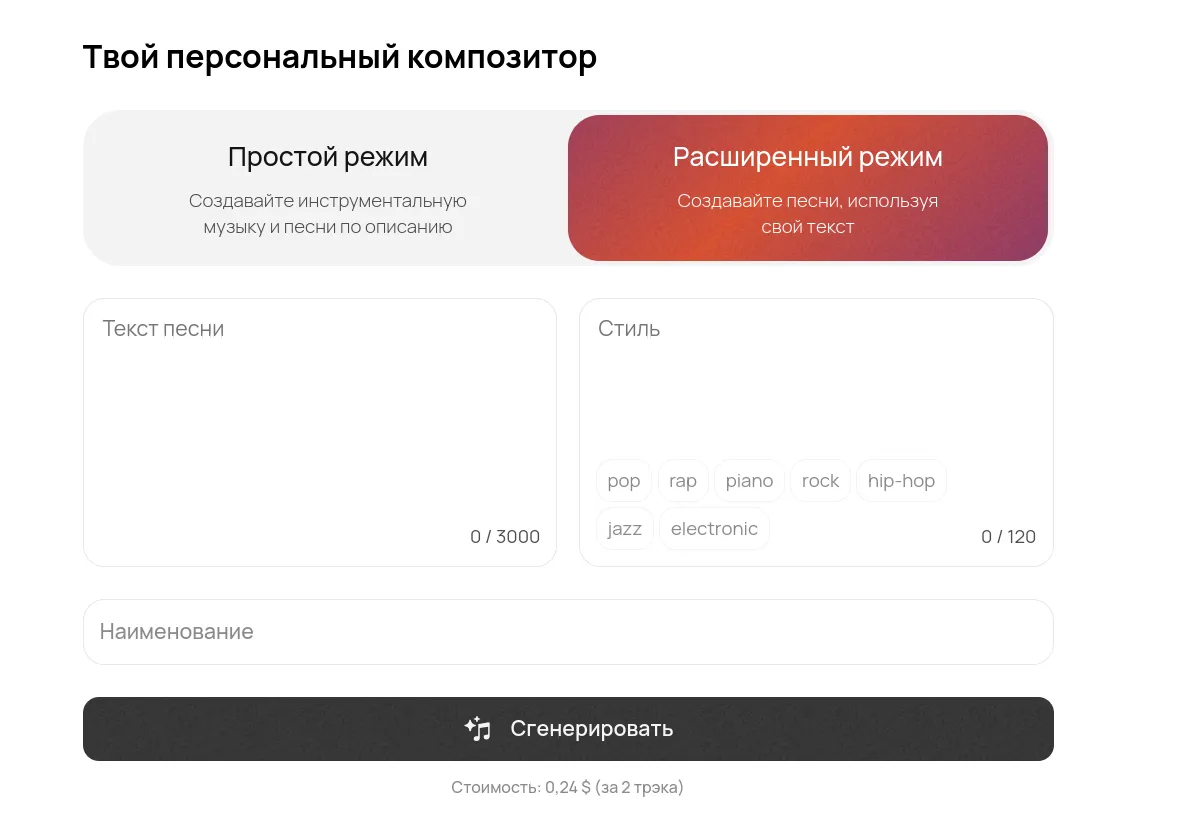
Prompts and style descriptions work best in English — the model was trained mostly on English-language examples — while the lyrics themselves can be in other languages. If you'd rather skip the markup, GPTunneL has a songwriting assistant: it turns your idea into ready lyrics structured for Suno's format.
How to try Suno AI online: step by step
Suno's official site sells a subscription. In GPTunneL you don't need one at all:
- Sign up for GPTunneL — with your email, in a minute.
- Top up your balance — it's shared across the platform: the same balance powers ChatGPT, Claude, image, and video generation.
- Open Suno and describe the song: mood and genre — or paste your own lyrics in advanced mode.
- Listen to both takes and download the winner — the file saves as mp3, ready to drop into a video or edit.
You're charged only for completed generations: no usage, no charges. Next to Suno the catalog also has other music models — Mureka and MiniMax Music, if you want a different sound character or generation price.
Suno AI FAQ
Does Suno sing in languages other than English?
Yes — Suno handles songs and lyrics in dozens of languages, and vocal quality is its strongest side. Hand the model your lyrics and you'll get a song with them.
How much does Suno cost and do I need a subscription?
There's no subscription in GPTunneL: you top up a balance and pay per generation — each one returns two tracks. The exact price is always visible on the pricing page and in the model card next to this article.
Can I use the tracks commercially?
The rights to the result stay with you. Restrictions may come from the model's own license terms — they're published by the developer, so check them before a commercial release.
How long is a finished track and can I download it?
Usually two to four minutes — a full song with verses and a chorus. The finished track downloads as a file and stays yours.
Do I need any music skills?
No. Describing the mood and genre in words is enough — the model does the rest; no editor or music theory required.
Bottom line
Suno AI is the shortest path from an idea to a finished song: no studio, no music education, just a couple of sentences. Try Suno in GPTunneL — no subscriptions, one balance for all models, and you pay only for completed tracks.