
Creating a comic normally requires a whole team of professionals:
- A writer to script the dialogue;
- An artist for the storyboard;
- An inker for the linework;
- A colorist for the mood.
But the rise of technologies like AI for comic creation lets a single author take on all of these roles at once. The barrier to entry has dropped to how clearly you can formulate your ideas and how well you can manage a set of neural network tools.
In this guide we'll walk through a full production process using GPTunneL — from a raw idea to finished, laid-out pages — using a multimodal approach. You'll learn how to combine the logical power of the language model Claude 4.5 Sonnet for writing the script with the visual power of the Seedream 4.5 generator.
We won't be building a comic from scratch. Instead, we'll take a detailed look at how a neural network for turning text into comics actually works: we'll cover methods for keeping a consistent character style and learn to work around typical moderation pitfalls. This will help you produce a design that looks like professional work, not a chaotic pile of images.
Why does making comics need multimodal AI?
Trying to create a graphic story with a single tool is usually doomed to fail: models that are great at drawing can't generate text, and "smart" text models can't visualize anything. A multimodal approach solves this by dividing responsibilities, where each tool — whether it's an image generator for comic strips or a sophisticated language model for scripts — does the job it's best at:
- The text neural network (LLM) acts as the architect: it generates a coherent plot, emotionally charged dialogue, and narrative logic, holding the context of the whole story in memory.
- The image-generation AI, in turn, is responsible purely for visual consistency and artistic execution.
- Vision models act as the connecting link, able to "look" at the result and check that it matches the script.
This approach removes the technical barrier for talented storytellers who can't draw but have a great sense of drama.
Major players already see this as the future. Innovative projects such as Toonsutra, backed by the AI Futures Fund, use Gemini models to create impressive comics with sound and reader-adaptive features. For an independent author, the same principle means being able to make targeted edits to the script or style without having to redraw the entire comic from scratch — something that would be impossible with a traditional approach.
Stage 1: script and storyboard with Claude 4.5 Sonnet
Any good story starts not with a picture but with a word. Claude 4.5 Sonnet fits the role of a virtual scriptwriter thanks to its large context window and ability to follow complex instructions. The model can produce a detailed structure with scene descriptions, dialogue, and emotional tags for each individual panel — which is critical for the visualization stage that follows.
An effective prompt for this task should include three components:
- A clear role (e.g. "an experienced Marvel scriptwriter");
- The desired output format (a table or a list of panels);
- Hard constraints (number of pages and spreads).
A classic story structure should include the hero's introduction, rising conflict, a climax, and a resolution — and the AI should clearly map these stages onto pages.
Prompt for generating a script in Claude
To get a working script that a text-to-comics neural network can turn into images, use the following prompt:
"You are an experienced comic book writer in the classic American style. Create an original story spanning 3 spreads (6 pages) with a clear plot. For each panel, specify:
- Page and panel number.
- Scene description (characters, actions, location, lighting).
- Character lines with emotional cues (thoughtfully, surprised, angrily).
- A technical prompt for image generation.
Use this structure: setup (pages 1-2), action and conflict (3-4), climax and resolution (5-6). Make the visual part as detailed as possible."
The model's response to this prompt is available here. The AI generated a classic noir story about a detective in 1950s New York style, searching for the criminal responsible for his wife being unable to escape a burning movie theater. The comic's pages and panels are numbered, the model provided character lines with emotion notes, and draft prompts for image generation.
After the first generation, ask for refinements. Ask the model to add emotional cues for every line that's missing one, and to double-check the panel numbering logic. Save all the generated descriptions in a separate document — it will help you at the visualization stage.
How to structure the output for working with Seedream 4.5
Seedream 4.5 is a model from ByteDance known for image quality (it can generate at 4K), skillful handling of text within images, and the ability to take up to 14 reference images in a single generation. Thanks to these capabilities, it works well as a neural network for comic creation.
To work effectively with an image generator like Seedream 4.5, the raw script needs to be converted into a set of technical commands. Each panel should be formatted as a separate block containing the number, the line of dialogue, an emotion note, and a detailed description for the neural network.
Descriptions need to be extremely specific. AI doesn't understand pronouns like "she" or abstractions like "an ordinary room." Instead, write: "A 35-year-old detective in a leather coat" or "a bedroom with scattered books and a neon lamp." General style traits — color palette, line type, mood — are best kept in a separate block and repeated in every request, so the comic's style doesn't "jump" from frame to frame.
Use our assistant that writes prompts for images to get instructions the neural network can understand. Follow this three-step process:
- Prepare a structuring prompt: Give Claude the command to convert the script: "Take the finished script and turn it into a list of panels. For each one: Panel [number], Line, Emotion, Frame description, Prompt for Seedream 4.5 (a detailed paragraph in English describing the frame). Don't add anything extra." Here's what the assistant answered →
- Prepare a general style block: Put together a universal closing line for all requests: "Overall style: vivid comic book aesthetic, comic book art, bold ink lines, vibrant colors, a slight neon tint, cinematic lighting, professional illustration."
- Fine-tune action detail: Make sure verbs describe a static state the artist can picture. Instead of "she walks into the room," use "she stands in the doorway, taking a step forward."
This kind of preparation ensures that even the best neural network for creating comics (in our case, Seedream 4.5) gets the most precise instructions possible, minimizing the need for endless regenerations.
Stage 2: creating characters and locations with Seedream 4.5
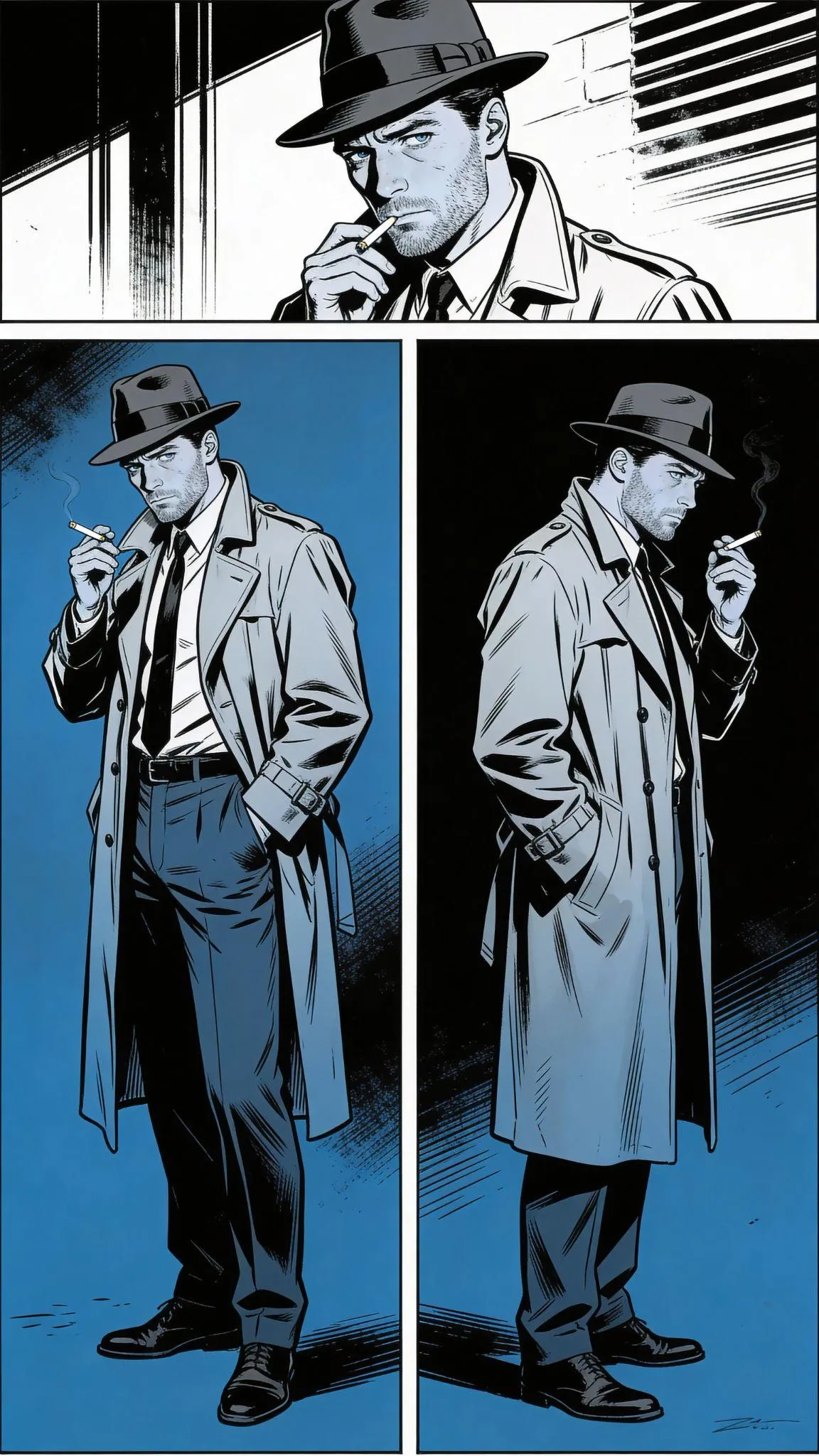
One of the problems for anyone using AI to generate comics is keeping a character's appearance consistent. If the hero wears glasses and a hat in the first panel and a helmet and a cape in the second, the story's magic is broken. The work starts with creating a "reference sheet" for the character: a full-body image of the hero on a white background in 3-4 different poses.
- Character example: "Film noir character design, male detective 35 years old, worn fedora hat and trench coat, tired determined eyes, stubble on face, 1950s style clothing, cigarette in hand, noir aesthetic, full body character sheet with front and side view, dramatic lighting, black and white with blue tones, detailed facial features, realistic comic book art style, character reference sheet."
- Location example: "1950s New York street at night, rain-soaked pavement reflecting neon signs, jazz club entrance with "Blue Note" sign, street lamp, wet asphalt, parked vintage cars, atmospheric fog, film noir cityscape, dramatic lighting, black and white with blue neon accents, detailed urban environment, cinematic composition, realistic comic book background art, location reference sheet."
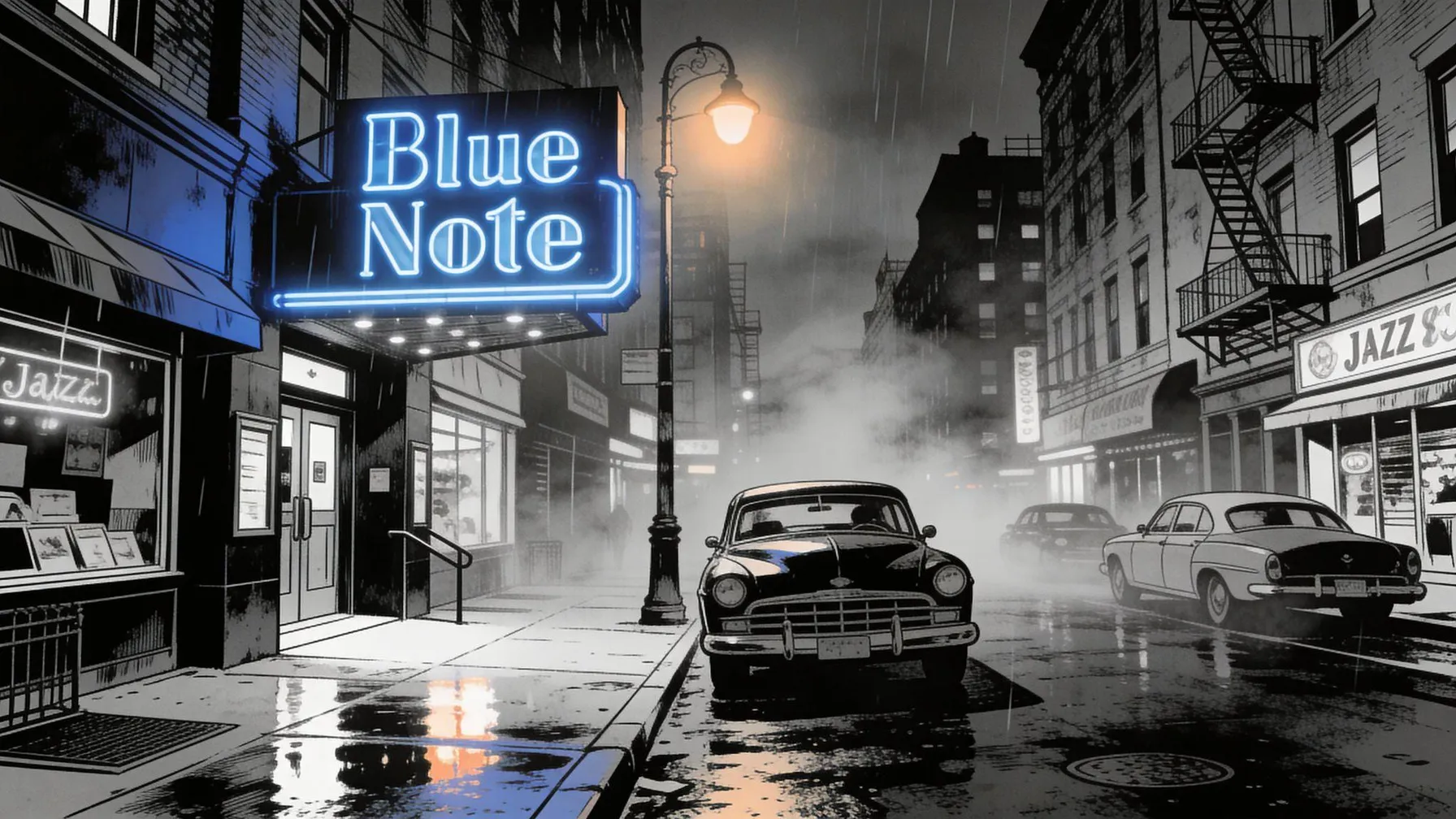
We gave the assistant the task of developing prompts for all the characters and locations in the comic based on the script. The response is available in the chat →
A prompt for a base character should follow a strict formula: character design, then a detailed description of the appearance, costume elements, white background, and style — comic book art style, character turnaround. All key appearance details (hair color, scars, accessories) are written out in a separate text file. These are your "anchors," which you'll copy into every subsequent prompt.
A prompt formula for keeping the style consistent
For visual consistency, use a proven prompt-assembly formula.
- Every request should start with fixed "style anchors": "comic book art," "bold ink lines," "vibrant colors," "high contrast," "professional illustration," and similar phrases. They tell the model we're drawing a comic, not a photorealistic image or an oil painting.
- Color tone and mood are set through emotional markers: blue-cyan hues for calm scenes, dark and high-contrast for scenes of danger.
- Only after that comes the description of the action and location. For example: "Alexa, a 25-year-old woman with long dark hair and a silver pendant, wakes up in her bedroom, surprised, half-tones of blue, mystical atmosphere, comic book art, bold ink lines."
You can also use reference images and refer to them in the prompt so the model understands what the scene, locations, characters, and objects should look like.
Dealing with moderation and fixing errors
Many platforms offering neural networks for comic text and images have strict safety filters (NSFW). Requests containing words like "death," "killer," or "bloody" are often blocked. If a neural network for creating comics online still refuses to generate or produces artifacts, use the following tricks:
- Appearance changes: If the character suddenly "changed outfits," add a phrase to the prompt like "keep Alexa's design from the previous frame: [image of Alexa as a reference]."
- Language errors: Text inside speech bubbles is often generated in a pseudo-language. Fix this by regenerating with an instruction like "Line in English: [text]."
- Blurry faces: For close-ups, add more detail to the emotion description. Instead of "the heroine's face," write "close-up of the detective's face, an expression of deep relief, detailed eyes and facial expression."
Use our AI assistant to rephrase prompts: replace direct depictions of violence with atmospheric euphemisms. For example, write "a scary monster with horns" or "a mysterious silhouette of a fantastical creature in misty haze."
Stage 3: laying out panels and adding text
Once you have a folder of finished images, the assembly stage begins. The best AI platform for comics includes tools for creating both images and text, but the final layout is often easier to do in graphic editors.
Placing speech bubbles and text
Image generators still struggle with integrating readable text. Although Seedream 4.5 and Nano Banana 2 Pro are considered leaders in generating text inside images, it's often simpler to add empty speech bubbles during generation and fill in the text by hand — or skip bubbles in the illustration entirely. That said, there are success stories too. For example, we asked the AI to create a comic page with a detective standing at the entrance to a bar. The model managed to generate text inside the image:
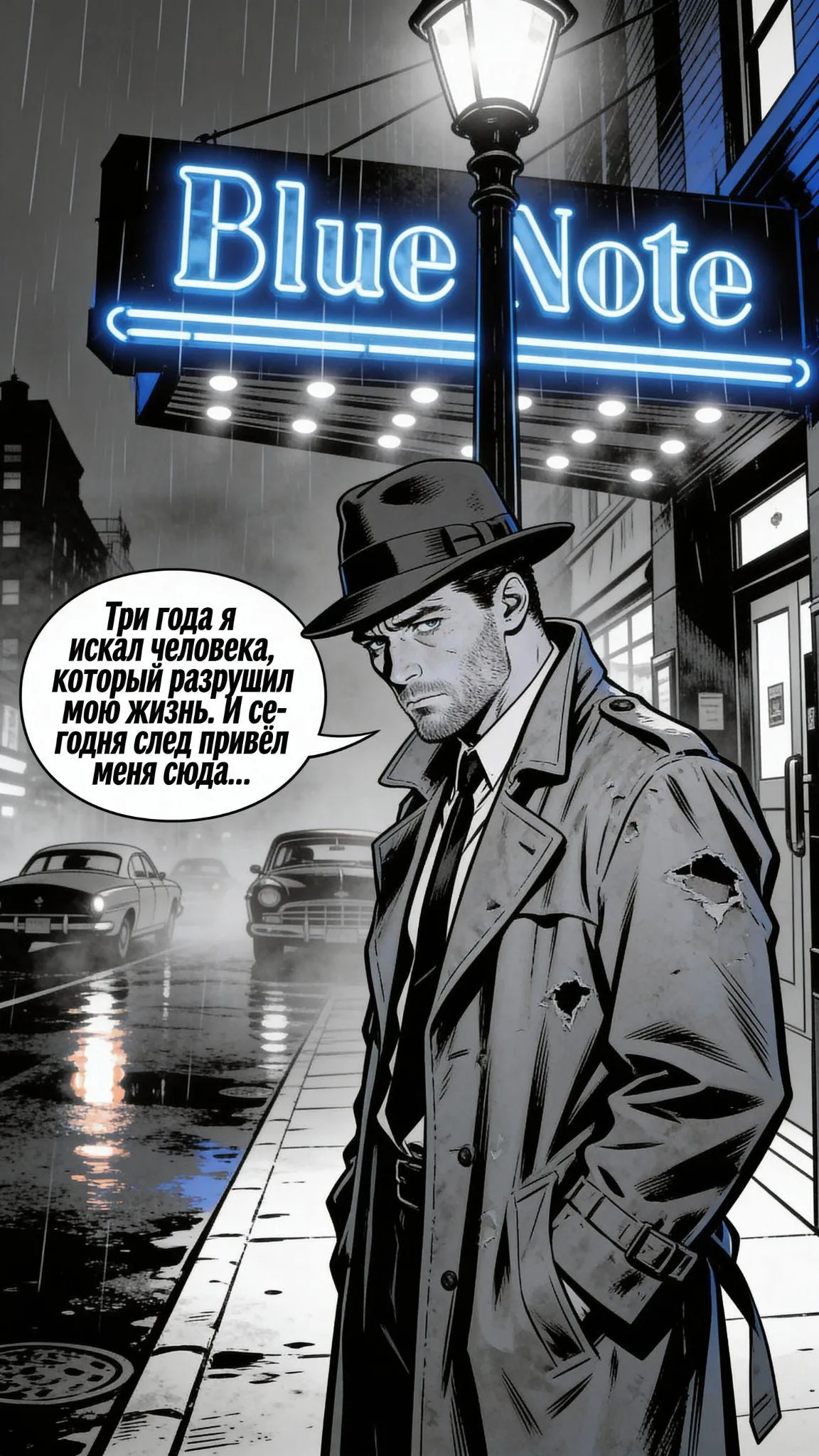
Vision models (for example, uploading an image back into Claude) can help you check the ergonomics: if a bubble covers the hero's face, ask the AI how to fix it.
Here's how you can use speech bubbles:
- Regular speech: Use oval clouds with a black outline.
- A shout or a loud sound: Rectangles with sharp, jagged corners.
- Whispers or thoughts: Dotted outlines or "thought bubble" clouds.
Example prompt for Seedream 4.5 for a panel with space reserved for text: "Close-up of a woman's face, she's surprised. To the left of her face, place a rounded white bubble with a black outline and the text: "Seriously? AI did this?". In the bottom right, a small dotted bubble: "I need to check...". comic book art, focus on expression."
Conclusion: common mistakes and how to avoid them
Even when working with the most advanced neural networks, it's important to remember: AI is a powerful tool, but the human remains the main creator. Technical limitations, such as the model's "amnesia" during long chats or prompts, still require your attention. To avoid losing character appearance details, keep feeding the generator references and spelling out key characteristics in detail.
Another pitfall is audience perception. Research shows readers can be biased against pure "AI art." As experiments from Bowling Green State University show, people often can't tell AI apart from a human on individual images, but across a series of images the inconsistencies become obvious. That's why manual correction of small details is critical for your comic to be perceived as a quality product.
Before presenting your story, go through a final checklist:
- Visual consistency: Flip through the pages quickly — the character should be instantly recognizable in every panel.
- Narrative logic: Make sure the plot flows smoothly and there are no unexplained time jumps between panels.
- Text readability: Check the text in the bubbles on a smartphone screen — it should be legible without zooming.
- Spelling and style: Proofread the dialogue. AI-generated comic text can sometimes mix up word forms or use awkward calques from other languages.
- Color palette: Assess the overall palette of the spread — abrupt color shifts without a story reason break the mood.
A multimodal approach removes technical barriers, letting you bring complex ideas to life without professional drawing skills. By combining the logic of language models with the power of visual generators, and applying a final "human" polish, you can create something that's not just a technological experiment, but a gripping graphic story.
FAQ
Can you create a full comic using only AI, without any manual work?
Technically, yes, but the result will be a compromise on quality. AI still isn't perfect at preserving tiny appearance details and precisely placing text. Minimal manual work — proofreading dialogue, fixing bubbles, and color correction — turns "generated content" into professional work.
How long does it take to create a 6-page comic using multimodal AI?
With a smooth workflow, it takes about 5–8 hours: roughly 1–2 hours for the script in Claude, 3–4 hours generating panels in Seedream 4.5, and a couple of hours on layout. By comparison, the traditional method would take weeks of an artist's work. Your first project will likely take longer while you learn to prompt effectively.
What limitations do neural networks have when creating comics?
The main barriers are character inconsistency (the hero might suddenly "change" their hairstyle), difficulty with text inside images, and strict moderation of conflict scenes. Models also tend to "lose the thread" of the plot in long dialogues, so the author has to keep reminding them of the story's context.