

In brief. Suno has released Visuals, an integrated image and music video generator built directly into its song-creation platform. The tool aligns video footage with the beat, synchronizes character lip movements with vocals, and stitches short clips into longer sequences. Powered by the H3 Move model (adapted from MiniMax H3), image and video generation require separate visual credits. Key questions at launch center around the total cost of a multi-minute clip, character consistency across scenes, and restrictions on celebrity likenesses.
On November 17, Suno introduced Visuals, a new section for creating artwork, album covers, animations, and full music videos. Previously, users generated tracks in Suno but had to switch to standalone video generators, transfer audio stems, match shots manually, and assemble sequences in third-party editors. Visuals brings most of that production flow into a single web interface.
This marks a significant strategic expansion. Suno is transitioning from a standalone music generator into an end-to-end creative production suite. Following major studio upgrades and the October launch of the Speech tool, the company is now tackling video generation—traditionally the most labor-intensive and costly part of music releases for independent creators.
Source: Suno Music, official Suno Visuals walkthrough.
What Suno Visuals Can Do
In the new section, creators can produce music videos for existing songs, design album covers, or assemble lyric videos with animated text. Users describe the scene, provide an image or character, select an audio segment, and generate video synchronized with the music.
According to the official guide, features include:
| Feature | What the Creator Gets |
|---|---|
| Video Clip | Individual clips ranging from 5 to 15 seconds |
| Music-aware generation | Visual pacing that accounts for song structure and lyrics |
| Lip Sync | Character mouth movements synchronized with vocal lines or speech |
| Lyrics | On-screen text overlays with customizable fonts, colors, and positioning |
| Reference Images | Image uploads to define characters, settings, and visual aesthetic |
| Start / End Frames | Granular control over the opening and closing keyframes |
| Visuals Editor | Timeline tools to extend, trim, split, and reorder video segments |
Prompts can specify camera motion, lighting setups, set design, and character actions. Suno provides preset original characters and prompt assistance. While users can upload reference images to maintain character identity between cuts, reference matching does not guarantee absolute visual consistency.
Resolution and Aspect Ratios
At launch, Visuals offers two generation modes: Fast (480p) for rapid prototyping and storyboarding, and Standard (720p) for higher-quality output. The system supports 16:9, 9:16, 1:1, 4:3, and 3:4 aspect ratios. Vertical framing suits TikTok, YouTube Shorts, or Instagram Reels, while horizontal formats fit standard YouTube releases. Both modes cap single-clip generation at 15 seconds.
It is important to distinguish individual clip length from overall project duration: sequences can be extended and chained in the editor. However, a complete three-minute song cannot be generated as a continuous finished video in a single click.
How to Make a Music Video in Suno
The most direct workflow starts with a track already in your Suno library:
- Open the song menu and select Create Visual → Video Clip (or navigate to Create → Visuals → Video).
- Choose which section of the track will play during the clip. You can select a Suno generation or upload an external audio file within platform limits.
- Describe the scene: for example, "rainy city street at night, camera slowly pushes toward a singer on a rooftop, neon light reflections in wet pavement".
- Optionally upload character reference art, start/end frames, or stylistic mood boards.
- Select Fast or Standard mode, set duration and aspect ratio. Enable Lip Sync if the character should sing.
- Generate your initial clip, inspect the result, and iterate with text prompts if adjustments are needed.
- Click Extend to open the Visuals Editor. Add subsequent shots, rearrange scenes, trim against musical cues, and optionally overlay song lyrics.
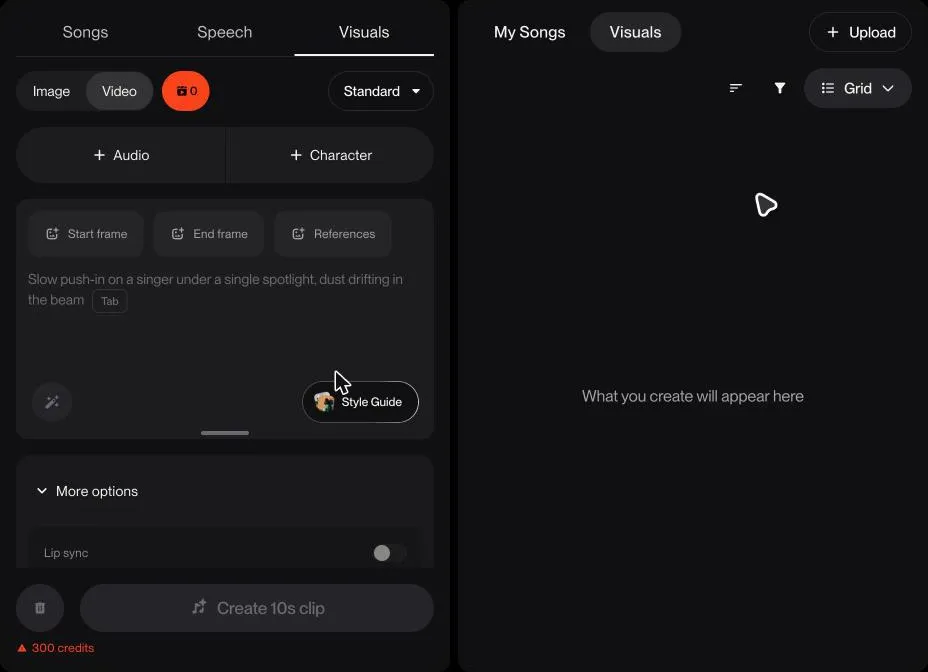
Suno Visuals generation interface: scene parameters, Lip Sync, and credit pricing. Source: The AI Musicpreneur.
Practical Example: Video for a Three-Minute Song
Imagine a creator producing a video for a three-minute electronic track. For the chorus, they generate a 10–15 second lip-synced shot of the protagonist; for verses, atmospheric urban b-roll; for breakdowns, dynamic lighting shifts and camera swoops. They then arrange all clips on the timeline and align cuts to the rhythm.
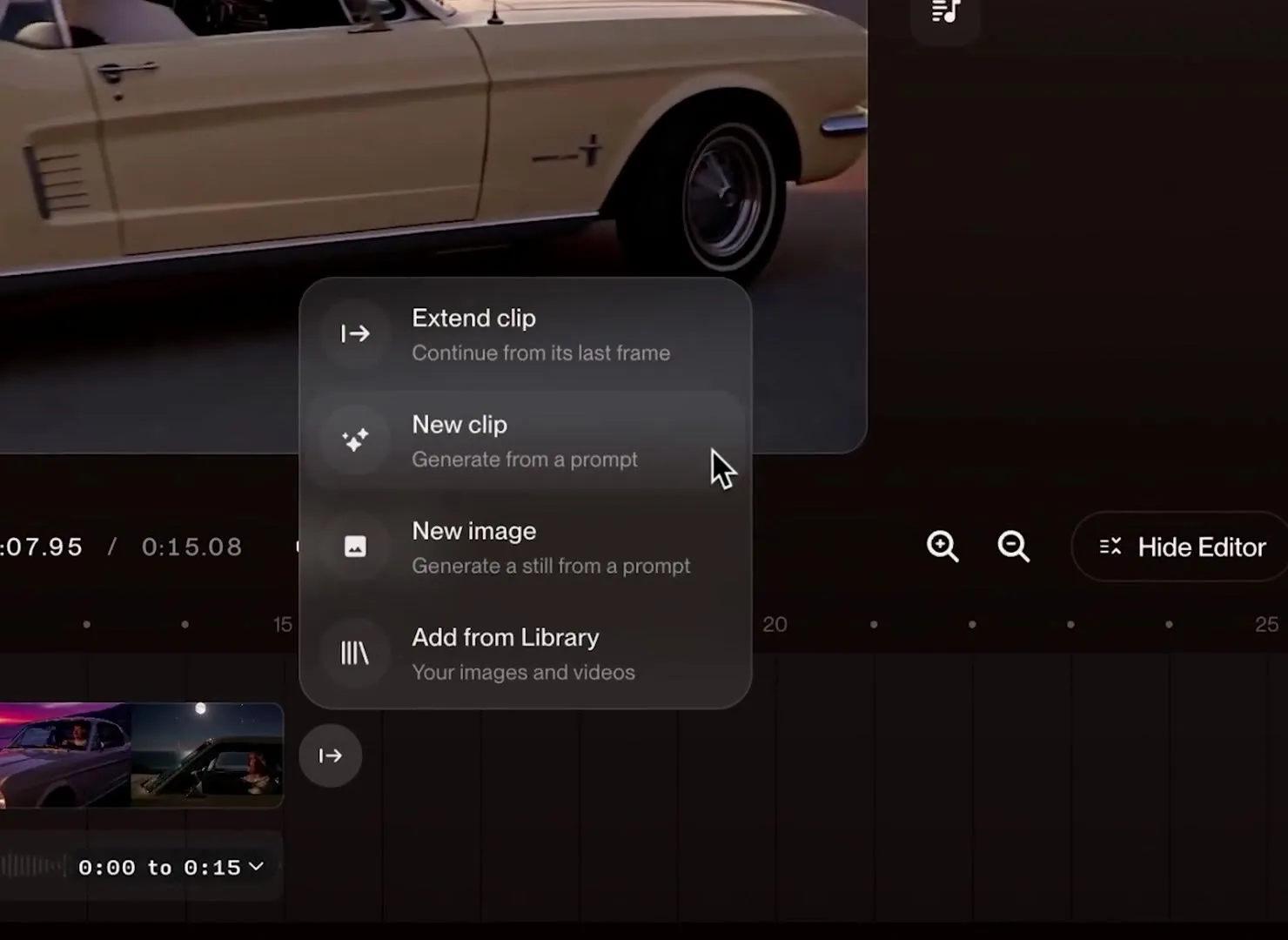
Suno timeline editor: extending and arranging clips on the multi-shot timeline. Source: Suno / The AI Musicpreneur.
With a 15-second maximum clip limit, covering three minutes without pauses requires at least 12 successful shots. In real production, the total generation count will be substantially higher: imperfect movements, character drift, jarring camera transitions, or minor sync issues frequently require re-rolls. Evaluating production cost therefore requires calculating total iterations rather than the price of one isolated cut.
Lyric-based videos are simpler: they require fewer distinct character scenes and rely on recurring visual motifs alongside stylized typography. Narrative videos with consistent characters and multiple camera angles require significantly more effort and generation attempts.
A similar production workflow without tedious manual file transfers can be built using the visual GPTunneL Workflow editor: audio tracks and generated footage feed directly into an integrated video editor node. On its timeline, clips are spliced to the rhythm, titles and overlays are arranged, and the finished video is rendered without jumping between disparate third-party applications.
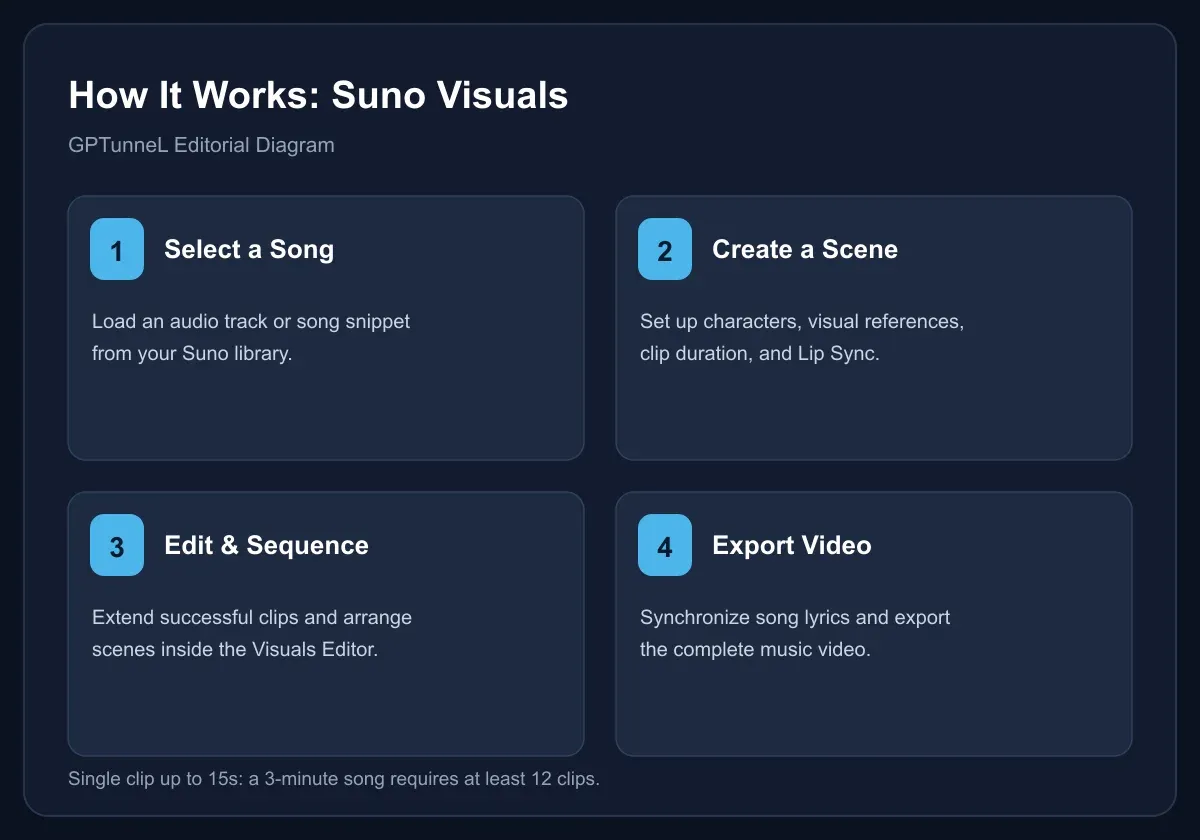
GPTunneL editorial diagram based on Suno official documentation.
Which AI Model Generates the Video
In the official Suno FAQ, Suno identifies the underlying engine as H3 Move. It is built upon MiniMax H3, developed by Chinese AI company MiniMax, and customized by Suno with specialized guardrails and adaptations for its user base. Visuals is therefore not an in-house video foundation model built by Suno from the ground up; instead, Suno integrated third-party foundational video architecture into its music environment.
This highlights Suno's product strategy: their competitive moat lies in tightening the loop between song composition, lyrical timing, video generation, and sequencing. While general-purpose video models generate striking standalone scenes, music video creators specifically require seamless alignment with audio tracks.
Independent benchmark data comparing H3 Move against dedicated video models for musical synchronization is not yet available. Claims regarding deep understanding of song structure and emotional arcs remain manufacturer statements, and real-world quality must be judged on community output.
Unlike closed single-model ecosystems, the GPTunneL Workflow canvas does not lock video creation to a single engine. Creators can generate music with Suno, assign high-energy action shots to Kling or Wan 2.6, and route character close-ups to Seedance—combining specialized models within a single connected pipeline.
Pricing and Visual Credits
Suno has separated account balances into Song credits for audio generation and Visual credits for images and video. Standard audio credits cannot be applied toward video tasks. Editing operations that produce new media assets also draw from visual credits.
Pricing scales with clip duration and render mode. At launch, Suno granted trial visual credits to subscribers on Pro and Premier plans, while standalone credit packs are available for purchase. Purchased visual credits do not expire according to Suno documentation. The new Platinum tier also includes visual credit allocations.
Up-to-date credit packages are listed on the Visuals Pricing page. Quoting a universal "cost per video" without specifying duration, quality mode, and re-roll allowance is misleading.
Community Reactions
Members of the r/SunoAI community welcomed the convenience of generating visuals alongside tracks without external audio handling, but credit consumption quickly became a focal point. In an early discussion on November 17, a Pro subscriber noted receiving 225 trial credits, while their interface quoted 300 credits for a 10-second clip and 450 credits for 15 seconds. This represents an individual user report rather than a comprehensive price schedule across all subscription tiers and resolution modes.
The reaction underscores a fundamental economic reality: for independent musicians, the true cost unit is the completed, polished video including all discarded takes. If a single song requires dozens of iterations, integrated tools must remain competitive against dedicated video generators and conventional editing software.
Copyright and Celebrity Filters
The launch of Visuals arrives amid ongoing legal debates across the music industry regarding training datasets and artist rights. Music Business Worldwide highlighted Suno's active copyright litigation with major record labels alongside its decision to rely on MiniMax technology.
Suno states that it has implemented text and visual safety filters designed to block the generation of recognizable celebrities, public figures, and protected intellectual property. Generations undergo automated inspection before being delivered to users. The company also reported audio screening for uploaded files and digital provenance watermarking on exported media.
In practice, prompts referencing specific recording artists or trademarked characters are likely to be rejected. Creators should work with original character designs, owned assets, and distinct concepts. Terms regarding commercial usage rights should be reviewed directly within Suno's terms of service and relevant licensing agreements.
What This Means for Generative Music
AI music tools are converging into unified creative suites: generate the track, fine-tune stems, design artwork, cut a vertical teaser, and publish the release. For emerging creators, this lowers technical barriers by removing the need to master multiple disjointed tools.
At the same time, cinematic video production involves distinct creative disciplines: pacing, storytelling, lighting continuity, and character retention. An algorithm capable of generating a compelling 10-second snippet does not solve every production challenge of a full-length music video on its own.
Takeaway. Suno Visuals is immediately practical for animated cover art, short promotional clips, lyric videos, and visual ideation. For complex narrative projects, the economics of multiple takes, scene controllability, and visual continuity will determine its viability. The product bridges audio and video workflows, but real-world reliability and cost efficiency will be proven through independent creative use.
Create your music video with GPTunneL. Build the full production pipeline without subscriptions and with a single balance:
- Music. Generate full tracks using Suno or dedicated audio models.
- Scenes. Render video footage with top video AI models including Kling, Wan 2.6, MiniMax, and Seedance.
- Editing. Assemble and align audio and video on the timeline inside Workflow with its built-in video editor node.
No VPN needed, flexible local payment methods, and transparent pricing for every model available on the pricing page.
Sources
- Suno: Introducing Visuals, Nov 17, 2026
- Suno Help: How do I create videos with Suno Visuals?
- Suno Help: Visuals FAQ & H3 Move Model
- Suno Help: What are Visual Credits?
- Suno: Visuals Pricing
- Music Business Worldwide: Visuals, MiniMax, and Legal Context
- Community Discussion on r/SunoAI
- Early User Reports on Credit Pricing