
On September 4 Higgsfield released 3D Jutsu, a browser 3D editor where an agent running on GPT-6 Astra assembles a scene from a description and a video model then renders it. We were solving the same problem in parallel, and GPTunneL Workflow now has a 3D Scene node: primitives, cameras, animation keys, cuts, an assistant chat and mp4 rendering right in the browser. The rendered previz goes to Seedance 2.5 or Hailuo H3 as a reference, and the model reproduces the camera move one to one.
Here is why a creator needs boxes, how the node works, how it differs from 3D Jutsu, and why a scene for $0.10–$1 saves tens of dollars in generations.
Why video models ignore the camera
Video models have learned to make a beautiful picture, but they follow directing badly. "The camera rises from underground, catches an eagle in focus and dives after it toward a field" is a prompt the model will read and then do its own thing: there will be an eagle and a field, but no flight. Every take costs money and minutes of waiting, and after the fifth one you just want to show the model what you mean.
Film solved this long ago: before the shoot, the scene is blocked out with grey primitives to agree on staging and camera movement. That is previz. Generative video needs it even more, because the model has no director on set and needs a reference.
Multimodal models, first of all Seedance 2.5 and MiniMax Hailuo H3, accept a video reference. If you explain properly that the reference defines only the camera, timing and object placement, while the look comes from text and images, the model reproduces the camera work precisely: push-ins, orbits, hard cuts between shots. That reference is exactly what the node produces.
Example: from an ant underground to a tractor in a field
The scene we debugged the node on is a single continuous 15-second flight:
- 0:00–0:03. Macro shot inside an earthen tunnel: an ant moves its antennae, shallow depth of field, soft diffused light.
- 0:03–0:05. The camera shoots upward through the soil and slows for a moment in a mole's burrow: the mole pushes the earth apart with its paws, crumbs fall from the ceiling.
- 0:05–0:08. Out through the grass into the sky, the frame floods with sunlight for a second, an eagle with spread wings ahead. The camera catches up and settles slightly behind and to the side.
- 0:08–0:11. Flight over a valley: the eagle makes one powerful wingbeat, rocky mountains around, fields and a dirt road below.
- 0:11–0:15. The camera turns away from the bird, dives toward the field, pulls out of the dive and settles behind a tractor just above the wheels: dust, furrows, even strips of tilled soil.
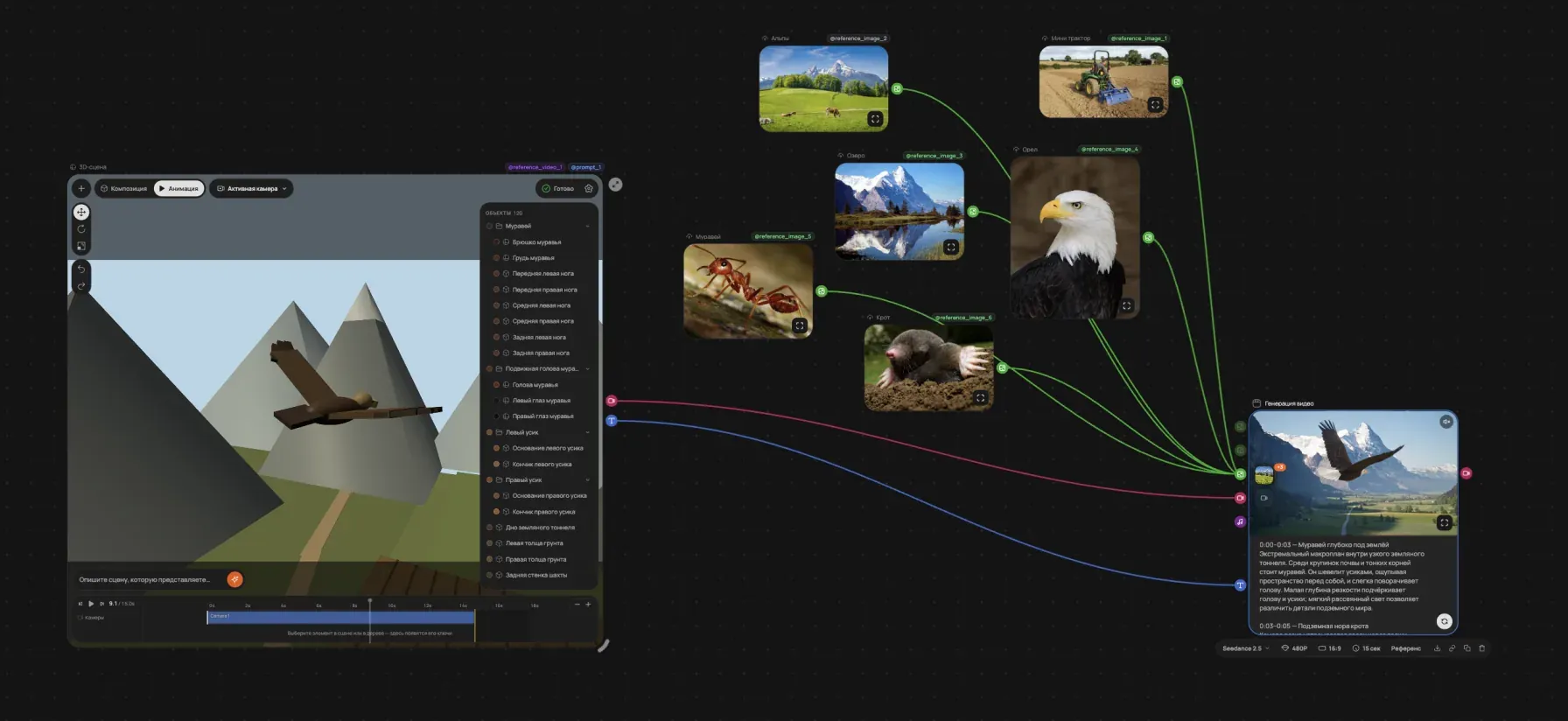
In text that is five paragraphs and four changes of scale, from centimetres to kilometres. No video model will produce such a flight from the first prompt, and it may not from the tenth either. In the node this storyboard goes to the assistant chat as is (the eagle workflow opens as a template, so the connections and settings can be taken apart), and half a minute later a scene of 120 objects stands on the canvas: tunnel, burrow, slope, an eagle made of a body, wings and tail, a valley with a tractor, one camera with keys along the whole path and cuts by timecode.
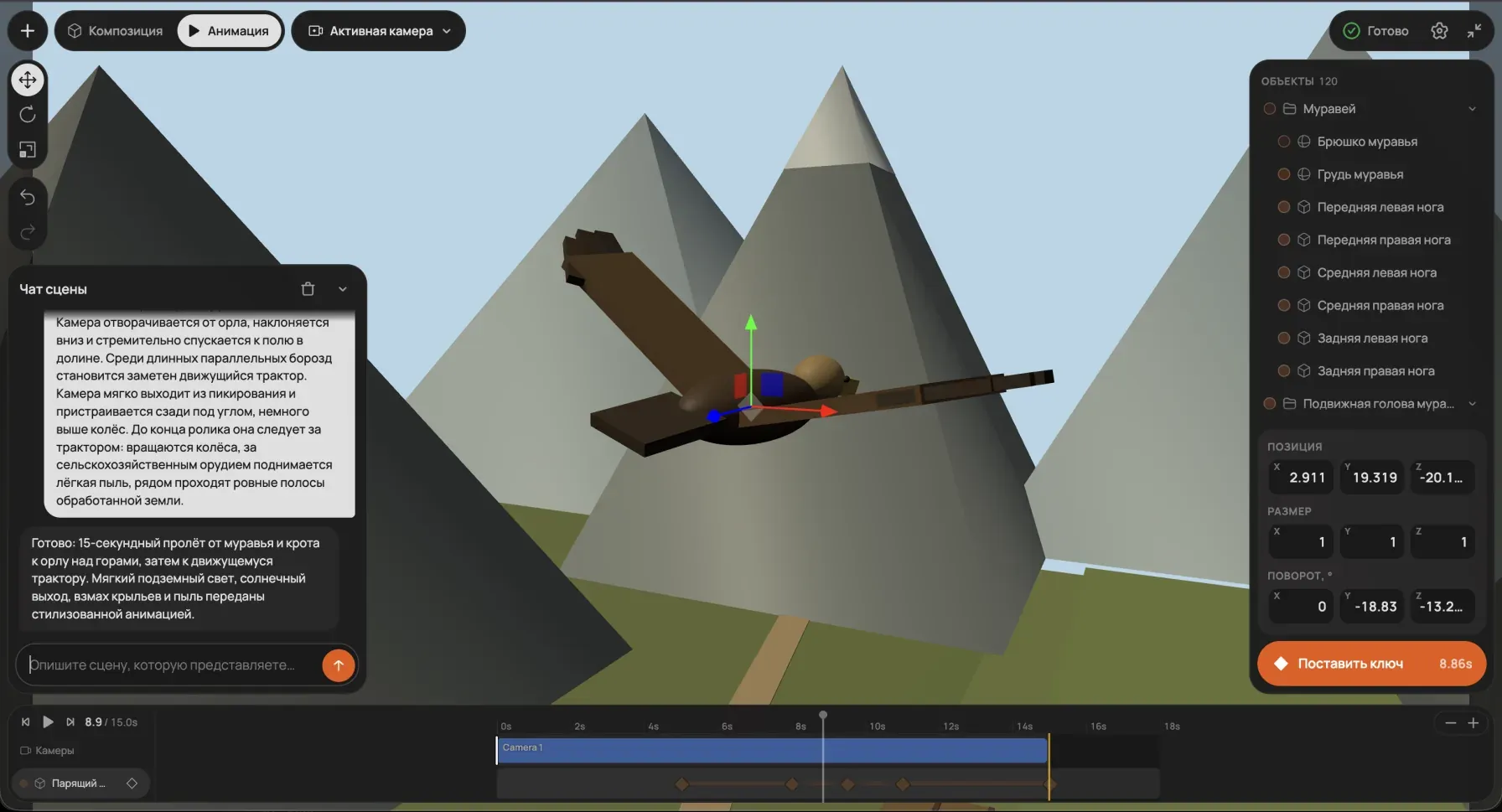
Whatever the assistant got wrong is fixed by hand: move an object with the gizmo, reposition the camera, set a key, play it back. Then render, connect the node outputs to Seedance 2.5, add reference images of the eagle and the tractor as inputs, and run the generation.
Angle, timing and shot order in the finished clip match the previz: where a box in the scene rises through the ground plane, in the clip the camera bursts through the grass into the sky.
What is inside the node
The scene is stored in the node data as a plain document: duration, background, objects, cameras, lights and a list of cuts. There are four object types: box, sphere, pyramid and group. A group is invisible, it is a pivot with children in local coordinates, so a tractor made of a body, a cab and wheels drives as one piece, and an eagle made of a body and wings does not lose a wing on a turn.
Animation is keys over time on position, rotation and scale, plus look-at point and field of view for cameras and intensity for lights. Between keys there is interpolation with easing. There can be several cameras, and cuts on the timeline switch the active one. Everything is edited with the mouse: gizmos, an object tree with an inspector, a timeline for the selected element, undo and redo.
Rendering happens in the browser, the server is not involved. A separate WebGL renderer draws frames deterministically, frame number i is computed at time i/fps, and WebCodecs hands them to the hardware H.264 encoder; ffmpeg.wasm only packages the stream into mp4, and eight seconds at 720p take a few seconds. The scene state at a point in time is computed by a single function shared by the viewport preview and the render, so the file matches what you see during playback by construction.
How the assistant builds a scene in 300 tokens
The first version of the assistant worked the obvious way: put the document's JSON schema and the current scene into the prompt and ask for a whole new document back. On the test task "a person enters the room and lies down on the bed" the answer took about 9,500 output tokens and a minute and a half, and "move the bed to the left" cost as much as a scene from scratch. The model regularly broke long JSON with hundreds of numbers, and without hierarchy the head came off the body on rotation.
We built a test rig with a set of tasks, automatic scoring by geometric heuristics and token accounting, and started changing the answer format. Instead of JSON the model writes one line per entity, defaults are omitted, animation keys go on indented lines. Instead of the whole document the model answers with patches: a line with a known id replaces the entity, a new id adds one, a separate command deletes. And most importantly, typical constructions are moved into macros expanded by code: a room with a door, a person with the pivot at the feet, "walk through points", "lie on the bed", "camera inside the room with a clear line of sight". The model is good at choosing what to do and bad at computing geometry, so geometry is not computed by the model.
On the same task the answer shrank to about 300 tokens: 30 times smaller, 12 times cheaper and 13 times faster, and quality by the rig's heuristics went from "sometimes" to 10 out of 10. The remaining errors are caught by a lint after the answer is applied: an object below the floor, a camera through a wall, a path through furniture. The notes go back to the model in one short request, and one retry is almost always enough.
A low reasoning effort cuts the cost several times more: hidden thinking tokens are billed too, and assembling a scene from macros does not need them. This economy is where the price comes from: a scene through the assistant costs $0.10 to $1 depending on complexity and the number of edits. Rendering to mp4 is free, it runs on your computer.
The answer is applied to the scene line by line as it streams: you watch the scene assemble instead of waiting for the closing bracket. If the model ends up wrong, the scene rolls back; if all is well, the edit lands in the shared undo history.
The prompt for the video model is included
The previz looks like coloured boxes on a flat background. Handed to a model without explanation, it turns into video-to-video: the model "improves" the boxes, adds textures and returns the same boxes. That is why the node has two outputs, video and prompt. The second holds a ready instruction: take only the camera, shots, timing and object placement from the video, treat every primitive as a placeholder for a real object from the description, do not treat a primitive's colour as the object's colour.
The wording was tuned on Seedance 2.5 and Hailuo H3: both have a convention for explicitly assigning the role of a reference video, and without it the clip is treated as a source of appearance. Long lists of prohibitions worked worse than a short positive instruction, "take the camera work from the reference, the objects and atmosphere from the description". You append your own scene description and character references to it.
How it differs from Higgsfield 3D Jutsu
Higgsfield solves the same problem with the same scenario: an agent blocks the scene with grey primitives, export produces a reference video, characters and locations are generated separately, then everything is combined in the chat and rendered. The difference is where it lives and what it costs.
| Higgsfield 3D Jutsu | 3D Scene in GPTunneL | |
|---|---|---|
| Where it lives | a separate app, files are carried between tools | a node on the workflow canvas next to video generation and editing |
| Who builds the scene | an agent on GPT-6 Astra; messages on Auto are free, a specific LLM charges credits (GPT-6 Astra about 17 credits per message) | an assistant on a compact patch format and macros, $0.10–$1 per scene |
| Assets | GLB import, Mixamo characters, GLB and mp4 export | primitives and groups, mp4 export |
| Final render | Higgsfield's video models, paid with subscription credits | Seedance 2.5, Hailuo H3 and the rest of the catalogue, pay per use |
| Subscription | from $19 per month for 270 credits | none, pay as you go |
| Edits | without regeneration: objects move by hand and via chat | without regeneration: gizmo, inspector, chat, undo |
Higgsfield has a wider asset library: ready GLB models and animated Mixamo characters give the scene recognisable silhouettes right away. We have primitives for now, but the scene sits on the same canvas as the video model, editing and frame extraction.
What it saves
A second of Seedance 2.5 at 720p costs $0.462, so a 15-second clip is about $7 per run without a reference and about $8.30 with a video reference of the same length. Getting a complex flight out of a prompt in ten attempts costs $70 and a couple of hours of waiting, with no guarantee. A scene through the assistant costs $0.10–$1, rendering is free, and then one or two runs of the video model against the reference. The proportion is the same for Hailuo H3: 768p costs $0.12 per second, and five extra takes still cost more than the scene.
The clip in the example was generated at 480p with a 15-second reference, such a run costs about $3.70. An exact estimate for your duration and resolution is in the calculator on the pricing page; video model rates change, the current numbers are always in your account.
One more example: a chase for $0.14
The second workflow is shorter, but it shows the whole path: the assistant builds the scene, references set the look, the video model returns cinema. The plot is a car chasing a person down a road, three cuts: wide shot, close-up on the runner, wide shot with a pull-back. A scene of 50 objects through the assistant cost $0.14.
The previz that went to the video model looks like this: a red body on a grey road, green spheres for trees, the camera behind the car.
Reference images of the person and the car are connected to it, and Seedance 2.5 returned a winter road at dusk, a battered old sedan and snow dust from under the wheels. The cuts and camera placement from the previz survived.
What this changes
The 3D scene did not appear on its own but as one more node in the workflow editor, next to image and video generation, LLM nodes, frame extraction and a video editor with a timeline. Before, the scene was built in one service, references were prepared in another, the clip was generated in a third and edited in a fourth. Now it is one screen, and every step can be replayed without taking files out.
Higgsfield and we reached the same conclusion almost at the same time: the next step in controlling video models is not prompts but geometry. A model reproduces what it was shown more precisely than what it was told.
Where to try it
The 3D Scene node is available in the workflow builder to every GPTunneL user: add it to the canvas, describe the scene in the chat or build it by hand, connect the outputs to Seedance 2.5 or Hailuo H3. The fastest start is the ready template with the eagle and the tractor: open it and drop in your own storyboard. No subscription, pay per use with local payment methods.
Questions
Do I need to know 3D editors? No. The assistant builds the scene from a text description; by hand you only move an object or reposition the camera. The gizmo and timeline work like in any 3D package, but knowing Blender is not required.
Which video models understand a video reference? The node's prompt was tuned on Seedance 2.5 and MiniMax Hailuo H3, where a reference video can be explicitly assigned as the camera source. With other models the result depends on whether they accept video input at all.
Can I upload my own 3D model? Not yet, the scene is built from primitives and groups. The look of objects is set by reference images at the video model's input, not by geometry.
How much does rendering the previz cost? Nothing. Rendering runs in the browser through WebCodecs; you pay only for the assistant ($0.10–$1 per scene) and for the video model generation.
Is this a Higgsfield 3D Jutsu alternative? By task, yes: a previz made of primitives that the video model uses as a camera reference. The differences are that our scene is built into the workflow next to generation and editing, and there is no subscription.