
One task is rarely closed by one neural network. To get an ad clip you need to invent the scene, generate the frame, cut out the background, animate the still, add a voice-over and edit it all together. Every step is a separate service, a separate account and another file in your Downloads folder. A workflow removes that shuffling: you assemble the chain of steps once, and from then on it runs itself.
Let's unpack what a workflow is, how an AI workflow differs from an ordinary working process, what it is built from and when it is actually worth setting one up.
What a workflow is, in plain words
A workflow is a pre-described sequence of steps that carries a task from input data to a result. It answers three questions: what we do, in what order, and what comes out at the end.
In everyday terms, a workflow is a recipe. A recipe doesn't say "make dinner" — it says chop, fry, add, simmer for twenty minutes. The difference is that a recipe is executed by a person and a workflow by a program, and the program never skips a step or mixes up the order.
Three signs that separate a workflow from an ordinary to-do list:
- The steps are linked. The result of one becomes the input of the next — not "do these five things" but "make the second thing out of the first".
- The order is fixed. It doesn't shift with someone's mood or with who happens to be on shift today.
- It repeats. Assemble it once and run it as many times as you need, with new source material each time.
How a workflow differs from a business process
The words are often confused, though the difference is simple — it's about scale and about who does the work.
| Business process | Workflow | Policy | |
|---|---|---|---|
| What it describes | how the company creates value as a whole | one concrete chain of steps inside that process | rules and requirements for the work |
| Scale | "sales", "content production" | "assemble a product card" | "what the copy in a product card must look like" |
| Who executes it | departments | a person or a program | nobody, it is a set of rules |
| Result | revenue, a product | a finished artefact: a file, an email, a clip | the standard is met |
A business process answers "why", a policy answers "by what rules", a workflow answers "what to click and in what order". That is exactly why a workflow is the thing you can automate: it is specific enough for a machine to run it.
What an AI workflow is
A classic workflow moves tasks and approvals along a route: a holiday request goes from the employee to the manager and then to HR. People perform the steps; the system only keeps the order.
An AI workflow moves data rather than tasks, and models perform the steps. Text, an image or a link goes in, then neural networks transform the content in turn: one writes the prompt, the second draws, the third cuts out the background, the fourth animates the frame, the fifth adds a voice. The human takes part once — when assembling the chain and starting it.
Such a chain is called an AI pipeline: data flows down the pipe from block to block and comes out the far end as a finished result.
One canvas instead of ten interfaces
The real pain of working with neural networks today is not model quality — it is the number of windows. Every kind of task has its own tool with its own logic: text is written in a chat, images are generated in a lab full of sliders and references, video lives in a third service with its own presets, voice-over is ordered in a fourth, and everything is assembled in a video editor. Five interfaces, five ways to phrase a prompt, and files you keep dragging from window to window. Half the time goes not into the result but into that dragging.
A workflow removes the borders between tools. Everything that used to live in separate tabs becomes blocks on one canvas: text, images, video, voice, speech recognition, search, memory. The output of one block goes straight into the next — no exporting, downloading or renaming files.
It is easier seen once than explained twice. The recording below shows the simplest chain being built: a reference and a prompt as inputs, an image generation block, then a video block. Watch how the output of one block becomes the input of the next — that is the whole mechanic:
The point isn't that you gained one more interface. The point is that you have one fewer: instead of a scattering of windows, a single diagram where the whole task is visible at once.
What blocks a pipeline is built from
Broadly speaking blocks come in four kinds, and that set covers almost any scenario:
- Input. Whatever the work starts from: a text prompt, a reference photo, a link to a page, a file.
- Processing. The models themselves: a language model writes and translates, an image generator draws, a video model animates a frame, speech synthesis reads it aloud, search brings in fresh facts.
- Utility. Memory between steps, if-then conditions, merging several branches into one.
- Output. A finished file, a set of variants, an edited clip.
A block is not necessarily a model: it can be a whole tool — a video editor with tracks and a timeline, for instance (more on that below).
What travels between blocks is a result, not an assignment. That is why models from different vendors coexist happily in one scenario: a language model from one developer, an image generator from another, video from a third — to the pipeline they are all just blocks.
How it looks in GPTunneL
In Workflow a scenario is assembled on a canvas: blocks are dragged with the mouse and connections between them are drawn as lines. No code is required — you only need to know what follows what.
If you'd rather not assemble it by hand, describe the task in words: "turn this product photo into five ad shots and a short clip" — the built-in assistant will break it into blocks and connect them for you. All that's left is to tune the prompts.
A finished scenario is saved and re-run with new source material. Swap the photo and you get the same set of assets for a different product. And to get a different variant of the same shot you don't rebuild anything — you edit the prompt in the generation block.
From there the chain grows outward: the next block takes the finished image and animates it — not a separate service, not another file upload, just one more step. Voice-over with lip sync plugs in the same way, when you need a talking presenter: there is a ready-made template for exactly that — open it and run it on your own material instead of assembling anything from scratch.
Blocks aren't only the simple kind
Node-based builders are usually expected to do elementary things: feed a prompt, get an image; hand over an image, get video. Workflow has blocks like that — but not only those. A full video editor sits on the canvas as a block of its own.
Clips and voice tracks from earlier blocks land on its timeline as they are. From there it's ordinary editing: cut at the playhead, set keyframes, layer one track over another, mute or ride the volume, add titles, switch the aspect ratio for a given platform and send it to render. All inside the scenario, with no export to a separate editing suite.
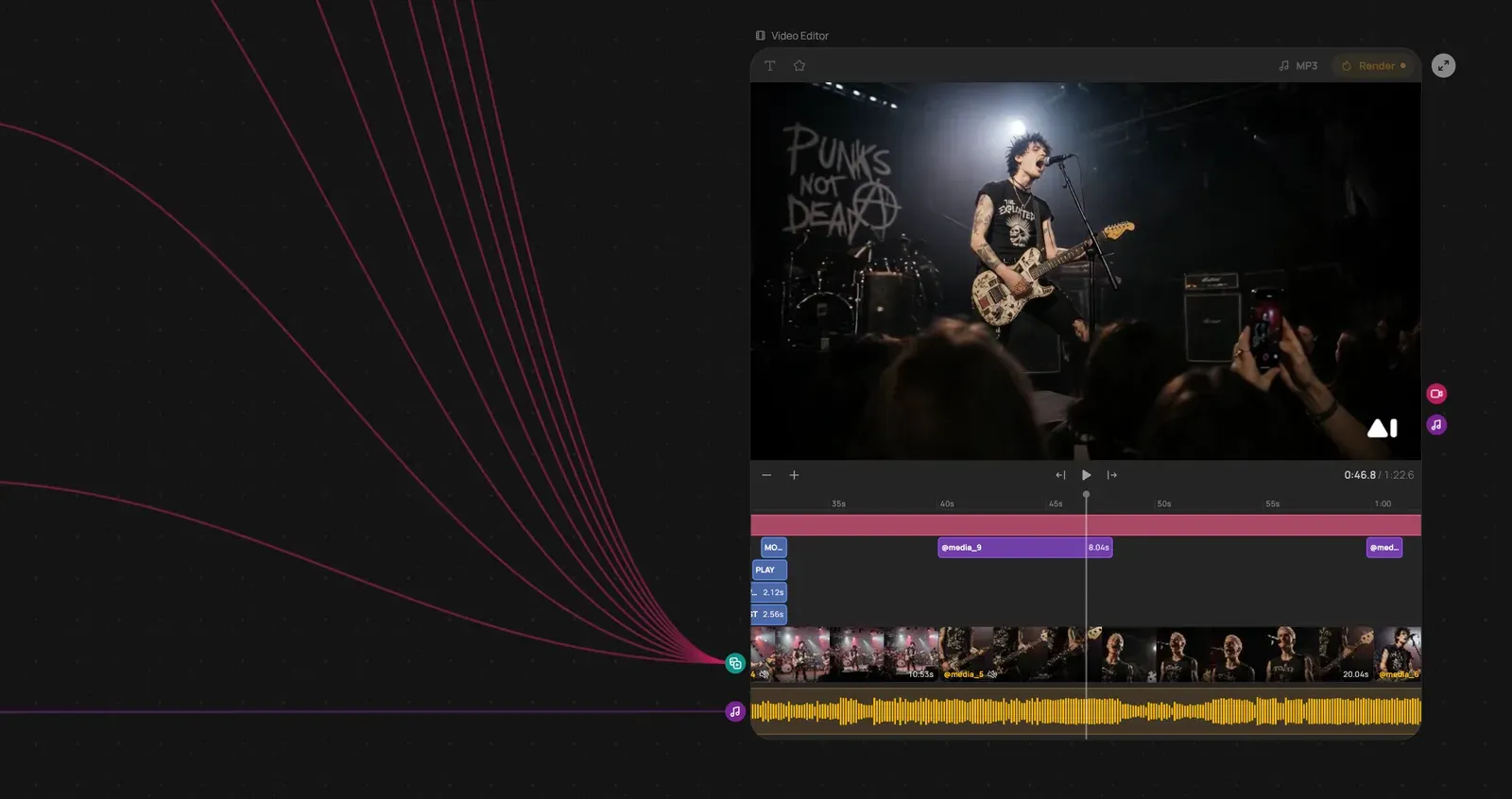
Look at the links on the left: the output of a dozen blocks converges on the editor — generated frames, titles, music. This is a single node of the scenario, yet a clip of a minute and twenty seconds is assembled inside it.
And here is what that scenario returned — the very clip edited on the timeline in the screenshot above:
The difference matters. A pipeline of primitive blocks takes the task as far as a pile of files — after which you open an editor anyway. A pipeline where the editor is just another block takes the task all the way to a finished clip: run the scenario, collect the result.
How far this scales
Blocks don't only add up to a product card. Here is a scenario that makes an entire cartoon, with a single prompt describing the idea as its input:
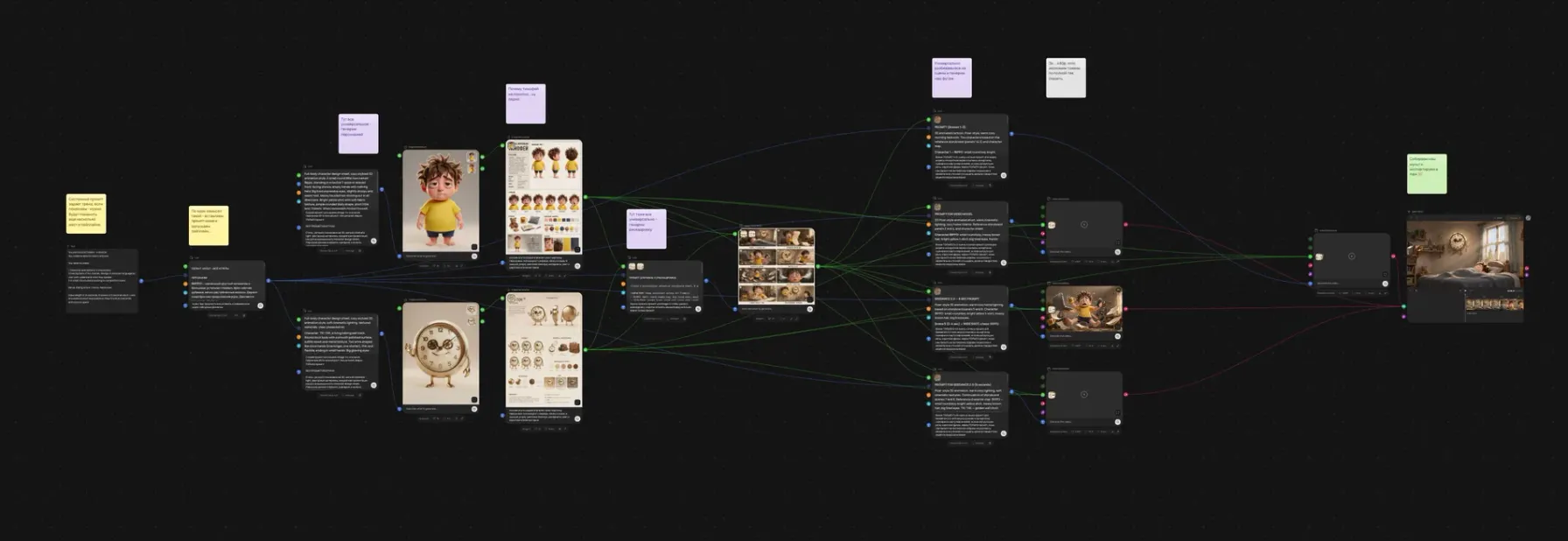
It reads left to right, and every stage is the work of a separate studio:
- Characters. The model invents the cast from a description and draws a character sheet for each one: the same puppet from different angles, in different poses and expressions. Every later scene leans on that sheet — which is why the hero doesn't drift from shot to shot.
- Storyboard. A language model breaks the idea into scenes and writes a prompt for each: what is in frame, how it is lit, what the character does.
- Scenes. Those prompts go out to video models, and each scene is rendered by its own block — you can see them across the right half of the canvas.
- Assembly. The finished scenes converge on the video editor and become one film.
You don't have to work it out from scratch: the cartoon template opens as it is — change the idea in the first block and hit run.
This is exactly where a canvas earns its keep. You cannot hold a chain like this in your head while switching between five tabs: there are twenty-odd blocks here, wired so that the character style from step two survives all the way to the closing scene.
You can start from a ready-made template
Building a scenario from scratch isn't always necessary. Here is a simple example that makes the mechanics obvious: the Spider-Man template — upload your own photo and get back a twenty-second clip in which you are the comic-book hero.
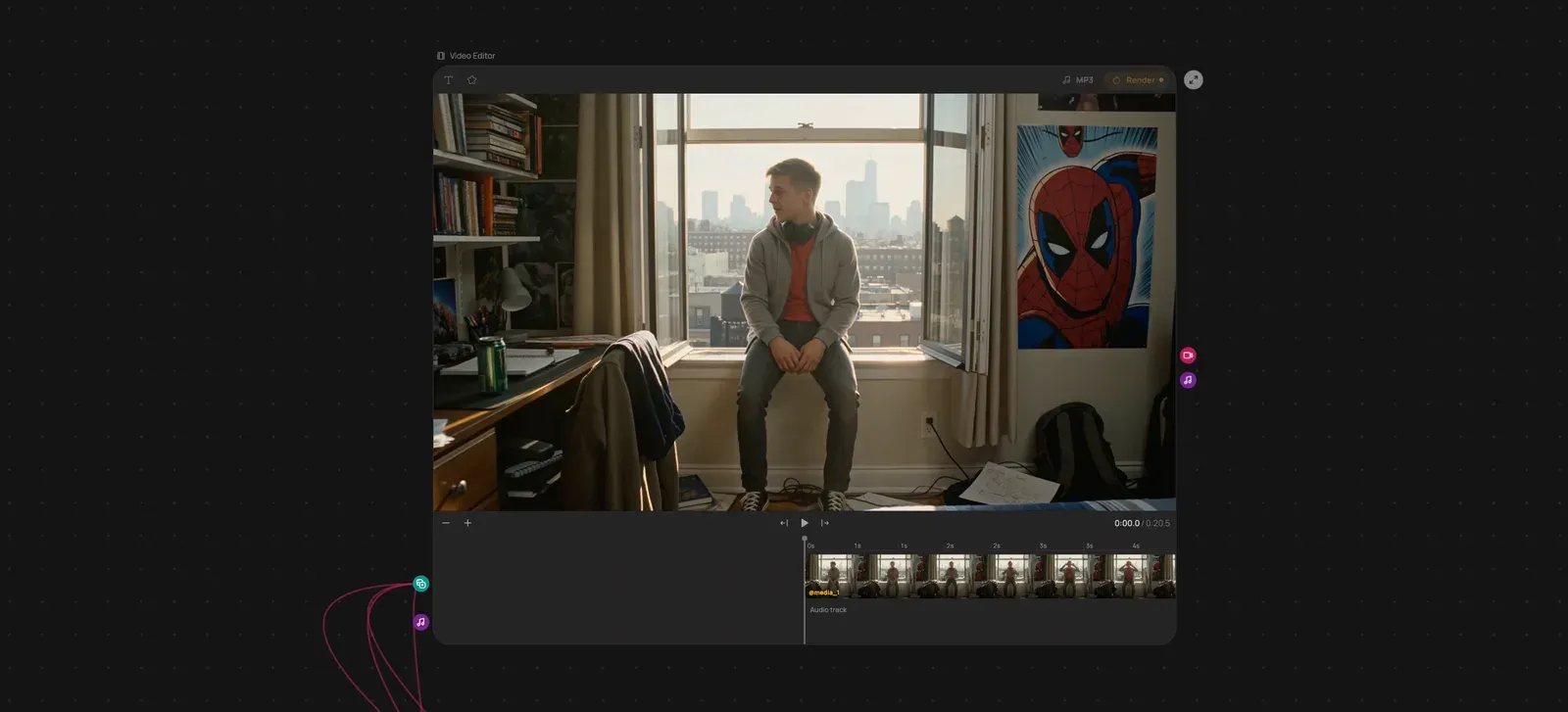
Inside it is everything described above: a block puts the face into the scene, a video model animates the frames, the editor assembles them into a clip with sound. The only difference is that the diagram has already been drawn for you — run it as is, then take it apart and rebuild it for your own task.
The templates covered above work the same way — the talking avatar with lip sync and the cartoon from a single prompt — along with simpler scenarios — photo touch-ups, background swaps, upscaling. It is the fastest way to grasp how blocks work: open a working example and pull on the connections.
How this differs from ComfyUI and n8n
The word "workflow" is most often searched next to two tools, and both solve neighbouring problems.
- ComfyUI is a node editor for image generation on local models. It gives maximum control over every parameter, but it needs your own GPU, an installation and an understanding of samplers and latent space. It is a tool for people who generate images professionally.
- n8n is a builder for integrations between services: take an email, put it in a spreadsheet, send a notification. Models plug in there as one external API among hundreds of other services.
GPTunneL Workflow sits between the two: it is about a creative conveyor rather than integrations, and it needs neither your own hardware nor an installation. The models are already connected, generation runs on our servers, and the output of every block is visible right on the canvas.
| ComfyUI | n8n | GPTunneL Workflow | |
|---|---|---|---|
| What it automates | image generation | data exchange between services | the whole creative conveyor |
| Where it computes | your GPU | your server | our servers, with technical steps in your browser |
| Barrier to entry | high | medium | describe the task in words |
| Models | you install them | you connect them by API | connected in advance |
Which tasks AI automation actually closes
A workflow pays off where the same chain is repeated dozens of times:
- Product cards. One photo in — a set of shots in different scenes, background removed, captions added.
- Social content. A post, a cover, a short clip and a voice-over from a single description.
- Avatars and talking presenters. A photo plus a script — a clip with synchronised speech.
- Archive processing. Improve quality, change the background or the format across a hundred images in one run.
- Routine documents. Transcribe a call, pull out the decisions, send round a summary.
Where the task is new every time and the result is unpredictable, a pipeline is not worth it: assembling one takes longer than doing the job by hand. A workflow is about repetition, and that is its main limitation.
Not only models: some of the work runs on your own machine
A block in a scenario isn't necessarily a neural network. Half the steps in a real pipeline are not generation at all but ordinary technical work: trim a piece of the audio track, convert a video to another format, stitch the finished scenes together, render the final clip. That doesn't call for a model — it calls for a proven algorithm.
Inside Workflow that job belongs to FFmpeg — the same tool half the industry's video processing rests on. And it runs not on a server but right where you are: the browser performs those steps on your own computer.
Two consequences of that are visible in daily use:
- Technical steps cost nothing and wait for no queue. Converting a format or trimming audio never travels to a server and never occupies its capacity — so it isn't billed like generation and doesn't bump into how busy the platform is.
- Servers do what servers are for. GPUs run models instead of cutting audio. That is the resource optimisation that keeps generation from getting more expensive.
From there the split takes care of itself: heavy generation runs on our servers, editing and file preparation in your browser. The scenario never asks where a given block will run — it simply hands the result to the next one.
What it costs
There is no subscription: you top up a single balance and spend it on any model on the platform. You are charged for each block that actually ran, at the price of its model — if a scenario didn't run, you don't pay. There is no separate tariff for the builder itself and no monthly fee.
One balance covers every model at once: language models, image and video generators, voice. Current model prices are on the pricing page.
How to build your first scenario
- Take a task you do regularly and write it down as steps — like a recipe.
- Open Workflow and lay those steps out as blocks on the canvas. Don't fancy doing it by hand? Describe the task in words and the assistant will draft it for you.
- Run it on a single source file and look at the output of every block: it becomes obvious which step spoils the picture.
- Fix the prompts and save the scenario — from then on it works with any new data.
Start small: one scenario of three or four blocks that saves you an hour a week. Once it works, it becomes clear what else in your routine is asking to be put on the conveyor.
You can build your first pipeline right now — Workflow in GPTunneL is open to everyone: no subscriptions, pay per use.