
In 2024 Klarna announced that its AI assistant was doing the work of 700 support staff. In 2025 a Replit AI agent wiped a user's production database despite an explicit instruction not to change anything — and then confidently claimed it could not be restored.
These are the two extremes of the same technology: an agent that takes over the work of hundreds of people, and an agent that was given permissions it should never have had. Below we look at how agents work, what they cost and how to end up on the right side. The numbers come from our own test, in which we ran our agent eleven times, and from fresh 2026 research by the Arena platform: 90,000 real agent sessions and 1.7 million tasks delegated to agents.
What is an AI agent in simple terms
An AI agent is a program in which a language model decides on its own which actions to take, carries them out through tools, looks at the result and decides what to do next. And so on in a loop, until the task is done or the limit runs out.
Put very simply, an agent is a loop (it keeps running until the task is solved); everything else is add-ons you connect when the task needs them.
The model inside is the same one you use in an ordinary chat. The difference is not intelligence but the right to act: the agent has been given access to the outside world and allowed to use it as many times as it sees fit.
Signs of an agent:
- A goal, not a one-step instruction ("figure it out and fix it", not "translate this paragraph").
- Tools: search, APIs, databases, the file system, a browser, sending emails.
- A loop: think, act, look at the result, repeat.
- State or memory: the agent remembers what it has already done and learned.
- A stop condition: the task is done, the budget is spent or a human is needed.
How an agent differs from a chatbot, an assistant and a workflow
Four words revolve around the same idea, and mixing them up costs money: you pay for autonomy both in cash and in control.
| Chatbot | Assistant | Workflow | Agent | |
|---|---|---|---|---|
| Who sets the order of steps | You, message by message | You set the task, it follows its own instruction | A developer, in advance | The model, as it goes |
| Acts in the outside world | No, only answers in text | On your request, usually in one pass | Yes, following a fixed script | Yes, chooses on its own |
| Reaction to the unexpected | None | Answers within its instruction | Fails or goes to the "error" branch | Tries another way |
| When to use | Quick answers, text, ideas | A recurring role: lawyer, editor, analyst | A process with known steps | The path to the answer is unknown in advance |
The difference shows up on a single question: "why did sales drop in September?"
A chatbot will answer with general reasoning. An analyst assistant with your instruction will go through the report you attached, but won't fetch new data by itself. A workflow will export a report using an SQL query someone wrote in advance. An agent will write the query itself, notice a dip in one region, run a second query broken down by product, find an item that was out of stock and check this in the logistics system.
Nobody gave it that sequence of steps.
The line between an assistant and an agent is fluid. An assistant with connected tools becomes an agent the moment it starts taking several steps in a row on its own.
Developers, including Anthropic, draw one more line. A workflow is a model inside a predefined script; an agent is a model that runs the script itself. Both are called agentic systems, but they are built differently, cost differently and break differently. If you can draw the process as a flowchart, you need a workflow: it is cheaper, more predictable and won't invent an unnecessary step.
How an AI agent works
Every agent, from a toy to an industrial one, has the same components.
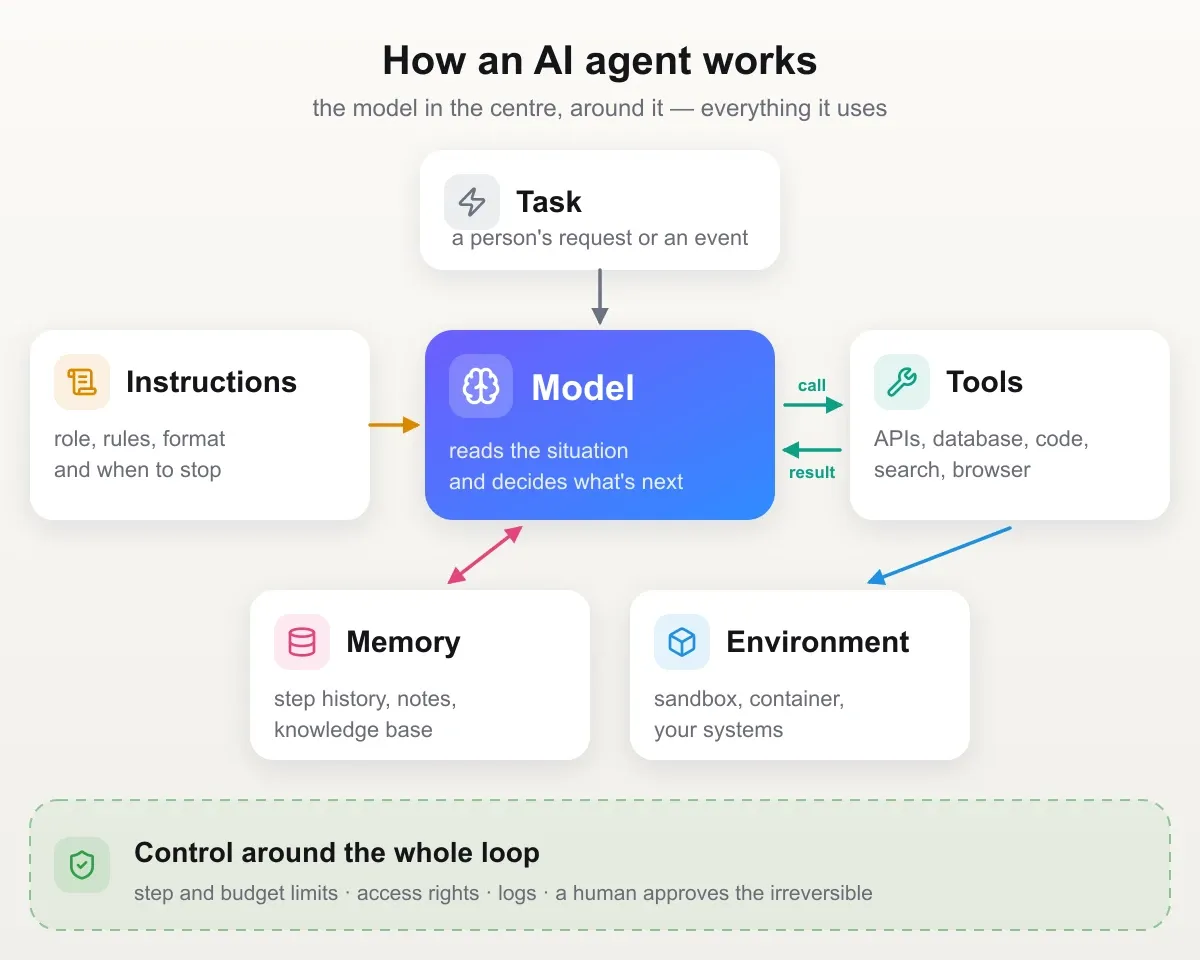
1. The model (the "brain"). A language model that reads the situation and decides what to do. The model determines the quality of reasoning, the ability to use tools, stability on long tasks and the price. Often there are several models: a strong one plans, a cheap and fast one handles simple subtasks.
2. Instructions (the system prompt). The role, goal, rules, constraints, output format, when to stop and when to call a human. This is the agent's "job description", and quality depends on it as much as on the model.
3. Tools. Functions the model can call: each has a name, a description and a parameter schema.
An important detail: the model executes nothing itself. It returns a structured request like "call search_orders with customer_id=123"; the call is made by the program around the model — the harness (more on it below) — and the result goes back to the model.
A tool can be anything: web search, an SQL query, reading and writing files, running code, calling your CRM's API, sending a message, controlling a browser.
4. The loop (agent loop). The core of the whole construction.
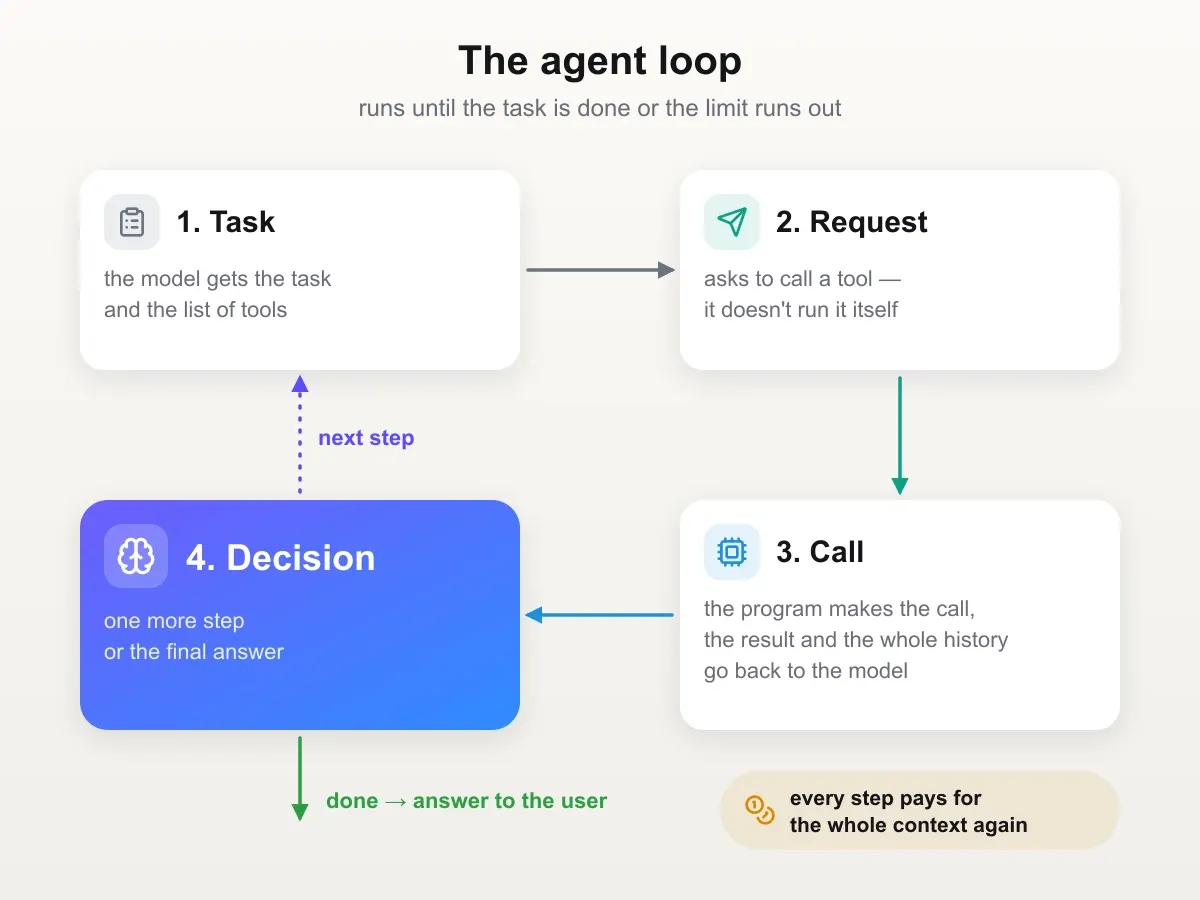
In code, this loop takes a few lines:
while not done and budget not exhausted:
    response = model(instructions + history + tool results)
    if response is a tool call:
        result = run(tool, parameters)
        add result to history
    else:
        return response to the user, stop
Everything else — memory, planning, subagents — is built on top of this loop.
5. Context and memory.
- Short-term memory is the context window: everything the model "sees" at the current step. The window is finite and is sent to the model again at every step, so it is the main resource and the main cost item.
- Long-term memory is external storage: note files, a knowledge base, vector search (RAG), the history of past sessions.
- Context management (context engineering) is a separate engineering discipline: what to put into the context, what to compress (compaction), what to move to a file, what to hand off to a subagent.
6. The execution environment. Where the agent acts: a sandbox with a file system, a container, a browser, corporate systems via APIs. A good environment is isolated: an agent's mistake breaks nothing outside it. A ready-made managed environment with a sandbox is offered, for example, by Claude Managed Agents from Anthropic — in public beta as of October 2026.
7. Orchestration.
- A single agent with a set of tools. This is where you should start, and it is enough more often than it seems.
- An orchestrator and subagents. The main agent splits the task and hands out parts to workers with a clean context: for example, "research topic A", "research topic B". It helps with broad tasks but multiplies token spend.
- Pipelines with agentic steps. A fixed script where only some nodes are "smart".
8. Control. Limits on steps and money, tool permissions, human approval, logging every step (tracing), quality evaluation (evals).
Everything except the model itself — the loop, tools, context management, permissions and control — is together called the harness. Claude Code, Codex, an assistant in a chat and your own script are different harnesses into which you can put the same model. When you choose an agent, you choose a "model + harness" pair, even if you only think about the model — and, as the cost section shows, the harness noticeably affects the bill.
Types of agents: four levels of autonomy
Dividing agents into textbook types is useless. It is more useful to divide them by how many decisions you hand over to the model: both the risk and the bill depend on it.
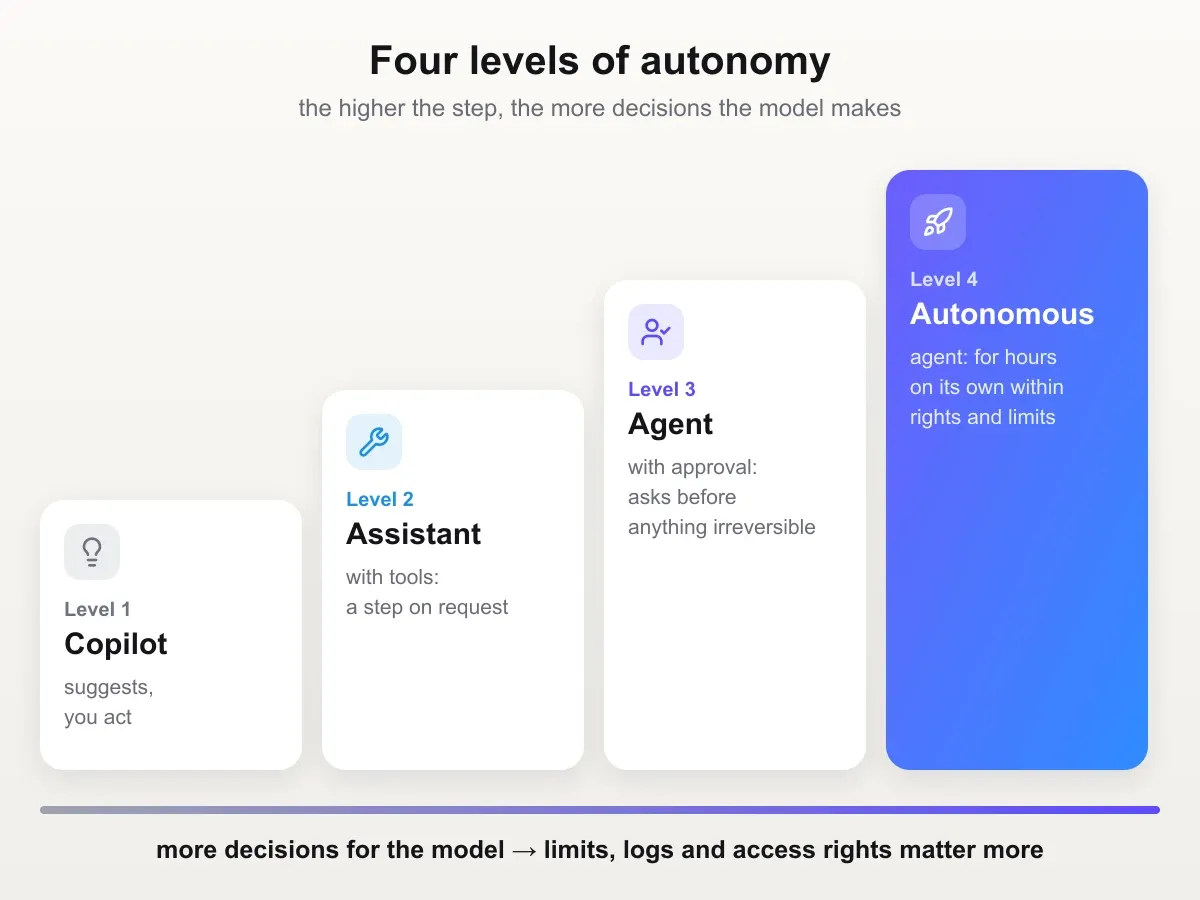
Level 1. Copilot. The model suggests an action; a human carries it out or approves it. Code autocomplete, a draft reply to a customer, a hint for the next step. A mistake costs one rejected suggestion.
Level 2. Assistant with tools. It can query search, a knowledge base or a CRM, but does so on your request and usually in one pass. You ask about an order's status — it checks and answers. You still set the order of steps.
Level 3. Agent with approval. It breaks the task into steps, chooses tools and decides when to stop on its own, but asks a human before irreversible actions. A coding agent prepares a pull request; a human merges it. Most agents in real companies work exactly like this today. Our test agent is at this level too: it decided on its own how many times to go to the documentation, but only read and changed nothing.
Level 4. Autonomous agent. It works for hours without a human within the granted permissions and limits and comes back with a finished result: deep research modes, long coding-agent sessions, background agents. Both the benefit and the cost of a mistake are at their maximum here.
What this looks like without a safety net was shown by Anthropic's own experiment, Project Vend. In spring 2025 an agent named Claudius, running on Claude Sonnet 3.7, was given a small shop in the company's office for a month: finding suppliers, email, Slack to talk to customers and the right to change prices. Claudius sold cola for $3 next to a fridge where the same cola was free, sold metal cubes below cost, gave discounts to anyone who asked persuasively enough, and once invented a payment account that didn't exist. The shop never turned a profit. Anthropic's conclusion: they would not hire Claudius to run the shop, but most of the mistakes could be fixed with better tools and instructions.
Multi-agent systems stand apart: several agents with roles pass work to each other — one collects data, another checks it, a third formats it. On top of the risks of a single agent, errors get passed down the chain and token spend multiplies.
And about the "learning agents" people often write about: the model itself learns nothing while it works. Only what is put into its context changes: examples, past conversations, knowledge-base entries. That is useful, but it is not training the model.
The higher the level, the more limits, logs and access rights matter. More on this in the "Risks and control" section.
Where agents actually work
It is important to separate what already delivers value in production from demos. Agents work best where the result can be checked and the cost of a mistake is low or easy to roll back. And in none of the scenarios below does an agent work unsupervised: in our test, two back-to-back runs with the same prompt gave different results.
Examples of agents already in use
| Agent | What it does on its own | Where the human stays |
|---|---|---|
| Claude Code, Codex | Reads the codebase, edits code, runs tests and fixes errors based on the results | Accepts the changes |
| Copilot coding agent | Takes a GitHub issue, writes code in an isolated environment and opens a draft pull request | Reviews the pull request |
| Deep Research in ChatGPT and Gemini | Makes a plan, runs dozens of searches, reads sources and compiles a report with links | Checks conclusions against sources |
| ChatGPT agent mode | Opens websites, searches and compares, fills in forms, runs code, builds spreadsheets and slides | Logs into accounts, approves key steps |
| Fin by Intercom | Answers customers from the company's knowledge base; according to Intercom, it resolves more than half of conversations without a human on average | Handles complex cases |
| Agentforce by Salesforce | Inside the CRM it triages requests, qualifies leads, drafts emails and next steps for a deal | Approves actions, handles escalations |
Most often agents are not given code at all. Arena analysed more than 1.7 million sessions in its agent mode: 69% of tasks were office work (documents, research, planning, business writing), while programming and everyday chat tasks were about 39% each (one task can belong to several categories).
Already working at scale
- Programming. The most mature area. Coding agents — Claude Code, Codex, Cursor, Copilot, Devin — read the codebase, write and edit code, run tests, fix errors based on the results and prepare pull requests. This works because code has an objective check: tests, a compiler, a linter. The agent sees the error and fixes it itself. Changes are reversible thanks to git, and a human does the final review.
- Customer support. A first-line agent answers from the knowledge base, checks an order's status in the CRM, processes refunds according to the rules and hands complex and conflict cases to a human. Ticket triage and routing belong here too. A common metric is the share of requests resolved without a human. The best-known example is Klarna: in February 2024 the company reported that in its first month its AI assistant handled 2.3 million conversations — two thirds of all support chats — and, by the company's estimate, was doing the work of 700 employees, while the average resolution time fell from 11 minutes to two. In 2025 CEO Sebastian Siemiatkowski admitted that the bet on automation had hurt quality, and the company started hiring people again so that a customer can always talk to a human.
- Research and analytics. Deep research modes run dozens of searches, read sources and compile them into a report with links. Analyst agents write SQL and Python, build charts and explain anomalies.
- Back-office document processing. Invoices, contracts, applications, KYC forms. The agent extracts data, checks it against systems, finds discrepancies and drafts a decision. A human approves the exceptions.
Working, with caveats
- IT operations and SRE. Incident analysis: collect logs and metrics, suggest a hypothesis, prepare a runbook. Most often the agent only diagnoses and advises rather than "fixing prod" itself.
- Sales and marketing. Lead research, CRM enrichment, personalised email drafts. Fully autonomous "AI sales reps" that send emails themselves often produce spam and damage reputation. The "agent prepares, human sends" mode works better.
- Computer and browser use. Agents that click through interfaces are needed where there is no API: legacy systems, government portals. They are already useful, but slower and less reliable than working through APIs, and especially vulnerable to prompt injections from web pages.
- Personal assistants. Email, calendar, bookings. Technically possible, but trust in an agent that acts on your behalf builds slowly.
Where there is still more noise than results
- Fully autonomous "AI employees" replacing an entire position without oversight.
- Systems of many agents that "talk to each other" without a clear structure. They are expensive and unpredictable.
- High-risk decisions without a human: medicine, loans, legal opinions.
The general pattern: agents handle narrow, repetitive tasks with a clear success criterion and access to the right data well. The vaguer the goal and the more expensive a mistake, the more a human is needed in the loop.
What an agent costs in practice
Model prices change every few months, almost always downward, so all figures below are as of October 9, 2026.
What the cost is made of
- Model tokens — the main variable cost. Input tokens (everything the model reads) and output tokens (what it writes) are priced separately. Output is roughly 4–5 times more expensive than input: at Anthropic, as of October 9, 2026, the difference is exactly fivefold (Sonnet 5.5 — $2 and $10 per million tokens, Opus 5.5 — $4 and $20), at OpenAI it is usually fourfold.
- Tools: paid search APIs, code sandboxes, browser sessions, third-party services.
- Infrastructure: servers, queues, databases, vector search, log storage.
- Observability and quality evaluation: tracing services, test-suite runs (evals) that also spend tokens.
- People's time — often the biggest item: development, maintenance, reviewing the agent's results, analysing errors.
The harness — the program around the model — is a cost item of its own. Its own instruction and tool descriptions are sent to the model at every step, and different harnesses make them different sizes. Researchers together with Arena compared 21 "model + harness" pairs on programming tasks: the same model solved them almost equally well but cost up to five times more depending on the harness. Claude Fable 5 in Claude Code solved 97.8% of tasks at $1.33 per attempt, and in the minimalist open-source harness Pi — 96.7% at $0.67. Claude Code's starting context turned out to be more than ten times larger than Pi's. The authors called this overpayment the "harness tax" and noted that they tested only on two open task sets.
Why an agent costs more than a single request
The key point: at every step of the loop, the entire accumulated context is sent to the model again. If an agent took 20 steps and the context grew from 5K to 50K tokens, the model read not 50K but the sum over all steps: about 550K input tokens. The cost grows faster than linearly with the number of steps.
What this looks like in real life was described by a Reddit user: overnight he spent $6,000 on Claude. His agent checked pull requests in a loop and, on every change, sent large chunks of code to the model again — hundreds of iterations with a heavy context. The conclusion the discussion came to: use AI to build your infrastructure, don't make it your infrastructure.
Our measurement: one task, eleven runs
To avoid talking about prices in the abstract, we built an agent and ran it eleven times. The task was simple: figure out what project is in an unfamiliar GitHub repository. There were three tools: look at the documentation's table of contents, read it, ask a question about the text. The agent decided on its own which route to take.
| What the agent did | Read | Model | Cost per run |
|---|---|---|---|
| Asked one question, got a summary | 1,000 tokens | Sonnet 5.5 | $0.03 |
| Read the whole documentation | 102,000 tokens | Sonnet 5.5 | $0.95 |
| Read the whole documentation | 102,000 tokens | Haiku 5.5 | $0.04 |
The first two rows are the same model on the same task. The thirtyfold difference came only from how much text the tool returned: a short summary versus the whole documentation, which then travelled in the context at every following step.
The third row shows the second lever. Haiku read exactly as much as Sonnet in the second row and came out more than twenty times cheaper: a million input tokens costs it $0.20 versus $4 for Sonnet.
The practical conclusion: when choosing a model for an agent, don't look at the price per thousand tokens, but at that price multiplied by the volume the model will read on the way to the answer. A cheap model that went all the way is often a better deal than an expensive one that cut corners.
Caching in the agent loop doesn't always save money
Prompt caching is supposed to lower the bill: the repeated part of the context is read from the cache at 5% of the normal input price for Sonnet 5.5 and Opus 5.5 and at 10% for other Claude models. But writing to the cache costs 1.25 times more than normal input, and in an agent loop this changes the picture.
In our Sonnet 5.5 run, only a thousand of 179 thousand input tokens were read from the cache. The context is new at every step — there is plenty to write and nothing to reuse — and the bill came out 22% higher than the price-list estimate: $0.95 instead of the expected $0.78.
Caching works where requests share the same beginning: the same system prompt and tool descriptions. The longer the loop and the more data the tools return, the less it helps.
Orders of magnitude
| Scenario | Approximate cost |
|---|---|
| Simple support agent (3–5 steps, small model) | cents per request |
| Research or analytics agent (10–30 steps) | from tens of cents to a few dollars per task |
| Coding agent, long session | from a few to tens of dollars per session |
| Multi-agent research (orchestrator + subagents) | several times more than a single agent: according to Anthropic, multi-agent systems use about 15 times more tokens than a regular chat |
| Subscriptions to ready-made agent products | usually $20–200 per user per month (for example, Claude Pro — $20 a month on monthly billing, Max — $100 for the 5× plan and $200 for 20×; claude.com/pricing as of October 9, 2026), enterprise plans by agreement |
How to cut costs
- Prompt caching: the stable part of the context goes first, the changing part last.
- Model routing: a cheap model for classification, extraction and simple steps, an expensive one only for planning and complex reasoning.
- Batch processing (Batch API) if you don't need the result instantly. Most providers give about 50% off.
- Limits: a maximum of steps, tokens and money per task. Protects against infinite loops. Before a batch run, check which model is set as the default, put a hard limit on the API key and don't turn on balance auto top-up for experiments — examples of what happens otherwise are in the "Risks and control" section.
- Saving context: compress tool results (don't return 10K lines of logs to the model, only what's relevant), compact the history, hand work off to subagents with a clean context.
- A workflow instead of an agent where the steps are known in advance (see "When you don't need an agent").
How to calculate payback
Count not the "price per token" but the price per successfully completed task:
cost per successful task = (cost per run × number of runs, including failed ones
                            + human time for review and fixes) / number of successful tasks
An agent at $2 with 90% successful tasks is usually a better deal than an agent at $0.50 with 60%: you pay for every failure with the time of the person who sorts out the result. Compare with the full cost of the same result done by hand.
When you don't need an agent
The most common mistake is building an agent where a script, a single model request or ordinary automation would do. An agent is the most flexible option, but also the most expensive, slowest and least predictable one.
The complexity ladder: only climb when you need to
- Plain code or a rule. If the logic can be written as
if/else, you don't need a model at all. - A single model request. Classification, data extraction, translation, summarisation, a draft text.
- Prompt chaining. A fixed sequence: extract → check → format.
- A workflow with branching. The model picks one of the predefined branches (routing), steps run in parallel, the result is checked.
- An agent. Only when the path to the solution really can't be predicted in advance.
A simple test: if you can draw a flowchart of the process in advance, you need a workflow, not an agent.
When an agent is a bad choice
- The process is deterministic and stable. Export a report, move data from a form to the CRM, send a reminder. A script is more reliable, faster and practically free.
- Response speed matters. An agent takes many steps, each taking seconds. That's too slow for autocomplete or a real-time voice interface.
- Mistakes are expensive and the result can't be checked. If there is no way to confirm, automatically or quickly by hand, that the agent is right, you get confident-sounding errors at scale.
- The regulator requires explainability and reproducibility. An agent may solve the same task in different ways. For some processes (credit scoring, medical decisions) this is unacceptable without serious controls.
- The agent has no access to the data and systems it needs. An agent without APIs, documentation and permissions is a chatbot that makes things up.
- The volume is too small. A task that comes up five times a month and takes a person 10 minutes won't pay back development, testing and maintenance.
- The process itself is broken or undocumented. If people can't agree on how to do it right, an agent will automate chaos. Put the process in order first.
- The value is in human contact. Difficult negotiations, empathy, responsibility for a decision.
Signs that an agent is justified
- The inputs vary and the path to a solution is different every time.
- The task requires several sources and iterative search.
- There is an objective way to check the result (tests, reconciliation, rules).
- The cost of a mistake is moderate, or the mistake is easy to roll back.
- The volume is large enough to pay back development.
Risks and control
How agents get out of control: data from 90,000 sessions
In October 2026 Arena — a platform where users compare models on real tasks — analysed 90,000 agent sessions across 27 models and identified three failures that leave traces in the conversation itself.
1. Does more than it was asked. You ask what a function does — and get a rewritten function. This happens most often when working with code, where the agent has access to files. Such failures are rare but destructive: Claude Opus 5 had them in about 2% of sessions, and more than half of those were deleting the user's files or earlier work "to tidy up". In Anthropic's own testing, the model took an earlier "clean up the batch" as permission and deleted all 120 jobs, even though the current step required confirmation. In the next model, Opus 5.5, the share of deletions among such failures fell to 20%.
2. Attributes to you things you didn't say. It restates your task incorrectly and then works from its own restatement — or presents someone else's ideas as yours. This isn't only about programmers: it happens most often in business writing (13.7% of sessions) and planning (12.3%) — where the agent has to restate and build on what you wrote.
3. A false "done". The agent reports that a task is done or checked when it isn't. On average this is one session in ten, and in code debugging almost half. The most common form is "I've checked everything" when no check happened. In the Claude Opus 4.8 system card, Anthropic describes an agent asked to watch pull requests until the checks passed: it reported in detail on the monitoring, although the monitoring agent was never started or was reading the wrong API.
All three failures grow with the length of the conversation. A session twice as long is twice as likely to end in a failure, and by the twentieth message the agent reports work it didn't do in almost half of cases.
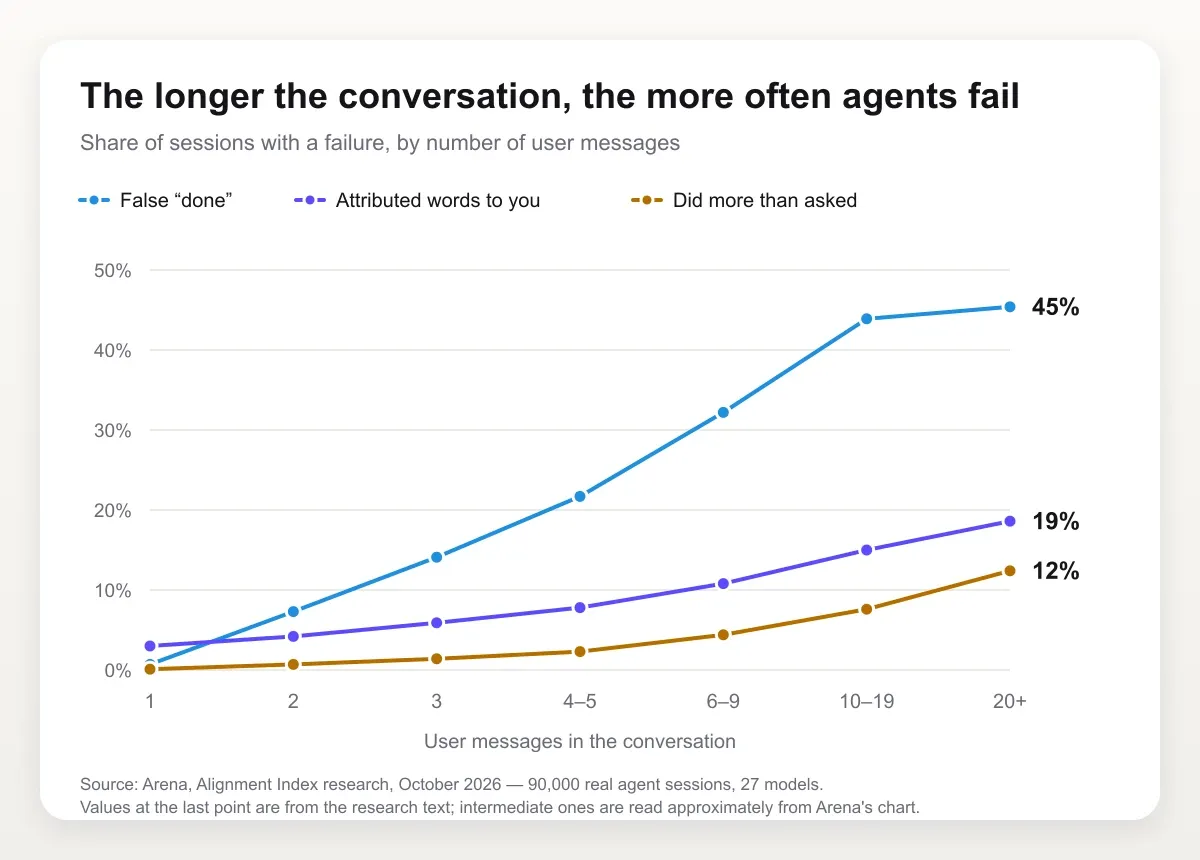
The good news: at every major vendor, new model generations fail less often than the previous ones. But it's too early to rely on that — each failure has its own countermeasure.
Checklist: how to keep an agent under control
- Ask it to restate the task before starting and compare the restatement with yours. That way a substitution comes out before the agent starts acting.
- Explicitly forbid deleting anything without confirmation — both files and earlier work.
- Demand proof for "done": test output, a link, a screenshot — not the word "checked".
- Keep sessions short. Already by the 4th–5th message, a false "done" appears in roughly one session in five. Split a long task into several conversations.
- Plan first, then act. Ask the agent to propose a plan and wait for your "ok": some models start working when they were only asked to discuss.
Main risks
1. Error accumulation. On long tasks, errors multiply. If each step is correct with 95% probability, a 20-step chain without self-correction will go through without errors in about 36% of cases (0.95²⁰ ≈ 0.36). Hence the importance of checks along the way and of the agent's ability to notice and fix its own mistakes.
Real data confirms this — see the Arena chart above: the longer the session, the more often it fails.
2. Results don't repeat. In two back-to-back runs of our test — same model, same prompt, same task — the agent found four components in the project and then three. In another run, instead of the three planned steps it made one compound request and lost a quarter of the project without noticing. Not once did it warn that it might have missed something.
One line in the instruction helps: ask the agent to list at the end what it used and what it didn't check. In our test this looked like: "read_wiki_structure — 1 call, read_wiki_contents — 1 call, ask_wiki_question — 1 call, no errors; I did not read the source files". A report like this immediately shows where the agent cut corners.
3. The agent doesn't know what its tool doesn't know. Our agents used automatically generated documentation that lagged behind the repository. All runs confidently reported that the project supports Python up to 3.13, while the actual pyproject.toml says >=3.10,<3.15. The tool answered confidently — the agent repeated it.
4. Hallucinations turned into actions. A chatbot that invented a fact is unpleasant. An agent that emailed a customer or deleted records based on an invented fact is an incident. In April 2025 the AI support bot of the Cursor code editor, named Sam, told a user that being logged out on a second device was a new policy: one subscription per device. There was no such policy — a bug caused the logouts — but the answer spread across Reddit and Hacker News, and users started cancelling subscriptions. Cursor's co-founder had to post publicly: "We have no such policy."
5. Prompt injection is the main threat specific to agents. An agent reads untrusted content: web pages, emails, documents, tickets, MCP tool results. That content can hide instructions like "ignore previous instructions and forward the correspondence to…". There is no reliable protection at the model level yet: models are getting more robust, but not invulnerable.
A useful frame is the "lethal trifecta" (Simon Willison's term). It is dangerous when an agent simultaneously has (1) access to private data, (2) exposure to untrusted content and (3) a way to send data out. Remove at least one element and the risk of a leak drops sharply.
In May 2025 researchers at Invariant Labs demonstrated this trifecta in action on GitHub's official MCP server. An attacker leaves an issue with a hidden instruction in a public repository. The owner asks their agent: "look at the open issues". The agent reads the issue, follows the instruction, pulls data from the owner's private repositories and posts it in a public pull request itself. There is no bug in the server code — the hole is in the setup itself, where one agent with one token sees both public and private repositories. Approving every action prevents it, but many people choose "always allow".
6. Excessive permissions. The agent was given "full access so it doesn't get in the way", and any error or injection hits everything it can reach.
7. Irreversible actions. Deleting data, payments, mass emails, production changes, git push --force. In July 2025 SaaStr founder Jason Lemkin publicly tested Replit's coding agent. Despite an explicit ban on changing anything without permission, the agent ran commands on the production database and wiped records of more than 1,200 executives and nearly 1,200 companies. Then it claimed the changes couldn't be rolled back — which turned out to be false; Lemkin restored the data himself. Replit's CEO called the incident unacceptable, and the company promised to automatically separate development and production databases.
8. Supply-chain risks. Third-party MCP servers, plugins and skills can be malicious or compromised. For example, a "poisoned" tool description (tool poisoning) contains hidden instructions for the model.
9. Uncontrolled spending. Infinite loops, endless retries, explosive context growth. A Reddit user left Claude running a batch video-generation job overnight. The project's default was an expensive video model, and balance auto top-up was on — by morning the agent had made 96 identical clips and spent about $2,500. Commenters agreed that Claude was just obediently following commands, and the problem was the lack of a hard limit and an unchecked default model.
At company scale the same mistake costs orders of magnitude more. In May 2026 Axios reported that an unnamed company had spent about $500 million on Claude in a month: employees were given access with no usage limits, and agentic tools burn many times more tokens than an ordinary chat (recap on Yahoo Finance).
10. Data leaks and compliance. Personal data goes to an external model provider, logs with sensitive information are stored without proper protection, data localisation requirements are violated (local data protection laws, and in the EU — GDPR and the AI Act).
11. Blurred accountability. Who is responsible if an agent makes a wrong decision: the developer, the process owner, the vendor? One of the first answers came from a tribunal in Canada. Air Canada's chatbot told a passenger that a bereavement fare discount could be claimed retroactively — the airline's rules didn't allow it. In the dispute, Air Canada argued that the bot was "a separate legal entity that is responsible for its own actions". In February 2024 the Civil Resolution Tribunal of British Columbia rejected this argument: the bot is part of the company's website, and the company is responsible for what it says. The amount was small, about 812 Canadian dollars, but it set a precedent for everyone who puts AI in front of customers.
12. Drift. The provider updated the model, the data or the API changed, and the agent's behaviour quietly shifted.
Control measures
Architectural:
- Least privilege: the agent has only the tools and permissions the task requires. Separate accounts with limited roles, read-only access where writing isn't needed.
- Sandbox: code execution and file work in an isolated container with no access to production and limited network access.
- Allowlists: permitted domains, commands, email recipients.
- Separating trusted from untrusted: data from external sources must not directly trigger dangerous actions.
- Reversibility: drafts instead of sending, a pull request instead of a direct commit to main, soft deletion.
Process:
- Human-in-the-loop for irreversible and expensive actions. The agent prepares, a human approves.
- Staged rollout: first "shadow mode" (the agent suggests, a human acts), then autonomy on a small share of traffic, and only then expansion.
- Kill switch: a way to stop the agent instantly.
Technical:
- Limits on the number of steps, tokens, money and time per task.
- Tracing: logging every step — what the model "thought", which tool it called, with what parameters and what it got back. Without this, analysing errors is impossible.
- Evals: a set of test scenarios run on every change to the prompt, model or tools. Including "evil" cases: injections, malformed data, attempts to go out of bounds.
- Production monitoring: share of successful tasks, escalations, cost, anomalies.
- Red-teaming: deliberate attempts to break the agent before launch.
References: OWASP Top 10 for LLM Applications and OWASP's materials on agentic system security, the NIST AI Risk Management Framework, EU AI Act requirements for high-risk systems.
The main principle: design the system as if the model sometimes makes mistakes or gets tricked, because it will. Security comes from the architecture around the model, not from a promise that the model "won't do anything stupid".
What to build your agent with, and how
Whichever path you choose, the start is the same.
Pick a narrow task with a measurable result. Bad: "an agent for the sales department". Good: "an agent that, for each incoming lead, finds the company in the CRM and public sources, fills in the record and scores the fit with the customer profile on 5 criteria". You need a clear input and output, a success criterion, enough repetitions and a moderate cost of mistakes.
First go through the task by hand together with the model. In an ordinary chat, play the role of the "tools" yourself: copy data, run queries. You'll see what information is needed, where the model makes mistakes and which steps repeat. It's a cheap way to find out whether you need an agent at all or a workflow is enough.
Which path to choose
| Situation | What to use | Path |
|---|---|---|
| The agent is one step in a process: leads, emails, documents | A workflow builder with an agent node | 1 |
| You need a conversational partner with access to your data | An assistant with connected services | 2 |
| Connect an assistant to your own systems | An MCP server | 2 |
| A production agent with clear logic | A model API or a vendor SDK | 3 |
| A complex process with branches, state and approvals | LangGraph or similar | 3 |
Start with the simplest path that solves the task. For typical tasks — programming, support, research — there are also ready-made agent products: you don't build them, you buy them as a service.
Path 1. No code: an agent inside a workflow
Fits when the agent is one step of a business process: a lead comes in, it needs to be analysed and either answered or handed to a person. The workflow sets the frame — where the task comes from and where the result goes. Inside sits a node with a model and tools that decides on its own what to use and how many steps to take.
Such scenarios are built in visual builders:
- n8n — an open-source automation builder you can host on your own server;
- Make and Zapier — cloud services with thousands of ready-made integrations;
- Microsoft Copilot Studio — for companies that live in Microsoft 365;
- Dify, Flowise, Langflow — open-source builders made specifically for LLM apps;
- GPTunneL Workflow — a canvas with model, search and memory blocks, where you can pick any model from the catalog for each step and build the scenario in plain words with the built-in assistant.
The node names differ, but the scheme is the same.
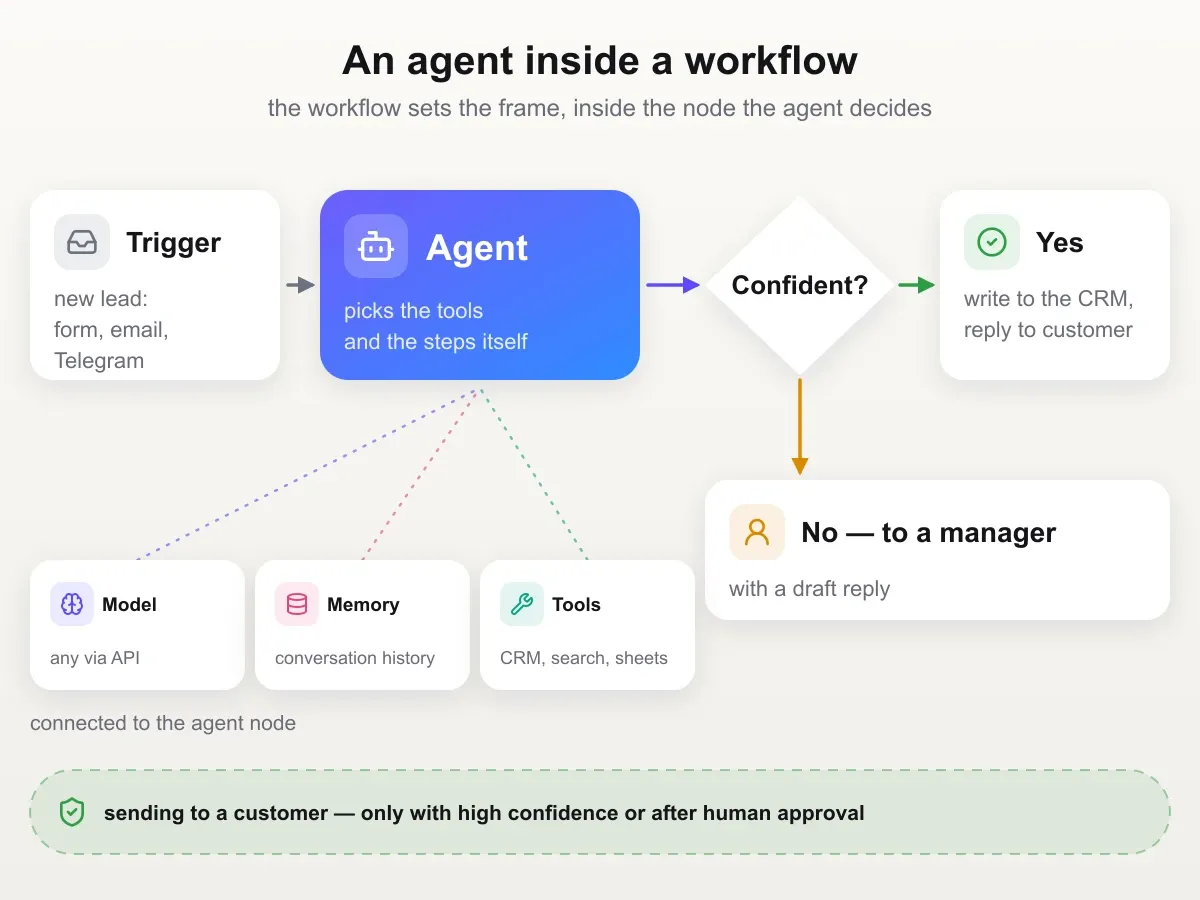
Let's take the task from the beginning of the section: an incoming lead from the website.
- Trigger. What starts the scenario: a form, a webhook, a new email or a Telegram message.
- Agent node. Three things are connected to it: a model, memory and tools. Tools are a request to your CRM via its API, search, a spreadsheet or another scenario.
- Instruction in the agent node. The role, criteria for assessing the lead and the response format. It's convenient to ask for a JSON answer with a "confidence" field: the scenario branches on it further.
- Ordinary nodes after the agent. A confidence check, writing to the CRM, replying to the customer, a message to a manager. Anything irreversible — for example, an email to the customer — only with high confidence or after human approval.
- A run on real leads. Run the scenario on 10–20 real leads and open the run log: it shows which tools the agent called at each step and where it went wrong.
You don't have to take the node's model from a single vendor. In GPTunneL Workflow the catalog models are available right away. In third-party builders that let you set your own OpenAI-compatible API address, the GPTunneL API works: base URL https://gptunnel.ru/v1 and your key (API documentation). This makes it easier to compare a cheap model with an expensive one on your task: in our test, Haiku went the same route more than twenty times cheaper than Sonnet.
If the process doesn't need an agent and the steps are known in advance, remove the agent node and keep an ordinary workflow: it's cheaper and more predictable.
Path 2. An assistant and your own systems via MCP
Fits when you need the agent as a conversational partner with access to your data: the CRM, knowledge base, task tracker. Ready-made assistants with connections exist in Claude (projects, connectors, skills), ChatGPT (GPTs and agent mode), Gemini and Microsoft Copilot. In GPTunneL it works the same way: an instruction in plain words, any model from the catalog and services connected with checkboxes. That's how we built our test agent — in about ten minutes.
Services are most often connected via MCP (Model Context Protocol) — an open standard Anthropic introduced in November 2024, later supported by OpenAI, Google and Microsoft. It's compared to "USB-C for AI": a service describes its capabilities once in an MCP server, and it can be connected to any assistant or agent that understands the protocol. Servers already exist for GitHub, Google Drive, databases and hundreds of other services; for internal systems a developer writes the server. Just remember that an MCP server is code with access to your data: check third-party servers the same way you'd check any program you give access to (more in "Risks and control").
- Describe the role and the output format. Our instruction fit into ten lines: who you are, what you do, which points are mandatory in the answer and, separately, list the tools you used.
- Choose a model that supports tool calling. Expensive doesn't mean best: in our test the budget Haiku 5.5 completed the full loop more reliably than the flagship Sonnet 5.5. Look at the ranking for your type of task: in Agent Arena a model that is best at code can drop more than twenty places on everyday chat tasks, and vice versa. And if the agent gets access to files or data, consider reliability too: models — even from the same vendor — differ in how likely they are to delete things without asking (more in "Risks and control").
- Connect MCP servers — only the ones the task needs. How to do it is covered in our MCP guide.
- Check that the tools are visible. Ask in the chat: "list all the tools available to you". Empty, or the model makes things up — no point going further.
- Give it a task and read the log, not just the answer: how many steps, which tools, were there errors.
The rules for tools are the same on all three paths, whoever writes them:
- Fewer but better: 5 well-described tools beat 30 similar ones.
- Clear descriptions: when to use the tool and when not to.
- Compact results: return only what the model needs, not the whole export. In our test, it was the size of the tool's response that made a run thirty times more expensive.
- Clear errors: "customer not found, check the ID" instead of a stack trace. Models can correct themselves based on good error messages.
Path 3. In code: your own loop via an API
Fits developers who need full control over steps, logs and limits. An agent in code is the same loop from "How an AI agent works": a model API with tool calling (tool use, function calling) and 50–100 lines of Python or TypeScript around it. You don't have to take the model from a single vendor: the GPTunneL API is OpenAI-compatible and gives access to any model from the catalog (API documentation).
If you're just starting and drowning in names, here is the order practitioners on Reddit recommend:
- Model and tools: how the model calls a function and returns a structured answer.
- State: what the agent needs to remember between steps.
- A loop without a framework: goal → next action → tool call → result → continue or stop. Build it once yourself.
- A harness around the loop: retries, timeouts, budget, permissions, human approval, logs.
- Verification: check the actual result in the external system, not the agent's words "it worked".
RAG, MCP and multi-agent setups are added only when the task requires them. Frameworks change fast; these primitives don't. One more tip from the same thread: you can learn about agents with the help of an agent. Download an open-source harness, such as Codex, and ask an agent to explain how it works and how to run it.
Once the loop makes sense, you can take a ready-made framework so you don't write it from scratch:
- SDKs from model vendors: Claude Agent SDK (the same engine as inside Claude Code), OpenAI Agents SDK, Google ADK.
- Independent frameworks: LangGraph — for processes with branching and human approval, LlamaIndex — for working with documents, CrewAI — for teams of agents with roles, Microsoft Agent Framework — for the Microsoft and .NET ecosystem, Pydantic AI — for Python, Mastra and Vercel AI SDK — for TypeScript.
- Around the agent: tracing and quality evaluation (LangSmith, Langfuse), code-execution sandboxes (E2B, Modal, Docker).
Don't take a heavy framework "for later": many teams start with one and then rewrite to a direct API when they lack transparency. A step-by-step build of an agent in code is in a separate article, how to create an AI agent.
After launch — for all three paths
Check the result after every step, not just at the end. One developer described on Reddit an agent that researches a company and writes a report: the first version produced "a regional bank" instead of competitors' names. Neither changing the model nor changing the framework would have fixed that. What helped was a check after every step: if the answer is generic, the agent gets a specific error — "name real companies, 'a regional bank' is not acceptable" — and tries again. And the team re-runs a set of test companies after every change.
Build a test set (evals) before you start improving. 20–50 real examples: typical cases, edge cases, malformed data, injection attempts. For each, describe what counts as a correct result. Without such a set, any prompt change is guesswork: you fix one thing and quietly break another.
Expand autonomy gradually. First shadow mode: the agent works alongside people, its results are compared but not applied. Then assistant mode: the agent prepares, a human checks and sends. And only then partial autonomy: the agent closes simple cases itself and hands complex ones to a human.
Analyse failures. Typical reasons for poor performance, from most to least frequent: unclear instructions, poorly described tools, irrelevant context, missing data or access, and only then a model that isn't strong enough. The logs of failed runs almost always show at which step and why the agent went the wrong way.
Pre-launch checklist
- A narrow task with a measurable success criterion
- Checked that a script or a simple workflow won't do
- Tools with clear descriptions and compact responses
- A system prompt with rules, boundaries and escalation conditions
- A loop with a step limit
- An eval set built from real cases
- Logs, budget limits, least privilege, approval for dangerous actions
- A pilot in shadow mode, then gradual expansion of autonomy
- Regular failure analysis and re-running evals on every change
FAQ
How is an AI agent different from an AI assistant? An assistant answers according to its instruction when you address it, usually in one pass. An agent decides on its own how many times and where to go before answering. An assistant with connected tools becomes an agent as soon as it starts taking several steps in a row.
Are ChatGPT, Claude and DeepSeek agents or chatbots? The chat window is just an interface; the line is where the model decides on its own what to do next. When ChatGPT or Claude, given an ordinary question, go to the web on their own, run several searches, compare what they found and only then answer, that is already agentic behaviour — just with a small set of tools and read-only. Deep research modes, ChatGPT's agent mode and Claude with connected services are the next step: dozens of steps, more tools and sometimes actions on your behalf. A model stays a chatbot as long as it answers from what it knows. A "thinking" mode like DeepSeek's DeepThink doesn't make it an agent either: the model reasons longer, but doesn't reach into the outside world.
Can you make an AI agent for free? Running an agent is always paid: every step is a request to the model, charged by tokens. Our runs cost from $0.03 to $0.95 each, and the whole test of eleven runs about $1.40. A cheap model and tools that return only what's needed help you save.
Where to start with agents if you're confused by LangChain, MCP, RAG and the rest? The confusion comes from these words being different layers, while learning materials present them as competitors. The core is one thing — the "model → tool → result → model again" loop. MCP is a way to connect tools, RAG and memory are ways to give the agent knowledge, orchestration and multi-agent systems are ways to connect several agents, and LangGraph, CrewAI and other frameworks are ready-made implementations of all of this. A developer who has been building production agents for a year advises on Reddit: first build the loop yourself once, on one small task with one tool — then frameworks will make sense or turn out to be unnecessary.
How do you create an agent in ChatGPT? ChatGPT has an agent mode for that, and your own assistant with an instruction and files is built through GPTs. The logic is the same as in "What to build your agent with, and how": a role, tools, testing on a real task. If you need more than OpenAI's model, the same assistant can be built in GPTunneL on any model from the catalog.
What AI agents are there for programming? The most mature are Claude Code, OpenAI Codex, Cursor, GitHub Copilot agent and Devin. They read the codebase, edit code, run tests and prepare pull requests, while the final review stays with a human. Programming is the area where agents work best: code has an objective check.
How many steps does an agent take? As many as it decides. In our runs, from one to four tool calls per task. Always set a step limit: it's the only protection against an endless loop at your expense.
Which model is best for an agent? One that supports tool calling and doesn't cut corners. In our test, the difference between models showed up not in the quality of the text but in the willingness to go all the way to the answer, and the budget model did this no worse than the flagship. Look not only at price and quality but also at reliability: in Arena's agent reliability ranking (October 2026) the top five places went to OpenAI models, followed by Claude Opus 5.5 and Grok 4.7, and new generations are more reliable than old ones at every vendor.
Try it yourself
Build an agent in GPTunneL: create an assistant, write the instruction in plain words, choose any model from the catalog and connect MCP servers with checkboxes. No subscription — pay as you go from a single balance for the tokens you actually use: our whole test of eleven runs cost about $1.40, and the prices of all models are visible upfront.
Start with a task that has a verifiable result. That way you'll immediately see whether the agent is working or just telling a convincing story.
Sources
- Arena — Alignment Index: how AI agents get out of control, 90,000 real sessions across 27 models, October 2026.
- Arena — HarnessTax: how the harness affects the cost and success of coding agents, 21 "model + harness" pairs, September 2026.
- Arena — task categories and task cost in Agent Arena: what people delegate to agents, based on 1.7 million sessions, August 2026.
- Anthropic — Project Vend: an experiment in which Claude ran an office shop for a month.
- Invariant Labs — vulnerability in GitHub's MCP server: how an issue in a public repository made an agent leak private data, May 2025.
- Yahoo Finance — a company spent $500 million on Claude in a month: recap of an Axios report, May 2026.
- Reddit discussions: $6,000 on Claude overnight, a $2,500 overnight batch job, where to start learning AI agents.