
Grok 3, the flagship model from xAI, combines advanced computing power, a capacity for deep logical analysis and a distinctive interaction style. Built to understand complex requests and generate substantive answers, Grok 3 in GPTunneL gives users access to advanced AI features, including work with up-to-date information and image generation.
Who this guide is for:
- Creators
- Marketers
- Entrepreneurs
- Anyone who wants to learn how to work with AI.
This guide will help you master prompt engineering for Grok 3 so you can get the most out of its potential in GPTunneL. We will go over the model's key features and its strengths as confirmed by benchmarks, and give you practical advice on writing requests. Mastering these techniques will let you get accurate, relevant and creative results across a wide range of tasks.
What should you keep in mind when working with Grok 3?
To work productively with Grok 3 in GPTunneL, it helps to understand its core characteristics and capabilities. The model is designed with an emphasis on logical thinking and processing large volumes of data, which makes it a versatile assistant. Taking these aspects into account when writing prompts will noticeably improve the quality and relevance of the answers you get, and let you tackle harder tasks.
- Deep reasoning and a logical chain: Grok 3 can spell out how it reached its conclusions. Ask for a step-by-step explanation ("Explain step by step", "Show the logic behind the solution") to get detailed answers on complex analytical, mathematical or programming tasks where the train of thought and the sequence of inferences matter.
- Up-to-date data through web search: Grok 3 can use fresh information from the internet. State in the prompt when you need the very latest data to analyze the news, current market trends or recent scientific publications. That lets the model go beyond its static knowledge.
- Important: In GPTunneL, access to current information runs through general web search. The model has no direct dynamic integration with X (formerly Twitter) for analyzing profiles or feeds in real time, as it may have in its native version.
- Large context window: The model handles up to 130,000 tokens on input and generates up to 4096 tokens on output. Use this for analyzing long texts such as books, articles, detailed reports or large chunks of code. Structure long inputs clearly so that Grok 3 makes effective use of the context you supply for full, coherent answers.
- Controllable style and "tone of voice": Grok 3 adapts its manner of delivery to your request. Set a role ("Answer as an experienced financial analyst"), a tone ("Use an informal, friendly style") or specific instructions on vocabulary, so the answers match the audience and the task while keeping their substance accurate.
- Multimodality: Beyond processing and generating text, Grok 3 in GPTunneL can create images from your description. Write detailed requests specifying the objects, how they interact, the setting, the color palette, the style (for example, "photorealism", "watercolor", "cyberpunk art") and the mood you want in the visuals.
- Robustness on difficult topics: The model is built to discuss a wide range of questions, including potentially contentious or "uncomfortable" ones, aiming for an objective presentation of different points of view rather than automatic avoidance or censorship. That is useful for analyzing ambiguous situations or getting information on sensitive questions.
Key performance figures for Grok 3
Grok 3's performance is confirmed by results in a number of respected benchmarks that assess various aspects of language models, from mathematics and coding to language understanding and logical reasoning. These tests show that Grok 3 is competitive among the leading LLMs.
Grok 3 posts strong results in tests such as:
- MMLU-Pro (language understanding across various formats)
- HumanEval (code generation)
- GPQA (answering graduate-level science questions)
Below is a table with the official test results for Grok 3 Beta (xAI data) compared with other models on several key benchmarks. These figures reflect the percentage of successfully completed assignments or the accuracy of the answers.
/* General rules for responsiveness */ .benchmarks-table { width: 100%; border-collapse: collapse; table-layout: fixed; /* distributes width evenly */ } .benchmarks-table th, .benchmarks-table td { border: 1px solid #000; padding: 8px; text-align: center; word-break: break-word; /* wraps long words */ white-space: normal; /* allows line breaks */ }
| Benchmark | Grok 3 Beta | Grok 3 mini Beta | Gemini 2.0 | GPT-4o | Claude 3.5 Sonnet |
|---|---|---|---|---|---|
| AIME’24 (Mathematics) | 52.2 % | 39.7 % | — | 9.3 % | 16.0 % |
| GPQA (Scientific reasoning) | 75.4 % | 66.2 % | 64.7 % | 53.6 % | 65.0 % |
| LCB (Coding, long context) | 57.0 % | 41.5 % | 36.0 % | 32.3 % | 40.2 % |
| MMLU-Pro (Multimodal understanding) | 79.9 % | 78.9 % | 79.1 % | 72.6 % | 78.0 % |
| LOFT (128k, Long context) | 83.3 % | 83.1 % | 75.6 % | 78.0 % | 69.9 % |
| HumanEval (Coding, per Artificial Analysis) | 91 % (Grok 3) | — | 95 % (Pro Exp) | 96 % | 93 % (Oct) |
These figures highlight Grok 3's strengths on tasks that call for reasoning, working with code and processing information in a large context. The high LOFT (128k) score, for instance, confirms how effective the model is with long texts.
Prompting tips
How well Grok 3 performs depends heavily on the quality of your prompts. Clear, specific and well-structured requests let the model understand the task better and generate the most relevant answer. Experiment with the wording to find the approach that works for your goals.
- Ask for a chain of reasoning — explicitly
Use phrases like: "Explain step by step…", "Break this problem down with a detailed explanation of each stage" or "Present the logical chain that leads to the conclusion". This gets you not just an answer, but an understanding of how it was reached. Read more about chain-of-thought prompting →
- Use instructions for tone and role
Grok 3 adapts well to a given communication style. State it at the top of the prompt: "Answer as an experienced financial analyst", "Use the sarcastic tone of a commentator" or "Present the information as concisely and formally as possible". This tunes the model to the output format you need without losing accuracy. How do you word your requests? Read here →
- Ask it to compare and choose
The model handles the analysis of alternatives well. Word your requests like this: "Compare product A and product B on price, functionality and user reviews", "Which is more effective for SEO: content marketing or paid advertising? Justify your answer" or "Assess the strengths and weaknesses of the proposed solution". To get a reasoned verdict, add: "Draw a final conclusion based on the analysis".
- Encourage clarifying questions
If your task contains ambiguities or needs extra information, encourage Grok 3 to ask questions. Phrases like "If there is not enough data to answer, ask clarifying questions" or "Before you start on the solution, clarify all the necessary details" help the model build a complete picture and improve the accuracy of the answer, which is especially useful in complex scenarios.
- Write requests for image generation
When asking for an image, be as specific as you can. Describe the objects, how they interact, the setting, the color palette, the style (for example, "photorealism", "watercolor", "cyberpunk art") and the mood you want. The more detailed the description, the closer the result will match your expectations. Example: "Create an image: a futuristic city on Mars, style Ghibli meets Brutalism, sunset lighting".
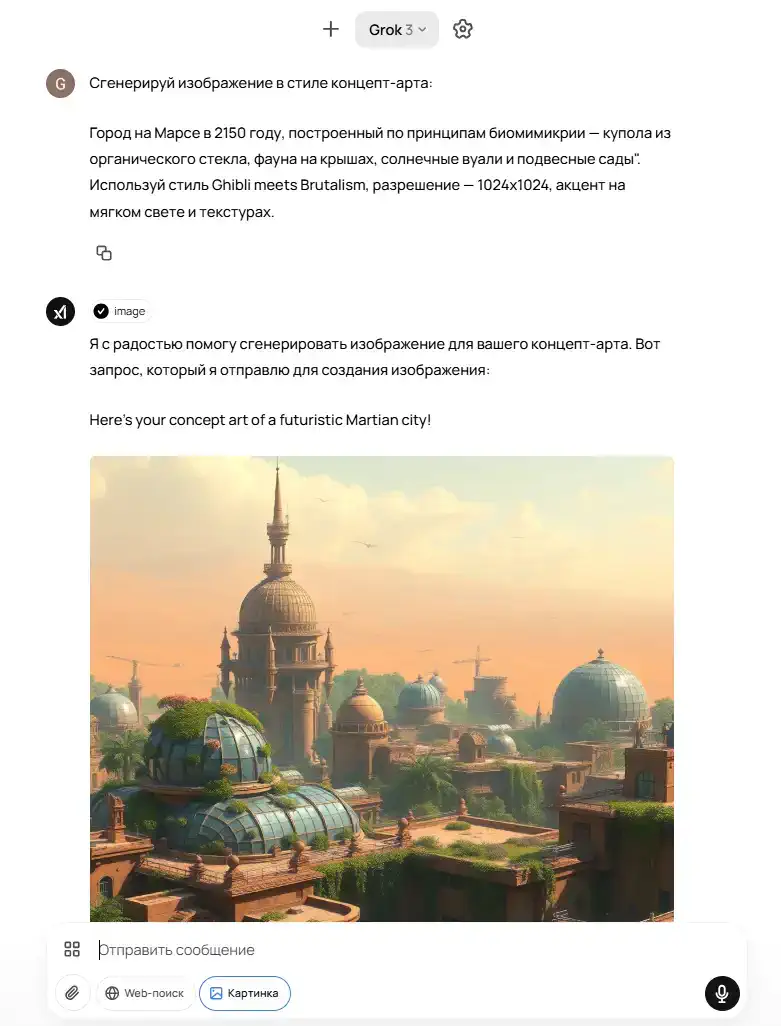
Source: Chat with Grok 3 in GPTunneL
Common mistakes to avoid when writing prompts:
- Requests that are too general or vague.
- Overloading the prompt with contradictory instructions.
- No guidance on the desired format or structure of the answer.
- Ignoring the option of asking for a step-by-step explanation.
Sample tasks
Practical examples show how to apply the prompting advice above to concrete tasks with Grok 3. These scenarios cover different areas where the model is used, from analytics to creative work and programming.
Multi-step logical thinking
Sample prompt: "Analyze the potential impact of introducing a four-day working week on the productivity of an IT company with a staff of 500. Take into account possible changes in employee motivation, operating costs and the quality of the projects delivered. Present a step-by-step breakdown of the arguments for and against, then draw a reasoned conclusion about whether such a step makes sense for a company of this type. Use hypothetical but realistic figures for the calculations if needed". Read the generated result →
Comment: This prompt activates Grok 3's analytical abilities, demanding not a simple answer but a structured analysis that weighs many factors. Asking for a step-by-step breakdown and the use of hypothetical data steers the model toward a deep exploration of the topic.
Programming and debugging code
Sample prompt: "Here is a Python script for web page parsing: [Paste the script]. Analyze it for performance bottlenecks, potential errors in exception handling and compliance with PEP 8. Propose an optimized version of the code with detailed comments on every change. Explain how your changes improve the readability, reliability and execution speed of the script. Put the emphasis on how well the solution scales". Read the generated result →
Comment: The prompt not only asks for the code to be fixed but demands deep analysis and explanation (HumanEval shows the model's strength in coding). Pointing to standards (PEP 8) and important aspects (performance, scalability) sets a professional context and steers Grok 3 toward a comprehensive solution.
Creative work and copywriting (including images)
Sample prompt: "Write a script for a short advertising clip (30 seconds) for a new mobile meditation app. The target audience is young professionals under stress. The style is inspiring and calm. Include a description of three key shots. In addition, generate concept art for the first shot: 'A young man sits on a park bench, eyes closed, a slight smile, the background is blurred autumn trees, soft sunlight'". Read the generated result →
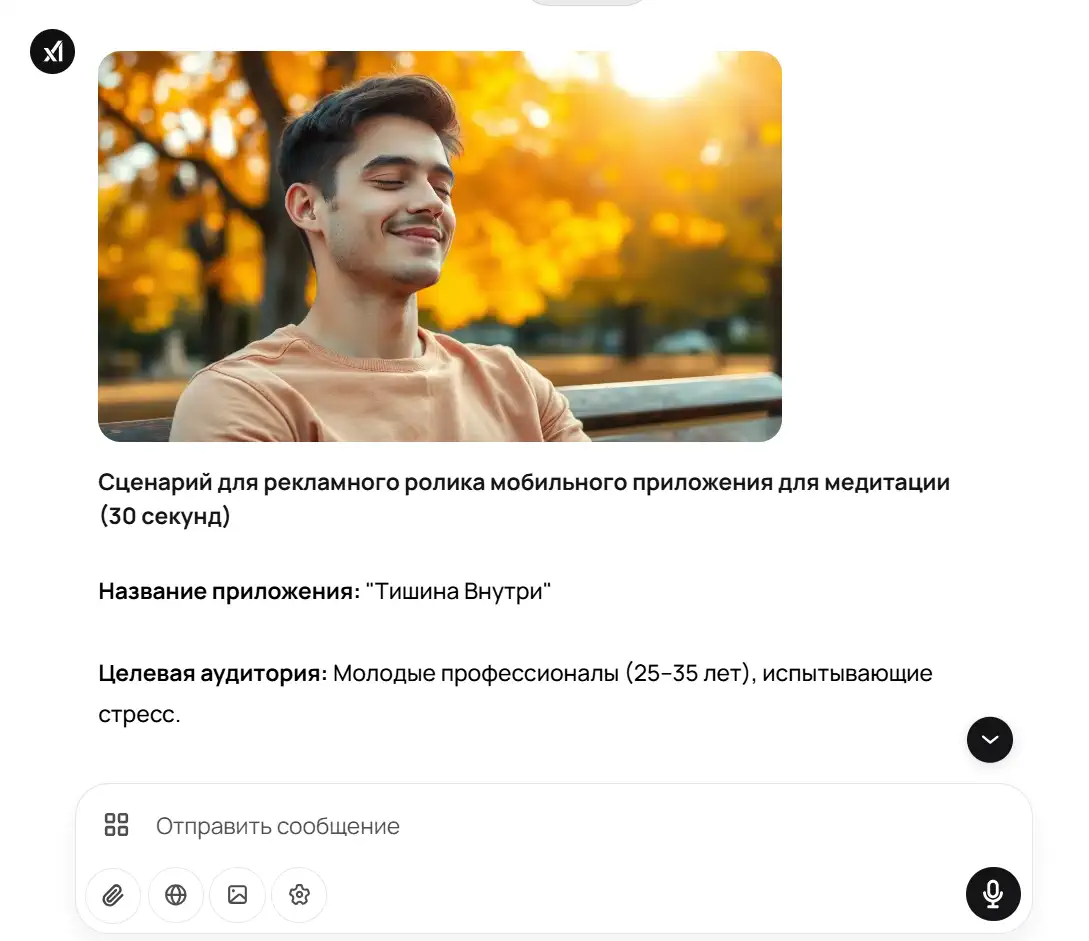
Comment: The request clearly defines the format (a script), the target audience, the style and the structure (three shots). The additional request to generate an image with a detailed description lets Grok 3 show off its multimodal capabilities, creating both textual and visual content on the topic.